Cloud Security Checklist for Small Teams Without Security Staff
Cloud Security Checklist for Small Teams Without Security Staff
Securing your cloud environment doesn’t have to be overwhelming, even without a dedicated security expert. You can even automate your cloud security without a full-time hire. Small teams can protect their systems by focusing on a few targeted actions. Key steps include:
- Enable Multi-Factor Authentication (MFA): Protect accounts by adding an extra layer of security beyond passwords.
- Apply Least Privilege Access: Restrict user permissions to only what’s necessary for their role.
- Harden Cloud Infrastructure: Secure networks, storage, and databases by minimising public access, enabling encryption, and monitoring for common cloud misconfigurations.
- Scan for Vulnerabilities: Regularly check containers, code, and infrastructure for weaknesses.
- Centralise Monitoring and Alerts: Set up logging and real-time alerts to detect and act on threats quickly.
- Prepare for Incidents: Create a simple response plan to handle security issues efficiently.
Start with identity management, then move on to securing infrastructure and setting up monitoring. These steps can reduce risks like stolen credentials, misconfigurations, and ransomware, all while keeping your team focused on building products.
Running a Security Program Without a Dedicated Team
sbb-itb-5d9b290
Identity and Access Management
In cloud environments, identity now serves as the frontline defence, replacing the traditional network perimeter. The goal is straightforward: control who has access to what and ensure they can verify their identity. Here’s a breakdown of the essential steps to strengthen this critical security layer.
Enable Multi-Factor Authentication (MFA)
Adding MFA is one of the simplest yet most effective ways to secure your cloud environment. Even if a password is compromised, a second authentication factor - like a code from an app or a physical security key - acts as a robust barrier. This single measure can block between 80% and 99% of account compromise attacks.
Start by enabling MFA for your cloud provider's root account and limiting its daily use. Then, enforce MFA for all administrative users and developers who manage production systems.
Select the right MFA method. Avoid SMS-based verification, as it’s the least secure. Instead, use authenticator apps like Microsoft Authenticator or Authy for standard accounts, and hardware security keys like YubiKey for administrators. Looking ahead, passkeys - offered by Google, Apple, and Microsoft - use biometrics like fingerprints to eliminate passwords entirely.
For consistent enforcement, use your cloud provider’s built-in tools, such as AWS IAM Identity Centre or Service Control Policies, to mandate MFA for all accounts.
Apply Least Privilege Access
MFA is essential, but it’s only part of the solution. Limiting user permissions to the bare minimum needed for their tasks significantly reduces risks. This approach not only protects against compromised accounts but also minimises the impact of accidental mistakes.
Define broad roles instead of assigning individual permissions. Roles like Admin, Engineer, Support, and Viewer usually suffice for small teams. Assign users based on their actual responsibilities. For example, an engineer working on features doesn’t need access to billing, and support staff shouldn’t have the ability to delete production databases.
Keep environments separate. Use distinct cloud accounts or projects for development, staging, and production. This separation prevents accidental changes to live systems and limits the fallout if a development account is breached.
Consider implementing Just-in-Time (JIT) access. This grants temporary administrative credentials only when needed. Instead of having privileged access 24/7, administrators can reduce access windows to as little as five minutes per task.
"Least privilege was a concept forged in the 1970s... Today's infrastructure is a vibrant, chaotic organism... Trying to implement 'least privilege' with that old mindset while keeping the business running smoothly simply doesn't work." - Jacob DJ Wilson, Cybersecurity Researcher
Review Access and Offboard Users
Regular reviews are crucial to maintaining secure access. Combine MFA and role management with automated tools to streamline user access reviews. Conduct reviews quarterly to ensure MFA is in place, remove inactive accounts, and tighten overly broad permissions.
Watch out for "ghost accounts" - users who haven’t logged in for months - and wildcard permissions (e.g., "*") that grant excessive access. Use tools like AWS IAM Access Analyzer to detect and address over-permissioned accounts automatically.
Offboarding must happen immediately. When an employee leaves, their access to all systems should be revoked the same day. Integrate your cloud access with HR systems so permissions are automatically removed when someone is marked as terminated. Don’t overlook third-party vendors or contractors who had temporary access.
Set up real-time alerts for sensitive IAM changes, such as the creation of new administrative users or modifications to security policies. These alerts should be sent to a monitored Slack channel or email to ensure prompt action.
Cloud Infrastructure Hardening
After securing identities and access, the next step is to strengthen your cloud infrastructure. Misconfigurations in areas like networking, storage, and encryption are common weak points. With 75% of enterprises finding it difficult to secure infrastructure configuration, access, and APIs, and the average cost of a data breach reaching around £3.5 million, the stakes are high. For smaller teams, these errors can be overwhelming - but they’re avoidable with targeted actions.
Configure Network Security
Operate under the assumption that your cloud network could be compromised, and adopt a zero-trust approach. This means verifying access at every layer rather than relying solely on perimeter defences.
- Use stateful Security Groups for controlling access at the instance level and stateless NACLs for subnet-level protection. This layered setup supports a zero-trust model.
- Limit public internet access to only those services that absolutely need it. Resources that don’t require public exposure should be placed in private subnets. For example, databases and internal APIs should always remain private.
- Deploy a Web Application Firewall (WAF) and an API gateway to protect your application layer from SQL injection, cross-site scripting (XSS), and unauthorised API calls. AWS users can use Service Control Policies (SCPs) to prevent accidental exposure of VPCs to the internet unless explicitly authorised.
Remove unused infrastructure such as old VPCs, subnets, or peering connections to reduce your attack surface. Standardise your network configurations with Infrastructure-as-Code (IaC) templates to ensure they are secure by default.
Once network security is addressed, the next step is safeguarding your storage and databases.
Secure Storage and Databases
Misconfigured storage is a leading cause of data breaches, but it’s a fixable issue. Start by disabling public access for storage resources like AWS S3 buckets, GCP Cloud Storage, or Azure Blob Storage unless absolutely necessary. Use account-level settings like "Public Access Block" to avoid accidental exposure.
Centralise your storage to apply consistent access controls. Users should only have the permissions they need for their roles, which limits the potential damage if credentials are compromised.
Enable logging and monitoring with tools like AWS CloudTrail or GuardDuty to track access and spot unusual activity. Regularly automate backups and test recovery processes to ensure you can maintain operations even in worst-case scenarios. In fact, one organisation reported a 94% reduction in storage costs after switching to a cloud-based provider, showing that security improvements can also deliver financial benefits.
With storage secured, the next priority is ensuring all data is encrypted.
Encrypt Data in Transit and at Rest
Encryption is a non-negotiable part of cloud security. Encryption at rest protects stored data - whether on disks, databases, or backups - so even if the storage medium is compromised, the data remains unreadable without the appropriate keys. Meanwhile, encryption in transit secures data as it moves between devices and cloud services or between cloud resources, protecting it from interception.
- Enforce encryption at rest using AES-256 and encryption in transit with TLS 1.2 or higher. While many cloud providers enable encryption by default, it’s important to double-check your settings.
- For highly sensitive data, consider providers like SpiderOak, which use "zero-knowledge" storage - ensuring the host cannot access your encryption keys.
Key management is just as important as encryption itself. Use automated secrets management tools to rotate API keys and database credentials regularly. Without secure key management, even the strongest encryption can be rendered useless.
"In cloud environments, identity becomes the new perimeter - meaning access controls and permissions are key to reducing your attack surface." - Wiz
Vulnerability and Secrets Management
After securing identities and infrastructure, the next step is to tackle vulnerabilities and exposed secrets in your codebase, containers, and Infrastructure-as-Code (IaC) files. It’s essential to ensure that your container images, source code, and IaC configurations are free from weaknesses and hidden risks.
Scan Containers and Dependencies
Container images and software dependencies often introduce vulnerabilities. Scanning these before deployment helps catch issues before they impact production systems. Tools like Trivy and Grype can help identify known vulnerabilities while also generating a Software Bill of Materials (SBOM), which acts as an inventory of all components within your application.
To avoid being overwhelmed by alerts, focus on vulnerabilities that are exploitable. By integrating these scans into your CI/CD pipeline, you can ensure every container image is automatically checked before it’s deployed.
Detect and Remove Secrets in Code
Hardcoded secrets - like API keys, database passwords, and cloud tokens - are serious risks. Security researcher Bill Demirkapi uncovered over 100,000 hardcoded secrets in public GitHub repositories, illustrating the scale of this problem. As Demirkapi aptly noted:
"Hardcoded secrets are the equivalent of leaving your house key under the welcome mat and announcing it on social media."
To address this, adopt a shift-left approach by integrating secret scanning tools into your development process, such as in your IDE or via pre-commit hooks. This prevents sensitive information from being committed to your repository [18,20]. If a secret does slip through, revoke it immediately at the provider level and clean your repository history using tools like git filter-repo or BFG Repo-Cleaner [20,22]. For runtime secret management, rely on solutions like Doppler, AWS Secrets Manager, or HashiCorp Vault to inject secrets securely [20,22].
Scan Infrastructure-as-Code (IaC) Files
While managing secrets requires early intervention, your IaC files demand just as much attention to prevent cloud security issues.
Misconfigured IaC files are a frequent source of vulnerabilities. Tools like Checkov and TFSEC can help identify issues such as publicly accessible S3 buckets or unencrypted databases. Alarmingly, nearly 50% of CloudFormation templates have been found to include insecure default settings.
To mitigate risks, configure your build process to automatically scan IaC files on every pull request, blocking merges that violate security policies. Developers can also use IDE plugins like TFLint or Checkov for immediate feedback during coding. Standardising your infrastructure with hardened templates and ensuring Terraform state files are secured in remote backends with encryption (e.g., S3 with SSE-KMS) adds another layer of protection. These efforts align with earlier steps to harden your network and storage configurations.
Monitoring and Incident Response
Once you've secured your infrastructure and addressed vulnerabilities, the next step is ensuring you can detect issues quickly and respond effectively. For small teams, this means keeping your monitoring system straightforward, targeted, and automated.
Enable Centralised Logging
Start by identifying the essential log data: who did what, where, when, and from where. As Chemiron Adam puts it:
"In the cloud, everything is API-driven... Without logs, you're essentially flying blind."
Enable management plane logs across your cloud environment to track activities like IAM changes, resource creation, and configuration updates. For example:
- AWS: Set up organisation-level CloudTrail.
- Azure: Use diagnostic settings at the subscription level and route logs to a central Log Analytics workspace.
- GCP: Configure organisation-level audit logs and create log sinks to a central project.
For critical resources like production databases or key storage buckets, enable data event logging to monitor access. Since these logs can increase costs, apply them selectively. Store all logs in one encrypted, access-controlled location - such as an S3 bucket with KMS encryption - to prevent tampering. Centralising logs can cut mean time to resolution (MTTR) by 40–60%.
Set clear retention policies - typically 30–90 days for active analysis, or longer if required for compliance. Use Infrastructure as Code tools like Terraform to ensure consistent logging configurations across environments.
Once your logs are centralised, the next step is configuring alerts to catch critical events.
Configure Real-Time Alerts
Focus on a small set of high-confidence alerts that address real risks to your business. Geoffrey Wenger explains:
"Small-team security monitoring is not about collecting every event. Small teams need a tight set of signals that answers four questions under pressure: who triggered the suspicious activity, what changed, what data moved, and what should be isolated right now."
Aim for 10–15 well-defined alerts that align with your most pressing risks. Examples of identity-based alerts include:
- Impossible travel (logins from distant locations in a short time)
- MFA resets outside business hours
- Creation of new inbox forwarding rules
Use cloud-native tools like AWS GuardDuty, Microsoft Defender for Cloud, or Google Cloud Audit Logs for efficient monitoring without complex setups.
Categorise alerts into three levels:
- Critical: Needs immediate action
- High: Requires attention within hours
- Routine: Can wait until business hours
Assign each alert to a specific owner to avoid overload. Keep critical alerts to fewer than five per week, and ensure each one includes a ticket path and a pre-written containment script to streamline response efforts.
For high-priority alerts, implement safe automation to speed up responses. For instance, you can automatically revoke session tokens, disable accounts, or isolate endpoints when risky patterns emerge. Start with automating data enrichment (e.g., WHOIS lookups), move to reversible containment (e.g., session deactivation), and only automate eradication with human confirmation.
A well-designed alert system lays the groundwork for effective incident response.
Create an Incident Response Plan
An incident response plan is your team's playbook during a crisis. Keep it practical and easy to follow under pressure.
Define roles and responsibilities in advance. Identify who handles critical alerts and who has the authority to disable accounts or isolate systems. In smaller organisations, IT staff can follow a basic 30-minute checklist - such as isolating the host, disabling the account, and preserving logs - while waiting for security experts to step in.
Set clear thresholds for calling in external incident response services, such as confirmed data exfiltration or ransomware attacks. Document communication protocols for notifying internal teams and external stakeholders like customers, legal teams, or regulators.
Use Network Time Protocol (NTP) and log events in UTC to prevent time discrepancies during investigations. Maintain at least 90 days of searchable logs for key activities, including identity, email, and endpoint actions.
Regular testing is crucial. Conduct one controlled detection test weekly to ensure evidence paths are intact and containment steps work as expected. After every incident, hold a "lessons learned" session to refine your processes.
As Andrea Fortuna points out:
"24/7 monitoring is not a promise that a human is staring at dashboards all night. It is a promise that the business will detect, triage, and respond within an agreed time window, even when the security team is asleep."
Compliance Preparation
To ensure your organisation stays audit-ready, it's crucial to align your security controls with the expectations of regulatory frameworks. For smaller teams, managing requirements like SOC 2, PCI DSS, or ISO 27001 without a dedicated security department can feel daunting. The trick is to integrate compliance into your existing cloud security processes, rather than treating it as an entirely separate task.
Automate Compliance Evidence Collection
Manually gathering evidence for audits is not only time-consuming but also prone to mistakes. Instead of relying on screenshots or chasing down logs, use API-driven integrations to connect compliance platforms directly to your cloud providers, identity management systems, and HR tools. This enables automatic collection of logs and configurations, complete with tamper-evident metadata (source, timestamp, and user), which auditors trust far more than manually compiled data.
Adopt a "do once, use many" approach by mapping a single security control - like multi-factor authentication (MFA) - to multiple compliance frameworks. For example, enabling MFA can simultaneously meet requirements for SOC 2, ISO 27001, and PCI DSS. This lets you reuse evidence for a large portion of overlapping controls, streamlining the process. Tools such as Nuvm can simplify this further by continuously monitoring your environment and flagging issues like unencrypted S3 buckets as they occur.
A great example of this in action is Arbor Education. In May 2025, they reduced their audit preparation time by over 66%, cutting their cycle from six weeks to just two. By using Secureframe, they centralised control mapping and automated evidence collection for frameworks like ISO 27001, ISO 9001, PCI DSS, and GDPR.
Start by focusing on areas with the biggest impact, such as access logs, change management, and employee onboarding/offboarding. Consolidate all evidence in one secure location - whether that's a compliance platform or an S3 bucket - to avoid version control headaches during audits [36,38].
As Tejas Ranade from TrustCloud explains:
"Automation transforms evidence collection into a continuous, seamless process, making it easier to stay audit‐ready at all times."
Once you've streamlined evidence collection, the next step is to formalise your practices with well-documented security policies.
Document Security Policies
Auditors will expect your organisation to maintain up-to-date, documented security policies that are reviewed at least once a year. Keep these documents concise and focused, covering key details such as who approved the policy, who received it, and when it was last reviewed.
Storing these policies as markdown files in a private version control repository can create a timestamped audit trail of all changes without the need for additional document management systems. If your team uses Microsoft 365, tools like Xoralia can integrate with SharePoint to automate policy reviews and updates.
Maintain a centralised register of your current security, privacy, and IT policies using tools like Google Sheets or Airtable. Schedule annual review reminders in Google Calendar or Outlook, and include relevant stakeholders as invitees to ensure accountability.
Jonathan Carpenter, CEO of Anchor Cyber Security, highlights the importance of this:
"Regulators, auditors, and cyber insurers all expect documented policies to be reviewed at least annually."
Assess Third-Party Risks
Your organisation's security is only as strong as the vendors you rely on. Carefully evaluate the security requirements and service level agreements in all third-party contracts, and implement a formal onboarding and offboarding process.
Use standardised criteria to assess vendor trustworthiness. Open-source GRC platforms like Eramba (Community Edition) or Openlane offer cost-effective modules for managing risk registers and vendor assessments. For teams with more resources, platforms like Regly provide pre-built templates tailored to regulated industries such as fintech.
Prioritise vendors with access to sensitive data or critical systems. Request their SOC 2 reports, verify their encryption practices, and document how you plan to monitor their security posture over time. This proactive approach ensures your organisation remains secure while meeting compliance requirements.
Implementation Roadmap
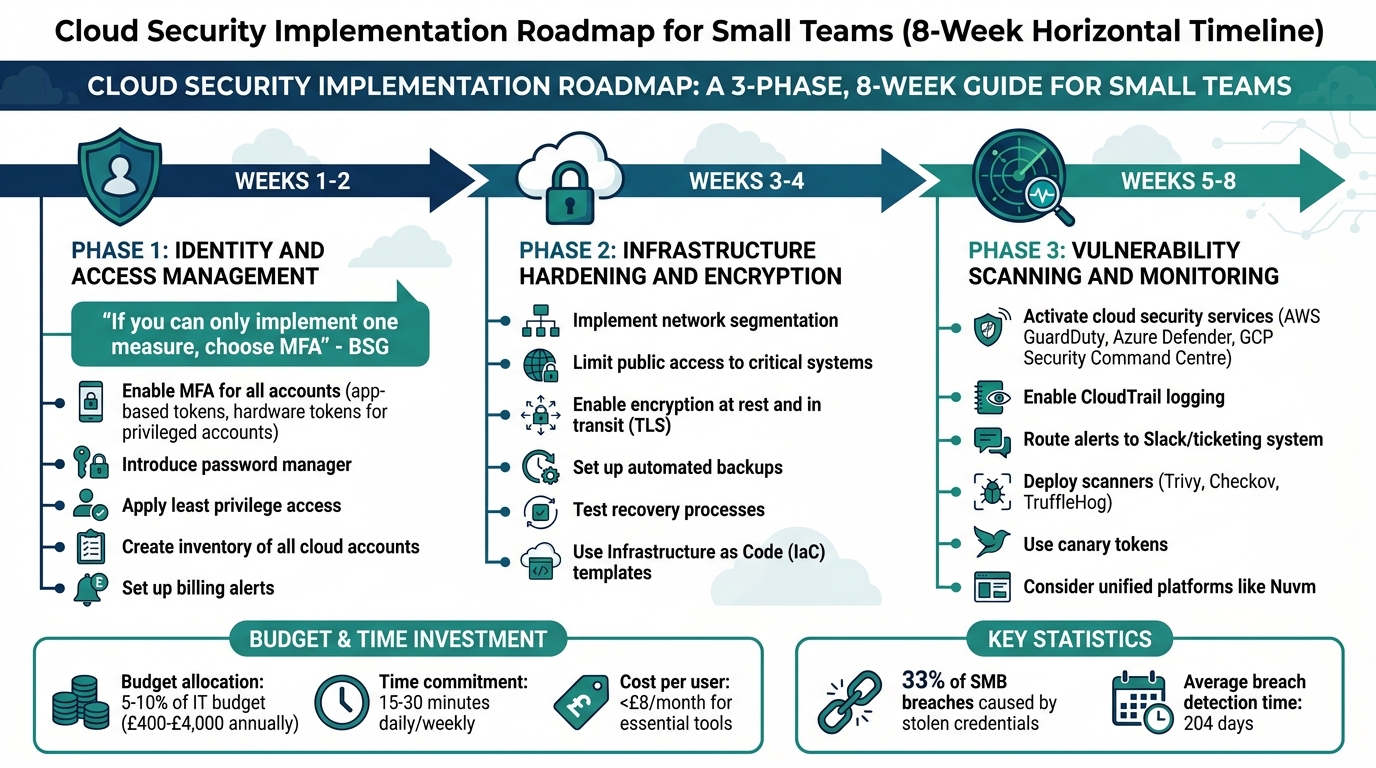
Cloud Security Implementation Roadmap for Small Teams: 8-Week Timeline
The process of implementing cloud security can be broken down into three key phases: identity controls, infrastructure hardening, and continuous monitoring. This step-by-step approach builds on the security measures discussed earlier, offering a practical guide for your team.
Phase 1: Identity and Access Management
Weeks 1–2: Strengthen identity controls. This phase focuses on reinforcing identity and access management, a critical foundation for any security strategy.
- Enable multi-factor authentication (MFA) for all accounts. Use app-based tokens, and for privileged accounts, consider hardware tokens for added security.
- Introduce a password manager to ensure employees use strong, unique passwords across all systems.
- Apply the principle of least privilege to every account, ensuring users only have access to what they need.
- Create a comprehensive inventory of all cloud accounts, subscriptions, and resources to prevent "shadow IT." Set up billing alerts to catch unexpected cost spikes, which could indicate a compromise.
As Business Security Group (BSG) aptly states:
"If you can only implement one measure, choose multi-factor authentication (MFA) across all business accounts".
Once identity controls are solidified, the focus shifts to fortifying your infrastructure in Phase 2.
Phase 2: Infrastructure Hardening and Encryption
Weeks 3–4: Strengthen your cloud infrastructure. This phase focuses on applying the principles outlined in the Cloud Infrastructure Hardening section.
- Implement secure network segmentation and limit public access to critical systems.
- Enable encryption for stored data (at rest) and enforce modern TLS protocols for data transmitted across networks.
- Set up automated backups and regularly test recovery processes to ensure they work as intended.
- Use Infrastructure as Code (IaC) templates to standardise secure configurations from the outset, avoiding the need to retrofit security later.
With your infrastructure secured, you can move on to establishing continuous monitoring in the final phase.
Phase 3: Vulnerability Scanning and Monitoring
Weeks 5–8: Maintain security through continuous monitoring and vulnerability scanning.
- Activate native cloud security services such as AWS GuardDuty, Azure Defender, or GCP Security Command Centre. These tools identify threats early without requiring a separate security console.
- Enable logging services like CloudTrail and route alerts to communication tools like Slack or your ticketing system for immediate action.
- Deploy vulnerability scanners such as Trivy, Checkov, and TruffleHog to identify potential weaknesses.
- For a more streamlined approach, consider platforms like Nuvm, which combine multiple scanners into one dashboard and map findings to compliance frameworks like SOC 2 and PCI DSS.
- Use canary tokens as a low-noise alert system to detect unauthorised access attempts.
Small businesses typically allocate 5–10% of their IT budget to security, equating to an annual spend of £400 to £4,000 for basic protections. Many essential tools, such as two-factor authentication apps and endpoint protection, cost less than £8 per user per month.
Conclusion
This checklist simplifies cloud security practices into actionable steps tailored for small teams. By taking a phased approach, you can secure your cloud environment today while preparing for future growth. Even without a dedicated security team, incremental improvements can make a big difference. The roadmap provided here offers a clear path: focus on strong identity controls, fortify your infrastructure, and implement continuous monitoring. Each step builds a scalable security framework for your team.
With stolen credentials causing 33% of SMB breaches, implementing MFA and least privilege is critical. Starting with identity management not only strengthens your defences but also sets a solid precedent for security practices. Small teams have the advantage of agility - when tools are simple and processes are clear, everyone can play a role in maintaining security.
Breaches often go unnoticed for an average of 204 days, making early detection vital. Centralised logging and real-time alerts can help identify threats faster. Cloud-native monitoring tools are a great option, and for a unified view across multiple scanners, solutions like Nuvm can map findings directly to compliance frameworks, all with minimal setup time.
Security requires ongoing effort. Allocating 5–10% of your IT budget to security - around £400 to £4,000 annually for basic protections - can significantly reduce risks. Regular checks, even just 15–30 minutes daily or weekly, can build strong security habits. Following a "SLAW" (Security Lab A Week) approach ensures progress without overwhelming your team.
Start with essential measures, automate where possible, and prioritise addressing high-impact vulnerabilities. These focused actions will not only strengthen your cloud security but also establish sustainable practices that empower your team to maintain robust defences.
FAQs
What should we secure first in the cloud?
To begin, take a close look at your cloud environment. Conduct a thorough security assessment to map out your infrastructure, examine configurations, and pinpoint any weaknesses or potential risks.
From there, focus on strengthening key areas like security groups, firewalls, and network ACLs. Eliminate any unused resources, such as outdated VPCs or redundant peering connections, to streamline your setup. Enhancing visibility and securing configurations should be a priority to minimise vulnerabilities and block unauthorised access effectively.
What alerts should a small team set up?
Small teams should configure alerts for unusual behaviour and security incidents within their cloud environment. Pay attention to detecting irregularities like unexpected login attempts, unusual spikes in network traffic, or unauthorised changes to cloud resources. These alerts enable teams to spot and address potential threats promptly, even if they lack a dedicated security team.
How can we prepare for SOC 2 or ISO 27001 without security staff?
Preparing for SOC 2 or ISO 27001 without a dedicated security team might seem challenging, but focusing on a few critical steps can make it manageable:
- Evaluate your cloud security: Look for weaknesses and address them to strengthen your overall security setup.
- Establish essential controls: Prioritise areas like robust Identity and Access Management (IAM), configuration management, and protecting sensitive data.
- Leverage automation for monitoring: Use lightweight tools such as Trivy or Semgrep to keep an eye on your systems without adding unnecessary complexity.
By combining automation with clear documentation and scheduling regular reviews, you can stay on track for compliance - even without a dedicated security staff.