How to Choose the Right Cloud Security Tool
How to Choose the Right Cloud Security Tool
91% of cloud breaches are caused by misconfigurations. If your SaaS company relies on cloud infrastructure, choosing the right security tool is non-negotiable. But with so many options, how do you decide? Here's a quick breakdown:
- Start with your needs: Identify risks like open S3 buckets, overprivileged roles, or shadow IT using a cloud security checklist.
- Key features to look for: Multi-cloud support, compliance mapping, actionable remediation, and integrations with tools like Slack or Jira.
- Budget wisely: For small teams, tools like Nuvm Cloud (from £948/year) offer affordable, practical solutions. Enterprise options like Wiz or Orca can be costly but may suit larger organisations.
Pro tip: Test tools in your actual environment. Focus on ease of setup, clear fixes, and low false positives. The best tool should save you time, not overwhelm your team.
Want to dive deeper? Read on for a step-by-step guide to choosing the ideal cloud security tool for your SaaS team.
7 Best Cloud Security Posture Management Tools 2025: Wiz vs Orca vs Prisma Reviewed
sbb-itb-5d9b290
Assess Your Team's Security Requirements
To address the risks discussed earlier, the first step is to evaluate your team's specific security needs. Before diving into vendor comparisons, take a moment to clarify what assets you're protecting and who is responsible for managing them. For smaller SaaS teams, where development and security often overlap due to limited resources, the tools you choose need to align with this reality - not an idealised larger team structure.
Identify Key Risks in Your Cloud Environment
Start by pinpointing the risks within your infrastructure. Many breaches stem from configuration errors, such as leaving S3 buckets or Azure Blob containers publicly accessible, disabling audit logging on critical resources, or failing to encrypt databases.
Another challenge to account for is shadow IT. Security teams often have visibility into less than 30% of the cloud applications being used within their organisation. On average, companies juggle around 130 different SaaS applications, and 85% of users have more privileges than their roles require. This creates a perfect storm for overprivileged accounts to be exploited, enabling attackers to move laterally through systems.
Take, for example, the Trivy ecosystem compromise in early 2026. Attackers used stolen credentials to breach 75 of 76 trivy-action tags, stealing SSH keys, Kubernetes tokens, and cloud credentials across AWS, Azure, and GCP. For smaller teams relying on open-source tools, this kind of supply chain attack highlights the importance of secure configurations.
To manage these risks effectively, prioritise them based on both likelihood and potential impact - whether financial, operational, or reputational. Tools that provide attack path analysis, showing how misconfigurations can be exploited together, are especially helpful for teams without dedicated security professionals.
Define Your Tool Selection Criteria
Your choice of tools should reflect your current operations and future compliance goals. If you're working across multiple cloud platforms, ensure the tool offers consistent coverage for AWS, GCP, and Azure. Keep in mind that some vendors might specialise in one platform over others. For teams preparing for audits like SOC 2, ISO 27001, or PCI DSS, tools with built-in compliance mapping can save significant time on evidence collection.
Ease of use is another critical factor. Look for solutions that not only identify issues but also provide clear, actionable remediation steps. This might include specific commands for cloud providers, Infrastructure-as-Code (IaC) fixes, or even ready-to-run scripts. Without such guidance, a tool that generates hundreds of alerts could overwhelm your team, leaving vulnerabilities unresolved.
Integration is also key. Tools that connect seamlessly with your existing systems - like Jira for ticketing, Slack for alerts, or CI/CD pipelines for IaC scanning - help ensure that issues are addressed promptly rather than piling up. Shift-left capabilities, such as scanning Terraform or CloudFormation templates before deployment, can catch problems early, saving time and effort.
| Criterion | Why It Matters | What to Verify |
|---|---|---|
| Multi-Cloud Support | Consistent coverage across AWS, GCP, and Azure | A breakdown of scanner capabilities by cloud provider |
| Compliance Mapping | Simplifies evidence gathering for audits | Request a sample compliance report during the trial |
| Remediation Guidance | Speeds up issue resolution | Check if findings include executable commands or IaC patches |
| Integration Depth | Ensures findings are actioned within workflows | Verify native integrations with Jira, Slack, GitHub, etc. |
Set Your Security Tool Budget
For small to medium-sized businesses, a reasonable monthly budget for security tools typically ranges from £100 to £500. Most vendors price their offerings based on asset count, such as virtual machines, storage buckets, or identities. Make sure to understand the pricing structure to anticipate how costs might grow alongside your infrastructure.
Remember, the total cost of ownership (TCO) includes more than just the licence fee. Plan to allocate an additional 20–30% for implementation, fine-tuning, and developer remediation efforts. Agentless tools often come with fewer hidden costs.
If you're an early-stage startup with fewer than 100 cloud resources, consider starting with native options like AWS Security Hub or Azure Defender, which are often free or low-cost. As your needs evolve, negotiating multi-year contracts with commercial vendors can help you secure discounts of 15–25%.
Finally, balance your budget against your team's capacity. A tool costing £10,000 per year but generating thousands of unactionable alerts is less effective than one costing £3,000 per year that highlights a manageable number of critical issues with clear solutions. The goal is to find a platform that offsets the reality that 63% of companies currently face cybersecurity staffing shortages, rather than one that assumes a fully staffed operations centre.
With your risks identified, criteria established, and budget defined, you're now ready to compare tools and find the best fit.
Features to Look for in Cloud Security Tools
When choosing cloud security tools, it’s essential to identify features that align with your team's specific needs and budget. The market has increasingly shifted towards Cloud-Native Application Protection Platforms (CNAPP) - solutions that combine multiple tools into a single platform. For smaller SaaS teams, this consolidation reduces management complexity and prevents duplicate alerts.
Multiple Integrated Scanners
Modern cloud security tools should offer a range of scanning capabilities within a single platform, ensuring comprehensive coverage of your tech stack - not just infrastructure configurations. Look for tools that include:
- Cloud Security Posture Management (CSPM): Identifies misconfigurations in AWS, GCP, and Azure.
- Container Scanning: Examines Docker images for vulnerabilities.
- Infrastructure-as-Code (IaC) Scanning: Reviews Terraform or Helm templates for security risks.
- Secrets Detection: Flags sensitive information in repositories.
- Dependency Scanning: Identifies issues in vulnerable libraries.
The need for these features is underscored by alarming statistics: between 2023 and 2024, around 80–83% of organisations faced serious cloud security incidents, with nearly 88% of breaches stemming from human error. Tools with integrated scanners offer a unified view, helping you prioritise vulnerabilities by correlating issues like misconfigured security groups with excessive permissions.
For example, Nuvm Cloud is tailored for small and mid-sized SaaS teams, combining nine scanners - including cloud posture, container images, source code, secrets, dependencies, IaC, Kubernetes, and web applications - into a single dashboard. This eliminates the hassle of juggling multiple tools and manually connecting findings. Additionally, platforms that integrate with workflows like Jira or Slack streamline issue resolution, ensuring quicker action.
Quick Setup and Clear Guidance
For smaller teams, time-to-value is key. Agentless tools have become the norm, allowing API-based discovery without the challenges of deploying agents. A CISO at a SaaS company shared their experience:
"Wiz deployed in 15 minutes and found 847 critical misconfigurations across our 3 clouds. Our previous agent-based tool took 6 months to deploy and covered only 60% of our assets".
Beyond rapid deployment, tools should provide straightforward remediation instructions. Instead of just flagging issues, they should offer actionable solutions, such as provider-specific CLI commands or even automated pull requests for IaC fixes. For instance, Nuvm Cloud provides ready-to-run remediation commands with each finding, making it easier for teams to address issues while maintaining compliance.
Automated Compliance and Drift Detection
Cloud environments change rapidly, often through APIs and IaC, which can lead to security posture drift. Tools with automated compliance mapping for frameworks like SOC 2, ISO 27001, or PCI DSS simplify audit preparation, turning it into an ongoing process instead of a last-minute scramble. This continuous monitoring helps you stay on top of audit requirements while aligning with a cost-effective, risk-based approach.
Drift detection is another critical feature, as it monitors for deviations between your "known good" state (defined in IaC) and the production environment. It alerts you to manual changes that bypass security controls. As one Head of Cloud Security put it:
"Attack path analysis is the differentiator. Knowing we have a misconfiguration is not enough - understanding that it is 2 hops from our crown jewel database changed how we prioritise remediation".
Agentless tools further enhance efficiency by reducing false positives by up to 90% through reachability analysis and curated rules. This reduction in noise is especially important for smaller teams, helping them avoid alert fatigue and focus on the most critical issues.
Compare Cloud Security Tools for SMBs
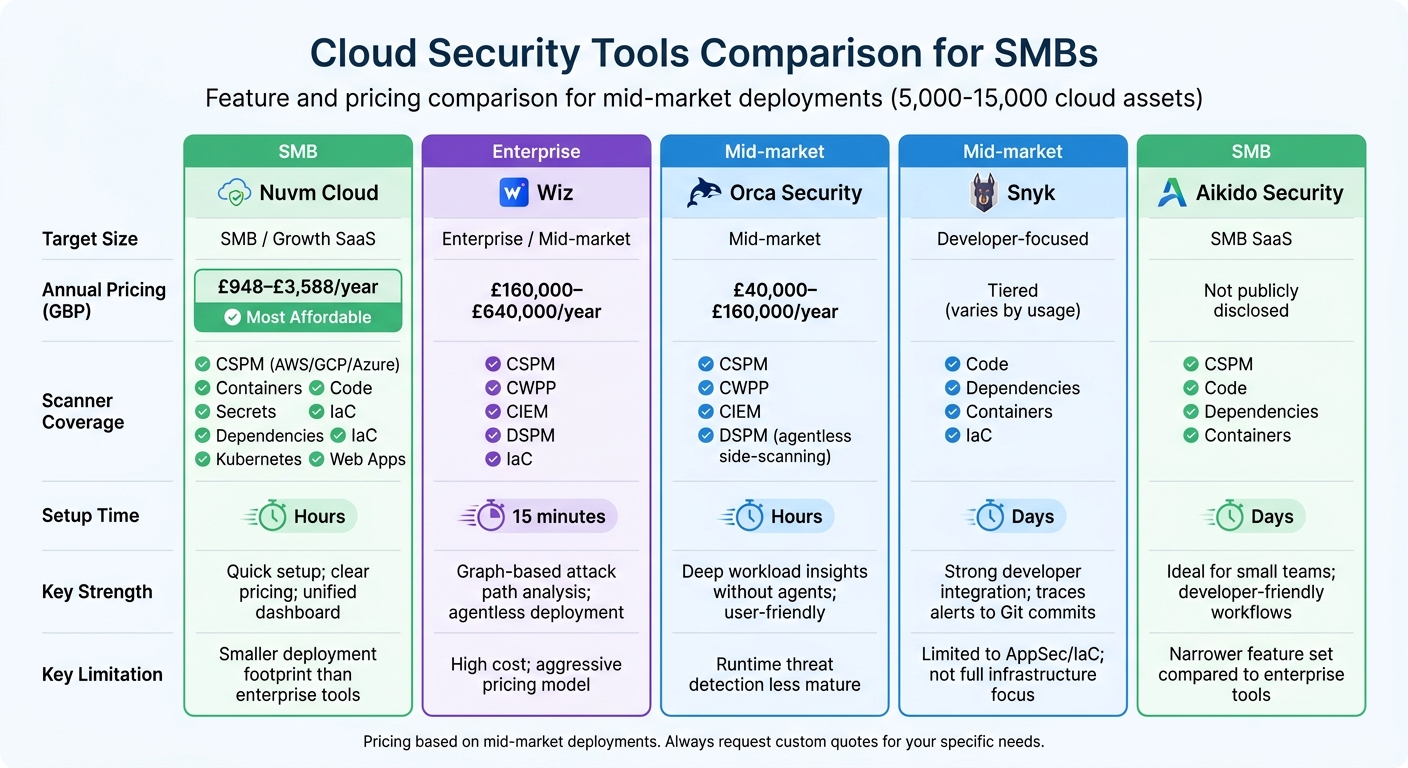
Cloud Security Tools Comparison for SMBs: Features, Pricing and Setup Time
Once you've outlined your needs, the next step is to assess how different tools measure up against your criteria. The cloud security market is split into two categories: platforms designed for large enterprises with dedicated security teams, and tools tailored for smaller SaaS companies with limited resources.
The distinction goes beyond just pricing - it’s about efficiency, ease of use, and practical outcomes. For example, enterprise tools like Prisma Cloud often require up to a year to fully implement and operate effectively. By contrast, SMB-focused tools can start delivering results in just a few hours. For a small SaaS team of 20 people gearing up for their first SOC 2 audit, this speed can make all the difference.
Feature and Pricing Comparison Table
Here’s a breakdown of five cloud security tools, focusing on the features that matter most to SMB SaaS teams. The pricing reflects mid-market deployments (approximately 5,000–15,000 cloud assets) based on annual contracts, where available:
| Tool | Target Size | Indicative Annual Pricing (GBP) | Scanner Coverage | Setup Time | Key Strength | Key Limitation |
|---|---|---|---|---|---|---|
| Nuvm Cloud | SMB / Growth SaaS | £948–£3,588/year | 9 scanners: CSPM (AWS, GCP, Azure), containers, code, secrets, dependencies, IaC, Kubernetes, web apps | Hours | Quick setup; clear pricing; unified dashboard | Smaller deployment footprint than enterprise tools |
| Wiz | Enterprise / Mid-market | £160,000–£640,000/year | CSPM, CWPP, CIEM, DSPM, IaC | 15 minutes | Graph-based attack path analysis; agentless deployment | High cost; aggressive pricing model |
| Orca Security | Mid-market | £40,000–£160,000/year | CSPM, CWPP, CIEM, DSPM (agentless side-scanning) | Hours | Deep workload insights without agents; user-friendly | Runtime threat detection less mature |
| Snyk | Developer-focused | Tiered (varies by usage) | Code, dependencies, containers, IaC | Days | Strong developer integration; traces alerts to Git commits | Limited to AppSec/IaC; not full infrastructure focus |
| Aikido Security | SMB SaaS | Not publicly disclosed | CSPM, code, dependencies, containers | Days | Ideal for small teams; developer-friendly workflows | Narrower feature set compared to enterprise tools |
Note: Pricing for Wiz, Orca, and Aikido is sourced from industry reports for mid-market deployments (5,000–15,000 assets). Nuvm Cloud pricing is based on public monthly plans (£79–£299/month when billed annually). Always request a custom quote tailored to your specific needs.
This table sheds light on how SMB-focused tools meet the needs of smaller teams, often bypassing the complexities of enterprise platforms. Let’s take a closer look at what sets Nuvm Cloud apart.
How Nuvm Cloud Differs from Competitors
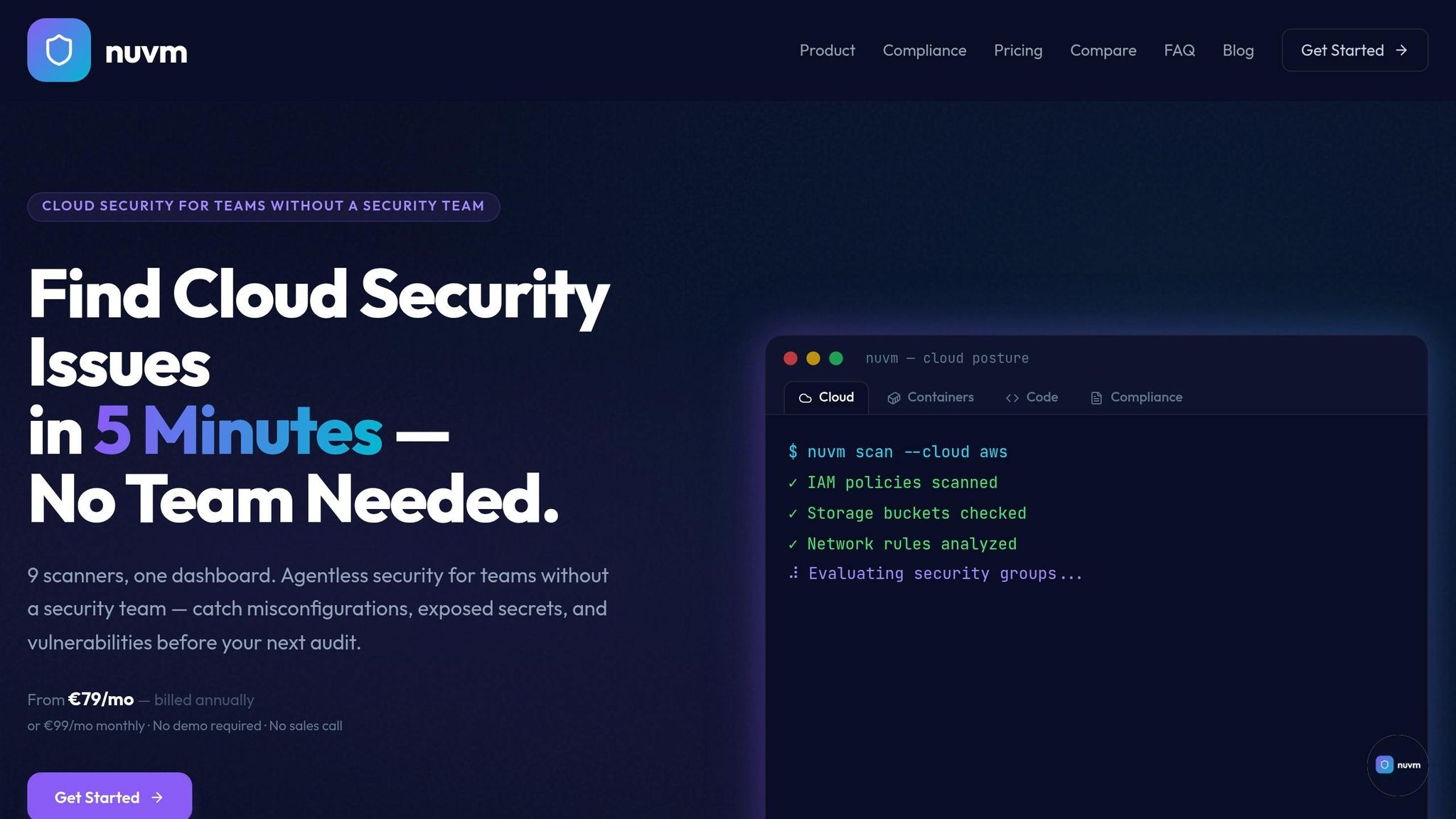
Nuvm Cloud is built with small and mid-sized SaaS teams in mind - especially those without dedicated security engineers. While enterprise platforms shine in large-scale, complex environments, they can be overly intricate and expensive for a lean team of 15 people.
Nuvm Cloud’s standout feature is its focus on simplicity. It combines nine scanners into a single, unified dashboard, covering everything from cloud posture and containers to source code, secrets, dependencies, Kubernetes, and web applications. The platform also includes ready-to-use remediation commands and auto-mapped compliance evidence for frameworks like SOC 2, PCI DSS, ISO 27001, and NIS2. This transforms audit preparation from a stressful quarterly scramble into an ongoing, manageable process. Setup takes just a few hours, and the pricing is straightforward - starting at £948/year for the Cloud plan.
That said, enterprise tools have their strengths. Wiz offers unparalleled graph-based attack path analysis for organisations managing multi-cloud environments with dedicated security teams. Orca’s agentless side-scanning provides exceptional workload visibility, and Snyk’s developer integrations are ideal for teams focusing on shift-left security in CI/CD pipelines. For a larger company with 500 employees and a dedicated security team, these tools may be the right fit. But for a 20-person SaaS startup preparing for its first audit, they’re often overkill - both in complexity and cost.
How to Select and Implement Your Cloud Security Tool
After evaluating your needs and comparing features, the next step is selecting and implementing the right cloud security tool for your organisation.
Shortlist and Test 3–5 Tools
Narrow your options down to three to five tools that align with your team’s size, budget, and technical requirements. Once shortlisted, test these tools in your actual environment using clear success benchmarks, such as time-to-first finding or false positive rates. This allows you to make objective comparisons.
During the proof of concept (POC), focus on testing workflows that are most relevant to your team. For example, connect the tool to your AWS, GCP, or Azure accounts and conduct scans for areas like GCP misconfigurations, cloud posture, containers, and Infrastructure as Code (IaC). Check if the tool provides pre-configured commands that allow for quick fixes without extra setup.
Verify Integrations and Support Quality
Make sure the tool integrates seamlessly into your current workflows. Look for compatibility with platforms like GitHub, GitLab, Docker, Kubernetes, Jira, and Slack. For instance, findings should automatically create tickets in Jira or send alerts directly to Slack, ensuring the tool fits into your daily processes without disruption.
During this trial phase, test the vendor’s support by submitting technical questions or integration requests. The quality and responsiveness of their support team during this period often reflect the kind of assistance you’ll receive after purchasing the tool.
Review Total Costs and Growth Potential
Take a close look at the total cost of ownership (TCO), keeping your budget in mind. This includes expenses for licensing, deployment, tuning, and the time spent on remediation. Tools that generate an overwhelming number of alerts without clear prioritisation can drain engineering resources, potentially leading to higher long-term costs.
Also, consider whether the pricing model can scale effectively as your cloud environment expands. If the tool charges per asset or workload, ask for a detailed breakdown of how costs might increase if your environment doubles in size over the next 18 months. Negotiating a multi-year contract can often save 15–25% if the pricing aligns with your projected growth. For smaller teams, tools like Nuvm Cloud, starting at £948 per year, provide fixed pricing, which eliminates unexpected costs as you scale.
Conclusion
Selecting the best cloud security tool hinges on understanding your team's size, technical expertise, and risk tolerance. Start by pinpointing your most pressing vulnerabilities with cloud security insights and choose tools that offer clear, actionable remediation. Considering that 91% of cloud breaches stem from misconfigurations, it's crucial to prioritise solutions that catch these errors before they make it to production.
For small to mid-sized SaaS teams without dedicated security engineers, platforms like Nuvm Cloud can be a practical choice. With nine integrated scanners, automated compliance mapping, and plain-English remediation guidance, Nuvm Cloud offers an affordable alternative to enterprise-grade tools like Wiz, which often come with much steeper price tags.
Once you've shortlisted your top three tools, test them using real-world data from AWS, GCP, or Azure. Proof-of-concept (PoC) results should weigh heavily - accounting for over 60% of your final decision. Pay close attention to false positive rates, time-to-first-finding, and how well the tool integrates with your existing systems, such as GitHub, Slack, Jira, or Kubernetes.
Lastly, evaluate the total cost of ownership over three years. This includes licensing fees, deployment costs, and the engineering hours required for maintenance. Tools that generate excessive alerts can quickly become "shelfware", wasting both time and money. Choose a solution that genuinely reduces your team's workload and fits within your resource constraints.
FAQs
Which cloud risks should I prioritise first?
When it comes to cloud security, certain risks demand immediate attention. These include misconfigurations, data exposure, weak identity and access management, and vulnerabilities linked to automation or AI-driven attacks.
Misconfigurations stand out as a major concern. With cloud environments often featuring complex settings, even small errors can lead to breaches. Similarly, poor identity management - like weak authentication protocols - can leave systems exposed to unauthorised access. Another common issue is the lack of visibility into cloud environments, which makes it harder to detect and respond to potential threats.
Focusing on these areas early is key to reducing risks in an ever-changing threat landscape.
How can I tell if a tool’s alerts are actionable?
Actionable alerts deliver concise, prioritised details, such as the affected assets, specific issues, and clear steps for resolution. This approach ensures teams can respond swiftly and effectively. It's essential to categorise alerts by severity, with critical ones flagged for immediate action. Using tools that consolidate alerts into a single dashboard or automate investigation and response processes can significantly cut down on noise and manual labour. This allows teams to focus on real threats and act decisively.
Which pricing model scales best as my cloud grows?
The right pricing model hinges on your organisation's growth trajectory and resource usage patterns. Subscription-based pricing works well for those with steady growth, offering predictable costs each month. On the other hand, pay-as-you-go pricing is better suited for businesses with variable workloads, as it scales directly with usage - whether that’s data, compute time, or other resources.
For smaller SaaS teams, opting for straightforward, all-inclusive pricing can help avoid unnecessary complexity. Larger organisations, however, might find tiered pricing more advantageous, though it requires careful cost management to keep expenses under control.