Cloud Posture Management: Common Questions Answered
Cloud Posture Management: Common Questions Answered
Cloud Security Posture Management (CSPM) helps SaaS teams secure their cloud environments by detecting and fixing misconfigurations in platforms like AWS, Azure, and GCP. Misconfigurations, such as public S3 buckets or overly permissive IAM roles, account for 99% of cloud security failures, which are predicted to continue until at least 2027. With CSPM tools, you can:
- Identify Risks: Spot issues like unencrypted databases or open access permissions.
- Simplify Compliance: Automatically map cloud configurations to standards like SOC 2 and ISO 27001, cutting audit preparation by up to 80%.
- Automate Fixes: Use auto-remediation for straightforward issues and guided steps for complex ones.
- Prioritise Alerts: Focus on critical vulnerabilities with attack path analysis, reducing alert fatigue.
- Monitor Continuously: Detect configuration changes in real-time to prevent breaches.
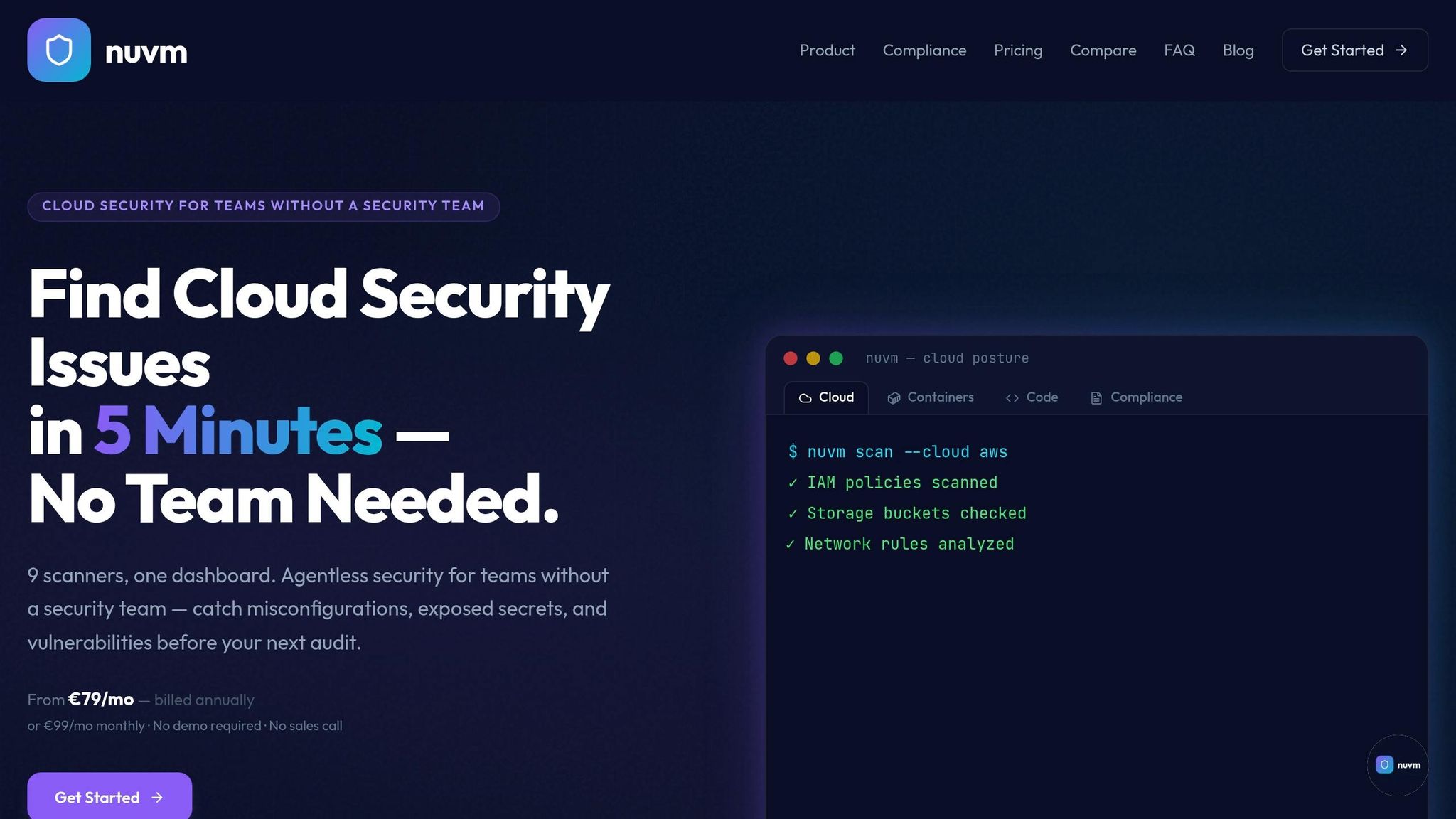
For small SaaS teams, tools like Nuvm offer affordable, easy-to-use solutions with features like multi-cloud visibility, compliance automation, and integrations for streamlined workflows. Starting at just £79/month, they provide a practical alternative to expensive enterprise platforms. Whether you're a team of 5 or 50, CSPM tools can help you secure your cloud infrastructure without needing a dedicated security engineer.
Cloud Security - What is CSPM / CNAP? Cloud Security Posture Management explained
sbb-itb-5d9b290
Why Cloud Posture Management Matters
Cloud Security Posture Management (CSPM) addresses three major challenges for small engineering teams: security blind spots, compliance burdens, and alert fatigue. Without a dedicated security team, these groups need tools that work straight out of the box, not solutions that take months to fine-tune.
Strengthening Cloud Security
Misconfigurations are responsible for 65–70% of cloud security issues. Common mistakes include top GCP misconfigurations, publicly accessible S3 buckets, unencrypted databases, and overly permissive IAM roles that grant access to entire environments. CSPM tools scan your AWS, Azure, and GCP accounts via read-only API access, flagging these vulnerabilities before they escalate into breaches.
IAM misconfigurations are particularly dangerous. A single policy with wildcard permissions can expose every resource. CSPM identifies these risky setups and suggests fixes, such as replacing "Resource": "*" with specific ARNs or implementing least-privileged access principles.
Modern CSPM tools go a step further with attack path analysis, which helps prioritise risks. Instead of drowning you in thousands of alerts, they highlight the most critical vulnerabilities - like internet-exposed resources linked to production data - that attackers are likely to target first. This approach saves small teams hours of triaging minor issues while also simplifying compliance efforts.
Simplifying Compliance with SOC 2 and ISO 27001
CSPM tools come equipped with templates that align cloud configurations with SOC 2 Trust Services Criteria and ISO 27001 Annex A controls. For example, when auditors need proof that databases are encrypted or access logs are retained, CSPM gathers this evidence directly from your cloud provider APIs - removing the need for manual audits.
The efficiency gains are impressive. CSPM can cut manual audit time by up to 80%, reducing evidence collection from 200–400 hours to just 20–40 hours per audit cycle. For small teams where security is often a part-time responsibility, this automation makes compliance manageable without requiring additional hires.
Continuous Monitoring and Alerts
CSPM also ensures real-time detection through continuous scans - hourly or even instantaneously - to catch configuration changes as they happen. For instance, if a security group unexpectedly opens port 22 to external traffic or an S3 bucket's permissions change, your team gets notified immediately, giving you a chance to act before any damage occurs.
For straightforward issues like enabling encryption or restricting public access, CSPM often includes auto-remediation features. These automated fixes run quietly in the background, allowing engineers to focus on more complex tasks. This automation is essential for small teams, especially given that nearly 60% of security teams report handling over 500 cloud security alerts daily. CSPM reduces this noise, surfacing only the most critical issues, such as internet-facing risks, compliance gaps, or configurations that could expose sensitive data.
How Cloud Posture Management Works
CSPM tools connect to your cloud accounts using read-only API access, typically through AWS IAM roles or Azure service principals. This connection allows the platform to inventory resources like virtual machines, S3 buckets, databases, serverless functions, and IAM policies - all without affecting system performance. Once connected, the tool evaluates your cloud configurations against established industry standards.
Scanning Your Cloud Resources
After establishing access, CSPM tools run more than 500 security checks on your cloud configurations. These checks measure your setup against benchmarks such as CIS benchmarks, NIST, and ISO 27001, flagging issues like unencrypted databases, publicly accessible storage, or overly permissive IAM roles. These scans are performed continuously - often on an hourly or near-real-time basis.
The numbers highlight the importance of this process: 99% of cloud security breaches are caused by preventable misconfigurations. For instance, Azure Storage Accounts show a misconfiguration rate of 60.75%. Gartner predicts that by 2027, 99% of cloud security failures will still be the customer’s responsibility. CSPM tools are designed to catch and address these issues before they escalate into security breaches.
Prioritising and Fixing Issues
Modern CSPM platforms go beyond just identifying problems - they use attack path analysis to rank vulnerabilities based on actual risk. Factors like business impact, exposure, and exploitability are considered, ensuring that critical issues, such as an internet-exposed database with sensitive customer data, receive immediate attention rather than being buried among minor warnings.
Many platforms also offer automated remediation to resolve straightforward issues quickly. For more complex problems, they provide detailed, step-by-step instructions for manual fixes. These can be implemented via the cloud console, CLI commands, or Infrastructure-as-Code templates like Terraform. Alerts can also be sent directly to tools like Slack, Jira, or PagerDuty, ensuring your engineering team is notified in their existing workflows. Additionally, some platforms integrate open-source scanners to bolster detection and remediation efforts.
Working with Open-Source Tools
A number of CSPM platforms, including Nuvm, enhance their functionality by incorporating open-source scanners like Prowler, Checkov, and Trivy. For example, Prowler audits live cloud APIs against the CIS AWS Foundations Benchmark. Checkov focuses on scanning Terraform and CloudFormation templates during the development phase, helping to prevent misconfigurations before deployment. Meanwhile, Trivy identifies vulnerabilities in container images and Kubernetes manifests. By integrating these tools into a single dashboard, smaller teams can achieve comprehensive coverage without the hassle of managing multiple standalone scanners.
Choosing a CSPM Tool for Small Teams
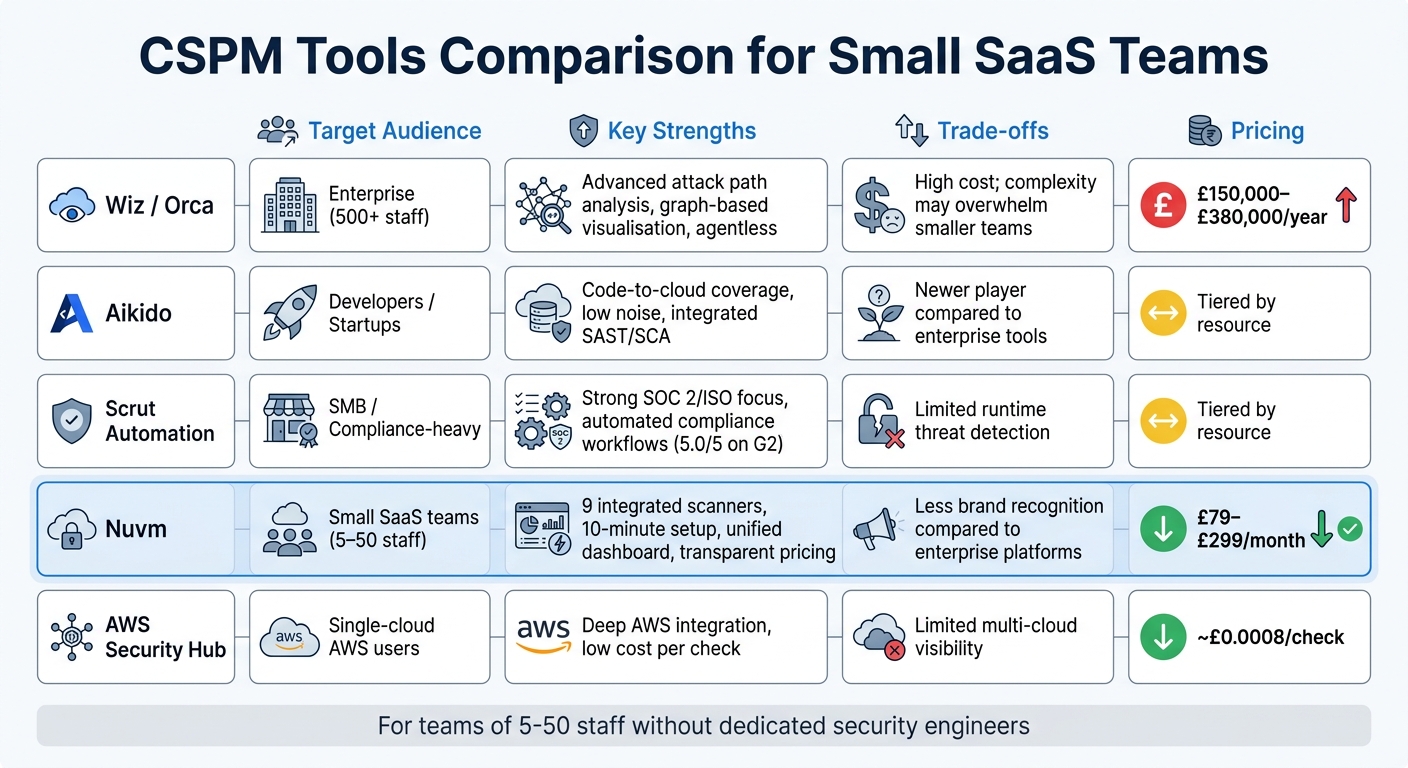
CSPM Tools Comparison: Features, Pricing, and Target Audience for Small SaaS Teams
For small SaaS teams, balancing enterprise-grade cloud security with limited budgets and resources can feel like a monumental task. With predictions indicating that 99% of cloud security failures will be the customer’s fault through 2027, finding the right Cloud Security Posture Management (CSPM) tool becomes more than just a technical decision - it’s a critical step in safeguarding your operations. The right tool must be easy for your engineering team to adopt and manage, especially given the earlier discussion on misconfiguration risks and compliance hurdles.
When exploring the market, CSPM tools typically fall into three categories:
- Enterprise platforms: Tools like Wiz and Orca offer advanced features like graph-based risk analysis and agentless scanning. However, these come with hefty price tags, ranging from £150,000 to £380,000 annually.
- Cloud-native tools: Solutions such as AWS Security Hub provide deep integrations at a low cost (roughly £0.0008 per compliance check). However, they might not be ideal for multi-cloud setups, leaving visibility gaps.
- SMB-focused platforms: Tools like Aikido, Scrut Automation, and Nuvm cater to smaller teams with simpler workflows and transparent pricing. While they may lack some of the advanced visualisation features of enterprise tools, they’re tailored to the needs of smaller organisations.
Let’s break down the key features small teams should prioritise when choosing a CSPM tool.
Features That Matter Most
When selecting a CSPM tool, focus on features that provide real value without adding unnecessary complexity:
- Agentless, API-driven setups: Tools using read-only APIs eliminate the need to deploy software on every virtual machine, making them easier to implement and less disruptive to workloads.
- Context-aware prioritisation: Not all misconfigurations are equal. In fact, only 1% of them typically lead to open attack paths. Look for tools that use attack path analysis or reachability insights to highlight the most critical, internet-facing risks.
- Compliance automation: Built-in mapping to standards like SOC 2, ISO 27001, and PCI DSS reduces the manual workload during audits and provides clear evidence for auditors.
- Developer-centric workflows: Features like AI-powered autofix, Infrastructure-as-Code (IaC) scanning in CI/CD pipelines, and integrations with tools like Slack, Jira, and GitHub make it easier to embed security into existing processes.
- Multi-cloud visibility: Even if you’re currently using a single cloud provider, having visibility across multiple clouds prevents future security silos and shadow IT issues.
Nuvm Compared to Other CSPM Tools
Here’s a quick comparison of some leading CSPM tools to help you decide which one fits your team’s needs:
| Tool | Target Audience | Key Strengths | Trade-offs | Pricing |
|---|---|---|---|---|
| Wiz / Orca | Enterprise (500+ staff) | Advanced attack path analysis, graph-based visualisation, agentless scanning | High cost; complexity may overwhelm smaller teams | £150,000–£380,000/year |
| Aikido | Developers / Startups | Code-to-cloud coverage, low noise, integrated SAST/SCA | Newer player compared to enterprise tools | Tiered by resource |
| Scrut Automation | SMB / Compliance-heavy | Strong SOC 2/ISO focus, automated compliance workflows (5.0/5 on G2) | Limited runtime threat detection | Tiered by resource |
| Nuvm | Small SaaS teams (5–50 staff) | 9 integrated scanners, 10-minute setup, unified dashboard, transparent pricing | Less brand recognition compared to enterprise platforms | £79–£299/month |
| AWS Security Hub | Single-cloud AWS users | Deep AWS integration, low cost per check | Limited multi-cloud visibility | ~£0.0008/check |
For small SaaS teams, Nuvm stands out as a practical option. Designed for teams without dedicated security engineers, it combines nine integrated scanners (covering cloud posture, containers, secrets, IaC, and more) into a single platform. Its automated compliance mapping to SOC 2, ISO 27001, and PCI DSS, along with clear remediation instructions, makes it particularly useful during audits.
While enterprise tools like Wiz excel at advanced risk visualisation, smaller teams often benefit more from streamlined solutions. For instance, a 15-person SaaS company operating on AWS and GCP could find Nuvm’s Pro plan (£179/month) offers comprehensive cloud posture management, container and dependency scanning, IaC scanning, and priority support - all at a fraction of the cost of enterprise solutions. The Platform tier (£299/month), with its unlimited users and 12-hour scan cycle, ensures the entire engineering team can collaborate on security without worrying about per-user fees.
To ensure the tool meets your needs, conduct a two-week proof of concept in your most complex cloud accounts. This trial will highlight whether the platform provides actionable insights or just adds noise. Pay close attention to the quality of remediation guidance - step-by-step instructions are invaluable when addressing issues. The right CSPM tool doesn’t just enhance security; it simplifies daily operations for small SaaS teams.
How to Implement CSPM in Small Teams
Introducing a CSPM tool doesn’t have to be a daunting task, even for smaller SaaS teams. By following a clear, phased approach, you can make the process manageable: Visibility (identify your assets), Prioritisation (concentrate on key risks), Remediation (address critical issues), and Prevention (stop problems before they escalate).
To get started, connect your CSPM tool using read-only API credentials. This setup provides a complete, agentless view of your AWS, Azure, and GCP environments without interrupting operations. It even captures shadow IT resources, giving you a more comprehensive picture.
Set Clear Security Priorities
Focus your attention on misconfigurations that create "toxic combinations". These occur when multiple errors align to form exploitable vulnerabilities. For instance, imagine a public-facing virtual machine with an over-privileged IAM role granting access to sensitive customer data. That’s a far bigger problem than a development sandbox missing encryption.
Set clear remediation timelines based on severity. For critical risks - like internet-facing resources with sensitive data - aim for fixes within 24–48 hours. Medium risks, such as internal resources with excessive permissions, can have a slightly longer window of 7–14 days. Tailor these timelines to the environment: production systems demand faster responses than development sandboxes. This approach reduces alert fatigue and ensures your team focuses on what matters most.
Once these priorities are in place, the next step is maintaining ongoing vigilance.
Turn On Continuous Monitoring
Configuration drift - small, unintended changes that weaken security - affects over 90% of cloud deployments. Instead of relying on scheduled scans (hourly or daily), switch to continuous monitoring via cloud provider APIs. This method detects configuration changes in real time, a crucial advantage since attackers often target unmonitored regions to avoid detection.
Make sure audit logs, such as AWS CloudTrail or Azure Activity Logs, are enabled across all regions - not just your primary zones. Continuous monitoring ensures you catch issues as they happen, rather than hours or days later, enabling faster and more effective responses.
Use Automation to Save Time
With your priorities set and real-time alerts in place, automation becomes a game-changer. Automated compliance mapping, for example, can slash audit preparation time from 200–400 hours to just 20–40 hours - reducing manual effort by around 80%. This can be especially helpful for small teams navigating their first compliance certification.
Enable auto-remediation for straightforward fixes. For example, you can automate enabling encryption on storage buckets or closing unauthorised public ports in non-production environments. For more intricate changes, like IAM or network configurations, guided remediation with step-by-step instructions is safer to prevent disruptions. Integrating CSPM alerts into tools like Slack or Jira ensures these tasks fit seamlessly into your team’s workflow.
Another proactive step is incorporating Infrastructure-as-Code (IaC) scanning into your CI/CD pipelines. This catches misconfigurations in templates like Terraform or CloudFormation before deployment, preventing issues from ever reaching your cloud environment.
For small-to-mid-sized SaaS teams, Nuvm’s Pro plan (£179/month) is a practical choice. It includes IaC scanning, cloud posture management, container scanning, and dependency scanning. With a 12-hour scan cycle and priority support, this plan helps you implement these strategies effectively.
Conclusion
Cloud posture management helps small SaaS teams tackle 99% of cloud security failures caused by preventable misconfigurations. For teams without dedicated security staff, automation becomes crucial in catching these misconfigurations before they escalate into breaches, which can cost an average of £3.8 million.
Some key advantages include continuous visibility across multi-cloud environments, automated compliance evidence mapping - which significantly reduces audit times - and risk-based prioritisation to ensure that critical vulnerabilities are addressed first. Adding Infrastructure-as-Code (IaC) scanning to your CI/CD pipeline can also stop issues before they reach production.
Choosing the right tool depends on your team’s size and budget. Enterprise-level platforms like Wiz or Prisma Cloud range from £230,000 to over £385,000 per year, offering advanced features that cater to larger teams. On the other hand, SMB-focused options, typically priced between £38,000 and £115,000 annually, provide a more practical and affordable approach for smaller teams. For example, Nuvm’s Pro plan, costing £179 per month, combines cloud posture management, container scanning, dependency scanning, and IaC scanning on a 12-hour cycle. This makes it a great choice for lean teams looking to maintain robust security without the need for a dedicated security engineer.