Unified Dashboard for Compliance Automation
Unified Dashboard for Compliance Automation
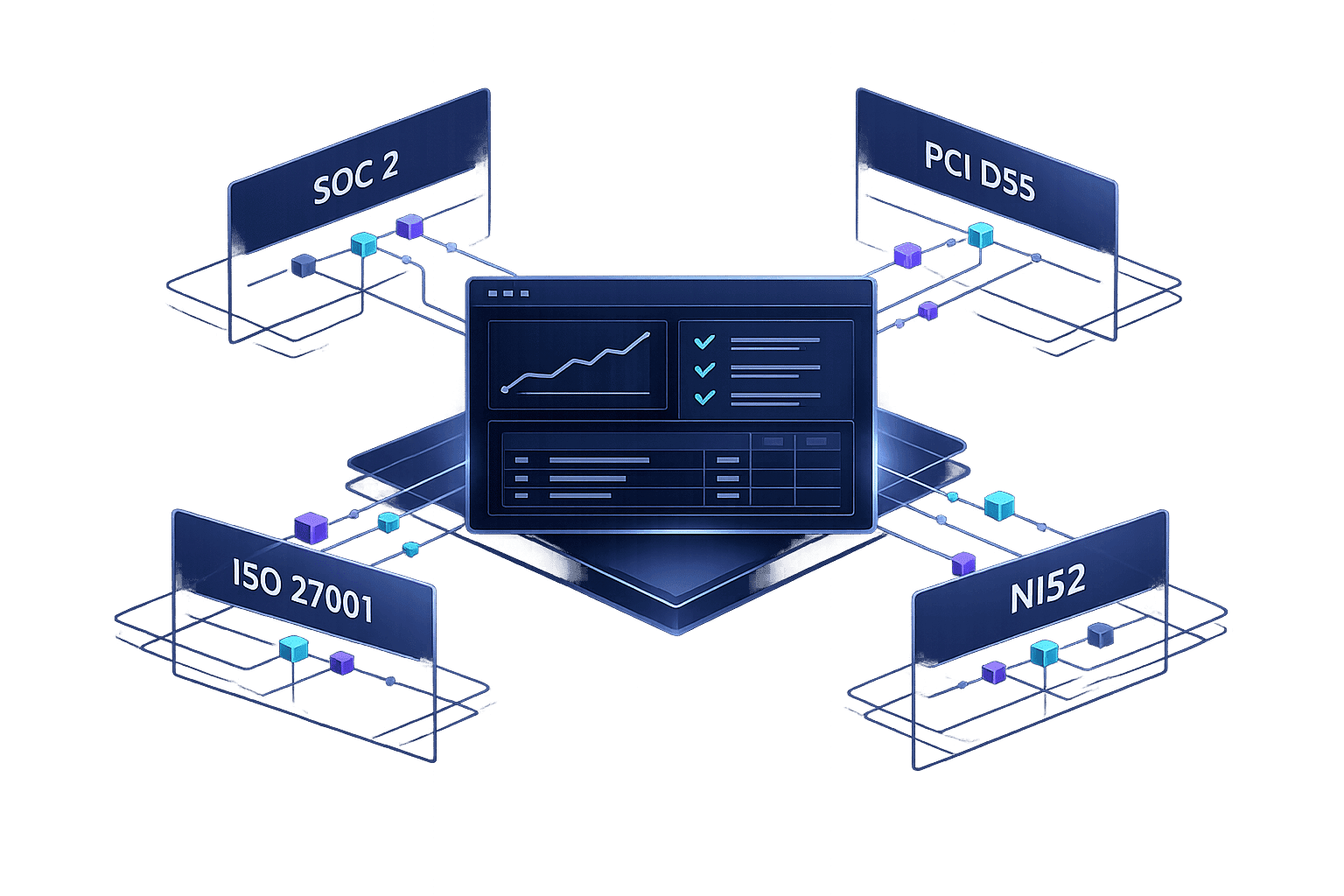
Small SaaS teams waste time and money on manual compliance tasks. A unified compliance dashboard simplifies this by consolidating security findings, automating evidence collection, and mapping to frameworks like SOC 2, PCI DSS, ISO 27001, and NIS2. This approach reduces audit prep time, cuts costs, and improves efficiency.
Key Takeaways:
- What it does: Combines security tools into one view, automates compliance mapping, and provides continuous monitoring.
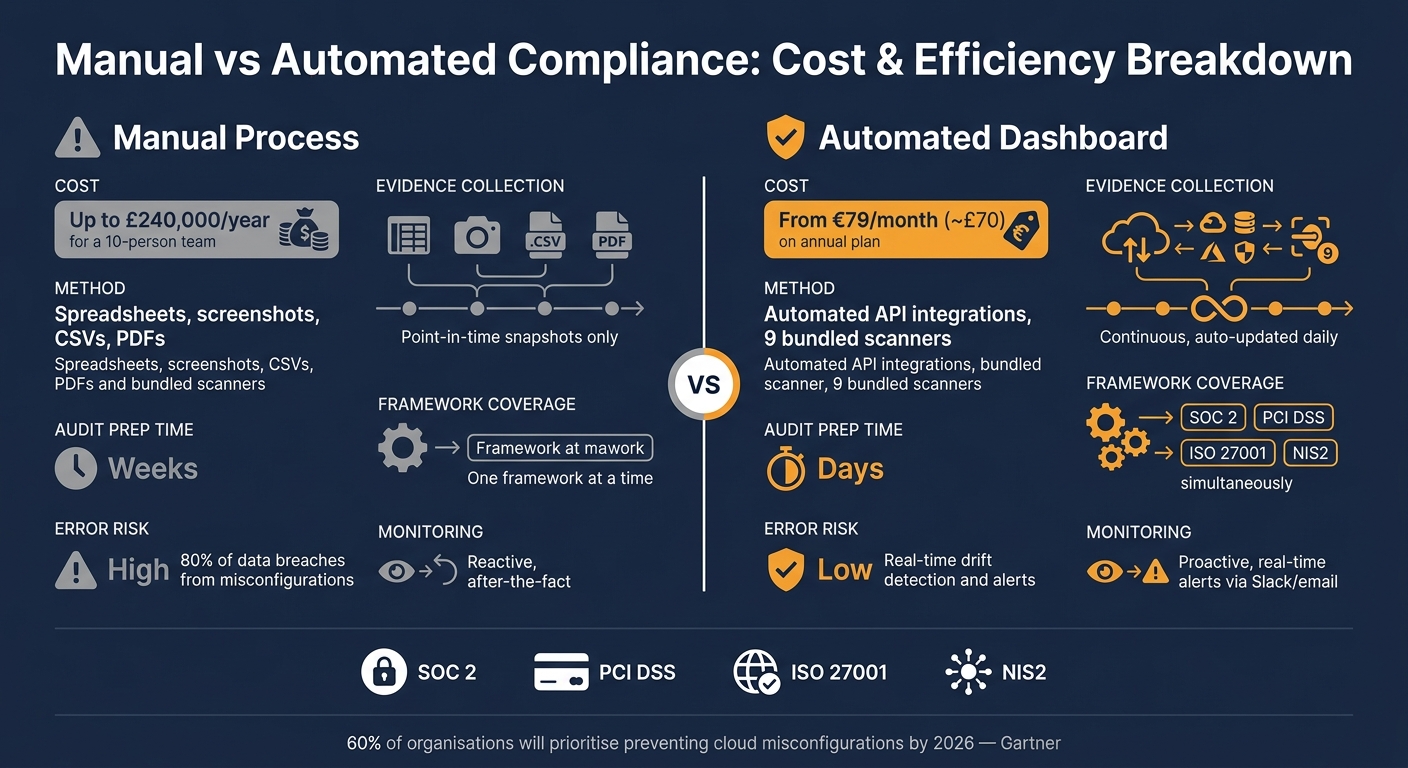
- Why it matters: Manual methods (e.g., spreadsheets) are error-prone and expensive - costing up to £240,000 annually for a 10-person team.
- Core features:
- Standardises findings from multiple tools.
- Maps findings to multiple compliance frameworks simultaneously.
- Automates evidence collection via API integrations.
- Detects and alerts for configuration drifts in real time.
- Who benefits: SaaS teams handling multiple compliance frameworks, especially in the EU and US markets.
By replacing manual workflows with automation, teams can focus on product development while maintaining compliance effortlessly.
Manual vs Automated Compliance: Cost & Efficiency Breakdown
Creating Your Own Custom Compliance Dashboard
sbb-itb-5d9b290
Core Features of a Unified Compliance Dashboard
A compliance dashboard is only as effective as its ability to simplify and streamline complex processes. For small SaaS teams juggling SOC 2, PCI DSS, ISO 27001, and NIS2 simultaneously, certain features can mean the difference between a tool that genuinely aids compliance and one that just adds another layer of complexity.
Normalising and Consolidating Findings
With so many tools producing outputs in different formats - think Prowler, Trivy, or Checkov - teams often face a fragmented view of their security landscape. Each tool has its own format and severity scales, leading to inconsistencies and extra work. A unified compliance dashboard tackles this by standardising all findings into a single format.
Every raw finding is transformed into a consistent "Finding" object, complete with details like severity, affected resource ID, cloud provider, and relevant compliance controls. This creates a single, actionable queue, eliminating the need to manually cross-reference outputs from different tools.
"Traditional CSPMs lack insight into cloud workloads, which means they cannot detect vulnerabilities, malware, data at risk, or exposed secrets." - Orca Security
Given that 80% of data security breaches stem from misconfigurations, having a centralised view is critical. Without it, key issues often remain hidden across disconnected tools, increasing the risk of breaches.
Mapping Controls Across Multiple Frameworks
Once findings are standardised, the next step is mapping them to compliance controls. A centralised inventory of controls is essential for this. A well-designed dashboard allows a single technical check to meet the requirements of multiple frameworks - SOC 2, PCI DSS, ISO 27001, and NIS2 - simultaneously. This approach eliminates redundant checks and simplifies compliance efforts.
"If you can write a security check as a SQL query, you can map that query to a compliance control." - Joe Karlsson, Engineer and Developer Advocate
Some platforms take this further by using SQL-based abstraction to query infrastructure metadata across cloud providers. The results are then tagged against multiple compliance frameworks in one go. This method not only simplifies mapping but also creates a clear audit trail, complete with timestamps, expected results, and actual outcomes - exactly what auditors look for.
Automating Evidence Collection and Reporting
Manually gathering evidence - screenshots, CSVs, PDFs - is not only tedious but often results in outdated information. A compliance dashboard solves this by implementing automated evidence pipelines. These pipelines use read-only API connections to pull required artefacts from cloud providers, identity systems like Okta or Azure AD, and HR platforms.
The benefits are clear. For example, platforms like Nuvm Cloud integrate with multiple scanners and automatically map their results to compliance frameworks like SOC 2, PCI DSS, ISO 27001, and NIS2. This transforms evidence collection from a last-minute scramble into a continuous process. Instead of rushing to gather data before an audit, teams maintain an up-to-date evidence library as a natural part of their workflow.
"If a platform doesn't handle evidence well, it's just a fancy checklist. Evidence is the currency of compliance." - Justin Leapline, episki
Real-time monitoring ties everything together. When infrastructure drifts from its compliant baseline - for instance, if a storage bucket is mistakenly made public or an MFA policy is disabled - immediate alerts are triggered. This ensures issues are addressed long before an auditor raises them, reducing stress and last-minute fixes.
These features form the backbone of a compliance dashboard, setting the stage for the integrations and workflow automation discussed in the next section.
Technical Architecture and Integrations
Integrations with Security Tools
A compliance dashboard isn’t much use unless it works seamlessly with the tools your team already relies on. Modern platforms achieve this by connecting to cloud providers like AWS, GCP, and Azure using read-only API access. This setup pulls in configuration metadata and audit logs without needing to install agents or risk impacting live infrastructure. It’s an agentless approach that avoids unnecessary performance issues or complications.
But cloud posture is just one part of the picture. A well-rounded dashboard integrates with tools across the entire application stack. For example, it can aggregate data from container scanners like Trivy, static analysis tools like Semgrep, secret detection tools like TruffleHog, and IaC scanners such as Checkov - all through a unified data pipeline. Platforms like Nuvm Cloud take this a step further by bundling nine different scanners into one system. This setup covers everything from cloud posture and containers to source code, dependencies, Kubernetes, and web applications. All of this data feeds into a centralised model, simplifying compliance management.
A Canonical Data Model for Compliance
These integrations are powerful because they feed into a canonical data model, which consolidates and standardises findings into actionable insights. Each Finding is tied to specific Controls and framework requirements, making it easier to address compliance issues. For instance, fixing a single misconfiguration - like enabling multi-factor authentication on a critical cloud account - can resolve compliance gaps across multiple frameworks such as SOC 2, PCI DSS, ISO 27001, and NIS2.
Additionally, every compliance check generates a timestamped Evidence object. This eliminates the need for manual document collection, as auditors can access verified proof directly.
| Component | What It Stores |
|---|---|
| Finding | Severity, resource ID, cloud provider, remediation guidance |
| Control | Control objective, owner, framework mapping tags |
| Evidence | Timestamp, artefact link, freshness status, sign-off |
| Framework | Requirement ID, description (SOC 2, ISO 27001, PCI DSS, NIS2) |
Workflow Automation for Small Teams
For smaller SaaS teams, this integrated system reduces compliance risks by automating tasks like drift detection and evidence collection. For example, if a cloud storage bucket is misconfigured, the system can detect it quickly using event-driven architectures like AWS EventBridge or through scheduled polling. Alerts are then sent directly to Slack or email, ensuring nothing slips through the cracks.
Another key advantage is integrating compliance checks into the CI/CD pipeline. Tools like Checkov can scan Infrastructure as Code (IaC) and act as a gate, blocking non-compliant configurations before they go live. This, paired with automated, timestamped evidence snapshots stored in version control, turns audit preparation into a continuous, stress-free process. According to Gartner, by 2026, 60% of organisations are expected to focus on preventing cloud misconfigurations as a top security priority.
How to Implement a Unified Compliance Dashboard
Here's a step-by-step guide to deploying your unified compliance dashboard efficiently and with minimal hassle.
Getting Started with Minimal Setup
For small SaaS teams, the thought of a lengthy setup process can be daunting. Fortunately, modern platforms make this process quick and straightforward. By using native OAuth or CloudFormation, you can connect your cloud environments in under 60 seconds - no need for manual IAM role setups.
Begin with read-only access to ease any concerns your team might have. This ensures the tool observes your systems without making any changes, reducing the risk of accidental modifications to live environments. Once connected, the dashboard starts identifying issues, offering clear explanations in plain language and even providing ready-to-use remediation commands. There's no need for time-consuming onboarding.
Set a firm deadline to phase out spreadsheets. Running manual trackers alongside an automated dashboard leads to unnecessary duplication of effort, which can frustrate teams and defeat the purpose of automation. Choose a migration date, stick to it, and fully commit to the new system.
After the dashboard is live, implement simple daily reviews to ensure ongoing compliance.
Daily and Weekly Compliance Routines
Use the dashboard’s real-time alerts to establish a consistent schedule for compliance checks. This helps you stay on top of risks and avoid surprises during audits.
| Frequency | Task | Purpose |
|---|---|---|
| Daily | Triage critical and high-severity findings (5–10 minutes each morning) | Address urgent risks like unencrypted storage buckets or missing MFA on root accounts before they escalate |
| Weekly | Review drift reports and MTTR (Mean Time to Resolution) trends | Identify recurring misconfigurations and process inefficiencies before they lead to audit issues |
| Monthly | Create an executive summary | Share compliance trends (e.g., "98% compliant over the past 30 days") with leadership or the board |
| Quarterly | Conduct automated access reviews | Audit user accounts, flag inactive ones, and generate evidence for SOC 2 CC6.2/CC6.3 compliance |
As Joe Karlsson from CloudQuery aptly states:
"Continuous compliance isn't a performance. It's a system that produces evidence as it runs."
Managing Exceptions and Risk Acceptance
In some cases, you’ll need to document exceptions due to business constraints, third-party dependencies, or compensating controls that address the underlying risks. Proper documentation is key - casual Slack conversations won’t cut it. Transparency is critical for maintaining trust in a continuous compliance system.
A well-designed dashboard allows you to log exceptions with the following details: the reason for the exception, the approver, the compensating control in place, and a mandatory expiry date. This transforms your risk register into a dynamic, auditable record. Some platforms even automate this process by pulling risk items directly from scan findings and mapping them to likelihood and impact scores, meeting requirements like SOC 2 CC3.1. When an auditor asks why a specific control wasn’t met, you’ll have timestamped, signed-off documentation ready - no scrambling to piece together a paper trail.
Conclusion: Moving Towards Continuous Compliance
The key difference between teams that struggle with audits and those that handle them with ease lies in when evidence is collected. Traditional manual processes capture just a single snapshot in time, while a unified dashboard provides a continuous record - automatically updated every day as part of regular operations. By automating evidence collection, compliance records are built continuously in the background.
Relying on manual compliance processes is expensive. For example, a ten-person team can spend around £240,000 annually on manual efforts. In contrast, continuous compliance slashes audit preparation time from weeks to just days, freeing up significant time and resources for other priorities.
"The shift, from point-in-time proof to continuous evidence, is what separates organisations that scramble from organisations that don't." - Joe Karlsson, Developer Advocate, CloudQuery
In the past, smaller SaaS teams often found continuous compliance out of reach. But that's no longer the case. Platforms like Nuvm Cloud now make this approach accessible. Their solution integrates nine scanners into a single dashboard, covering areas such as cloud posture, containers, source code, secrets, dependencies, IaC, Kubernetes, and web applications. Compliance evidence for standards like SOC 2, PCI DSS, ISO 27001, and NIS2 is automatically mapped from scan results. Each finding includes a plain-English explanation and a ready-to-run remediation command. Pricing starts at €79/month (around £70) on an annual plan, making it a cost-effective way to turn audit preparation into a streamlined, ongoing process.
The aim isn’t to achieve perfection overnight. Instead, it’s about replacing the chaotic, last-minute scramble for audits with a system that quietly runs in the background, alerts you to issues as they arise, and provides a complete evidence package when needed. This is the essence of continuous compliance, and it’s now a realistic option for teams of any size.
FAQs
How quickly can we set up a unified compliance dashboard?
Modern cloud security platforms are designed to deliver visibility almost immediately after being connected. Take tools like Nuvm Cloud, for example. They cater specifically to small and mid-sized SaaS teams, sidestepping the delays often associated with large-scale enterprise implementations. These platforms focus on quick deployment, providing a single dashboard that integrates nine scanners. With automated compliance mapping, they ensure you have actionable insights ready well in time for your next board meeting.
What data access is needed to collect evidence safely?
To gather evidence securely for a unified compliance dashboard, it's crucial to have read-only access to your cloud, configuration, and security telemetry. This typically involves access to:
- Cloud inventory and security posture APIs: Platforms like AWS, GCP, and Azure provide these APIs for monitoring.
- Audit and logging sources: Examples include CloudTrail, CloudWatch, Azure Monitor, and GCP Cloud Logging, which track activity and changes.
- Keys/access discovery and configuration state: This includes details such as IAM policies and encryption/KMS settings.
Using tamper-evident storage ensures that audit artefacts remain unaltered and trustworthy.
How can SOC 2, ISO 27001, PCI DSS, and NIS2 compliance be managed together?
Managing SOC 2, ISO 27001, PCI DSS, and NIS2 simultaneously can feel overwhelming. A unified compliance platform can make it easier by mapping internal controls across these frameworks. With automated monitoring, you can ensure critical actions - like enforcing MFA or encrypting data - align with the requirements of all four standards, cutting down on repetitive tasks.
For smaller SaaS companies, Nuvm Cloud is a game-changer. It features nine integrated scanners and automatically maps findings to compliance evidence. This approach keeps audit preparation ongoing and significantly reduces the effort involved.