How to Automate SOC 2 Compliance in Your Cloud Environment
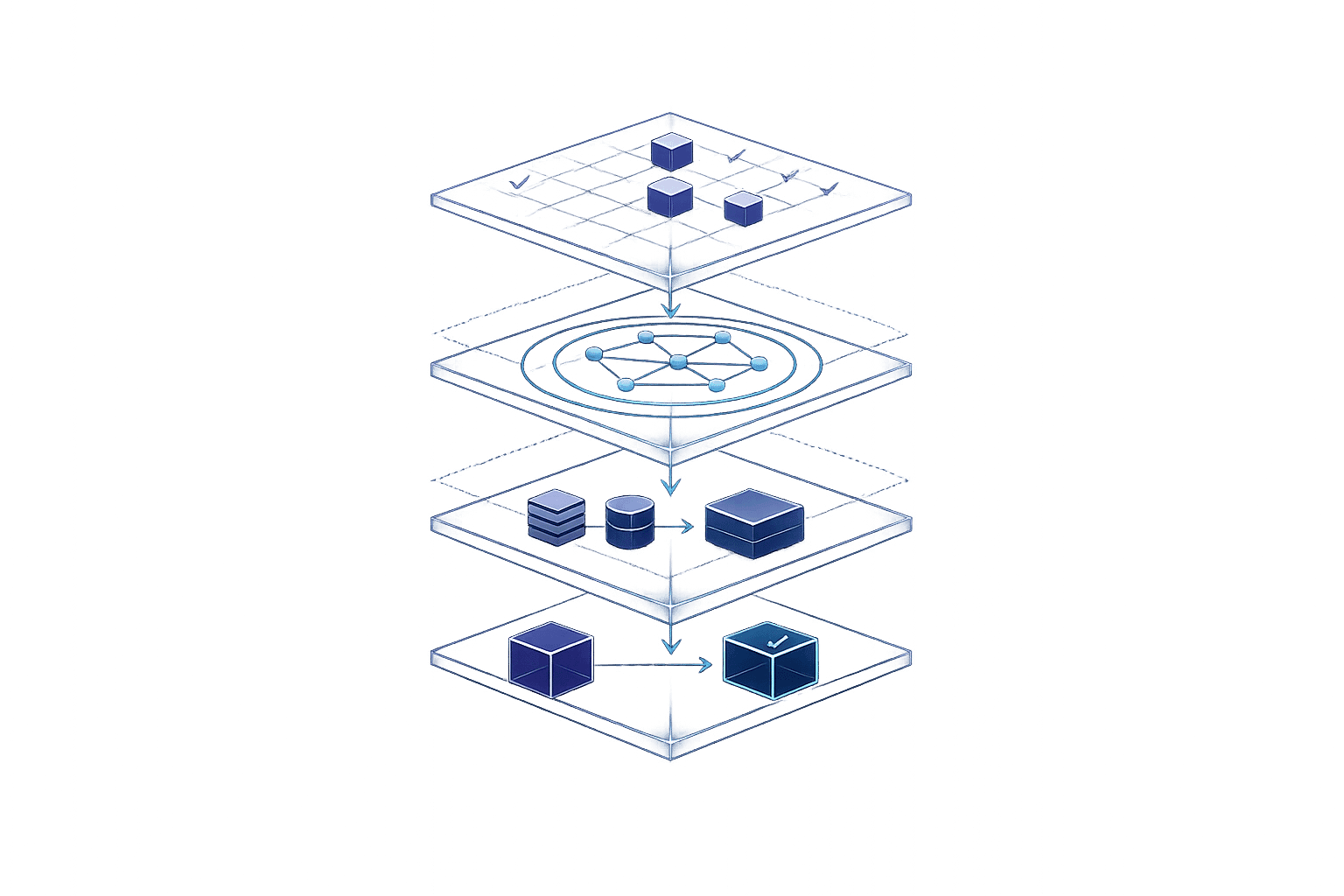
How to Automate SOC 2 Compliance in Your Cloud Environment
SOC 2 compliance is critical for SaaS companies to secure enterprise deals and protect customer data. However, manual compliance processes are time-consuming and error-prone. Automating SOC 2 compliance can save time, reduce costs, and improve security by continuously monitoring cloud environments for misconfigurations using cloud security posture management (CSPM).
Key Takeaways:
- SOC 2 Trust Services Criteria: Focus on Security, Availability, Processing Integrity, Confidentiality, and Privacy.
- Automation Benefits: Reduces audit costs by 20–40% and speeds up breach detection by nearly 100 days.
- Tools for Automation: Use AWS Config, Azure Policy, GCP Security Command Centre, and platforms like Drata or Vanta for evidence collection and compliance monitoring.
- Steps to Automate SOC 2:
- Map SOC 2 controls to cloud services using compliance packs.
- Set up continuous monitoring to detect configuration drift.
- Automate evidence collection via APIs and integrated tools.
- Implement auto-remediation workflows for compliance violations.
Automation transforms SOC 2 compliance from a reactive process into a proactive system, ensuring your cloud environment stays secure and audit-ready.
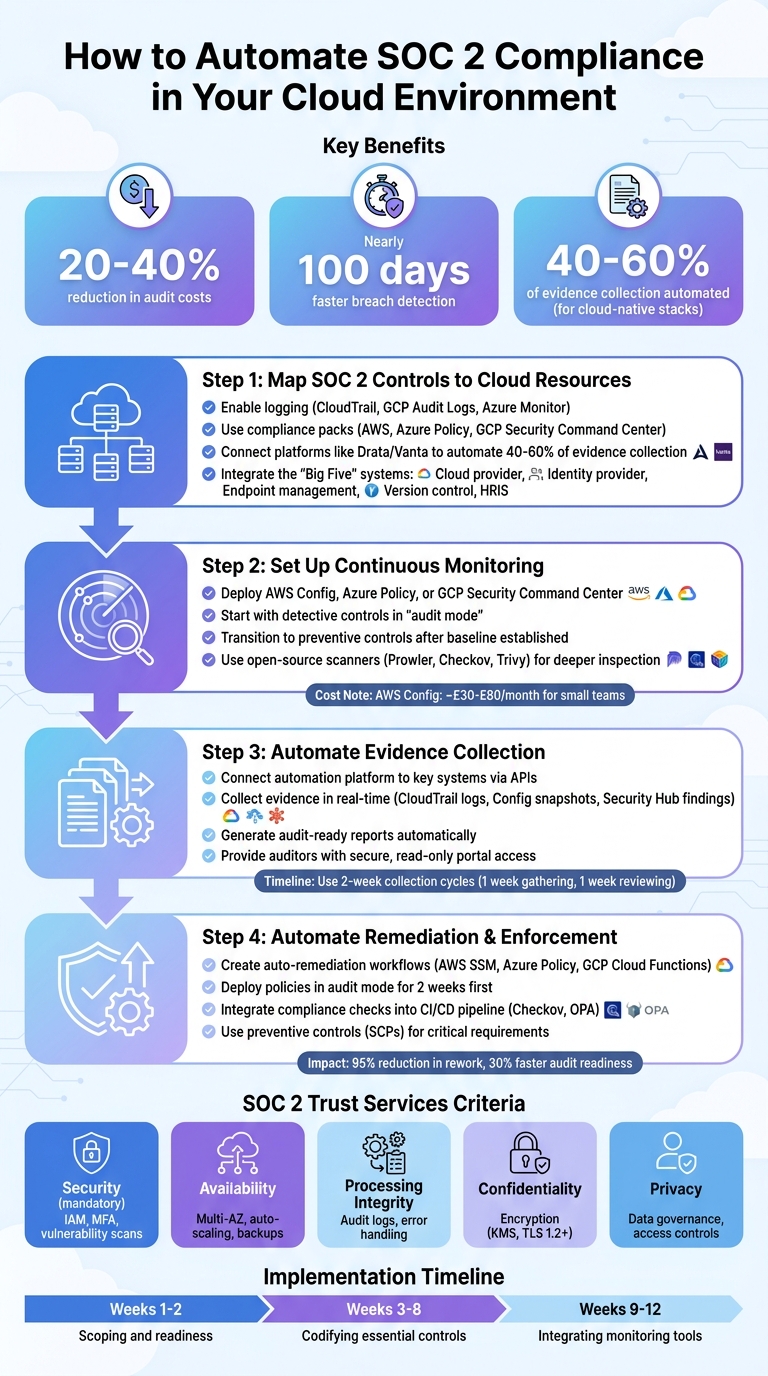
4-Step Process to Automate SOC 2 Compliance in Cloud Environments
Mastering SOC 2 Compliance For Startups
sbb-itb-5d9b290
SOC 2 Trust Services Criteria Explained
SOC 2 evaluates systems based on five key criteria: Security (mandatory), Availability, Processing Integrity, Confidentiality, and Privacy.
Breaking Down the Criteria
- Security: This is the foundation of SOC 2 compliance. It involves implementing measures like IAM policies, multi-factor authentication (MFA), and regular vulnerability scans using tools such as Amazon Inspector.
- Availability: Ensures systems remain accessible and operational. This can be achieved with Multi-AZ configurations, auto-scaling, and automated backup validation using tools like AWS Backup.
- Processing Integrity: Focuses on ensuring operations are complete, valid, and authorised. Audit logs via CloudTrail and error-handling mechanisms like Lambda Dead Letter Queues are essential here.
- Confidentiality: Protects sensitive data through encryption. Use services like KMS or S3 encryption for data at rest and TLS 1.2+ for data in transit.
- Privacy: Governs the collection, use, retention, and disposal of personal information. Tools like Amazon Macie and strict access controls help maintain compliance.
Leveraging Cloud Controls for SOC 2
Aligning cloud controls with these criteria enables a shift to "Compliance as Code." This approach involves continuous monitoring of infrastructure for unauthorised changes, replacing traditional manual audits with a proactive process. As the SOC 2 Auditors Editorial Team explains:
"Continuous monitoring fundamentally changes the audit dynamic from a reactive, stressful event to a proactive, manageable process."
For a cloud-native stack (e.g., AWS/GCP with Okta and GitHub), automation platforms can handle 40–60% of the evidence collection for SOC 2 compliance. However, tasks like quarterly access reviews and disaster recovery exercises still require human involvement. Ali Aleali from Truvo Cyber notes:
"The best platform in the world can't pass an audit for you. The program can."
Security and Availability in Cloud Environments
Cloud providers like AWS, GCP, and Azure offer built-in tools to meet Security and Availability requirements without needing third-party software.
- Security: Use IAM to enforce MFA, AWS Config to verify encryption on S3 buckets and EBS volumes, and tools like GuardDuty or Azure Defender for Cloud to identify vulnerabilities.
- Availability: Multi-AZ RDS configurations ensure database redundancy, while AWS Config rules (e.g.,
multi-az-rds-instance-enabled) enforce these settings. AWS Backup automates backup policies and validates their functionality, providing critical audit evidence.
Small teams can start with detective controls in "audit mode" to assess their security posture without disrupting workflows. Once issues are resolved, they can implement preventive controls, like AWS Service Control Policies (SCPs) or Azure Deny policies, to block violations. Use preventive controls for critical needs like encryption, while detective controls monitor aspects like resource tagging.
Cost Consideration: AWS Config is priced at approximately £0.002 per configuration item recorded and £0.0008 per rule evaluation. For smaller teams, this typically costs around £30–£80 per month - far cheaper than manual compliance efforts.
Confidentiality and Privacy for SaaS Teams
In multi-tenant SaaS environments, proving that customer data remains isolated is crucial. Encryption ensures this separation:
- Encryption at Rest: Enforce server-side encryption on S3 buckets using AWS Config rules like
s3-bucket-server-side-encryption-enabled. - Encryption in Transit: Require TLS 1.2+ for all communications. Azure Policy can block HTTP-only connections, while GCP SSL policies enforce minimum TLS versions on load balancers.
For privacy, strict data access controls and automated lifecycle management are key. Tools like Amazon Macie scan S3 buckets for personally identifiable information (PII) and flag improper data storage. IAM conditions can further restrict access based on IP address, time, or MFA status, creating an audit trail to confirm that only authorised personnel access sensitive data.
Building a Multi-Layered Defence
A robust approach combines preventive policies (e.g., enforcing encryption and blocking public access) with detective controls to monitor for configuration drift. Adding tools for data loss prevention strengthens overall security. By mapping these controls to your cloud resources, you create a framework for continuous SOC 2 compliance. This layered strategy ensures no single control is your sole line of defence.
Step 1: Map SOC 2 Controls to Your Cloud Resources
To transition from manual audits to a system of continuous compliance, the first step is to map SOC 2 controls to your cloud services. This involves linking SOC 2 requirements (like "enforce MFA" or "maintain audit logs") to specific cloud resources, such as IAM policies, logging tools, and monitoring systems.
Start by enabling logging tools like AWS CloudTrail, GCP Audit Logs, and Azure Monitor. These tools create an immutable audit trail, which is essential for demonstrating who accessed what, when, and why - key elements of controls such as CC7.2 (Security Monitoring) and CC7.3 (Audit Trail Maintenance). Without these logs, proving compliance becomes nearly impossible.
Once logging is in place, align each cloud service with its relevant Trust Services Criterion. For instance, AWS IAM policies enforcing MFA align with CC6.1 (MFA Enforcement), while logging tools from GCP and Azure fulfil audit trail requirements. Tools like AWS Audit Manager simplify this process by automatically linking CloudTrail and Config data to SOC 2 frameworks, creating audit-ready evidence packages without the need for manual effort.
Automating Control Mapping with Compliance Packs
Instead of manually mapping controls, use automated compliance packs. AWS provides the Operational-Best-Practices-For-SOC-2 conformance pack, which includes numerous managed Config rules aligned with SOC 2 standards. Similarly, Azure Policy offers pre-built initiatives for SOC 2, while GCP's Security Command Center highlights misconfigurations and maps them to compliance frameworks through a centralised dashboard.
Using Pre-Built Compliance Templates
Platforms like Drata and Vanta simplify the process further by using pre-built templates to automatically connect cloud APIs to SOC 2 controls. These tools extract technical data from AWS, GCP, and Azure and map it directly to relevant Trust Services Criteria, reducing the need for manual configuration. For a typical cloud-native stack (e.g., AWS or GCP integrated with Okta and GitHub), these platforms can automate 40–60% of evidence collection.
To ensure continuous compliance monitoring, integrate the "Big Five" systems: your cloud provider (AWS/GCP/Azure), identity provider (Okta/Azure AD), endpoint management (Jamf), version control (GitHub), and HRIS (Rippling/Gusto). This setup helps detect compliance issues, such as an engineer disabling MFA or making an S3 bucket public, in real time.
However, these templates often require fine-tuning. For example, a built-in test might confirm logging is enabled, but your specific policy may demand 90-day log retention - a requirement that would necessitate a custom test. Ali Aleali from Truvo Cyber highlights this distinction:
"AWS tools handle the infrastructure-level evidence collection well, but a GRC platform like Secureframe, Vanta, or Drata adds value by covering non-AWS controls (HR, vendor management, policies)."
Before committing to a platform, create a comprehensive list of all systems within the scope of your SOC 2 audit. This ensures the platform supports native integrations for your specific tech stack. Keep in mind, platforms are most effective with cloud-native architectures; if you're using on-premises infrastructure, automation capabilities may be limited. Additionally, share your chosen tools with your CPA firm early to confirm they accept the platform's generated evidence.
With your SOC 2 controls now mapped to cloud resources, the next step is to set up automated continuous monitoring to quickly identify and address compliance drift.
Step 2: Set Up Continuous Monitoring and Scanning
Once your SOC 2 controls are mapped, the next step is to ensure these controls remain effective as your cloud infrastructure evolves. Cloud environments change quickly – a system compliant at noon might not be by 12:05 PM due to temporary resources like serverless functions or containers. Continuous monitoring catches these changes in real time, allowing you to address misconfigurations before they escalate into audit issues. Essentially, this step ensures your SOC 2 controls stay functional in a dynamic cloud setup.
Cloud-native tools are key to automating compliance efforts. For instance, AWS Config tracks every resource change and uses rules (managed or custom) to enforce policies like enabling server-side encryption on S3 buckets. Similarly, Azure Policy provides both detective (audit) and preventive (deny) controls, with built-in SOC 2 initiatives. Meanwhile, GCP Security Command Centre offers over 140 detectors to identify misconfigurations and vulnerabilities, automatically triggering remediation workflows through Cloud Functions when needed.
Start by using detective controls in "audit mode" to establish a compliance baseline without interfering with developer workflows. Once this baseline is set, you can shift to preventive controls that block non-compliant resources from being created. For minor issues like unencrypted S3 buckets, automation tools like AWS SSM Automation or GCP Cloud Functions can resolve them instantly. However, more critical changes, such as altering security group rules, should require manual approval to minimise disruption.
Integrating Cloud-Native Monitoring Tools
Each major cloud provider offers unique capabilities for continuous monitoring. Azure Policy stands out for its policy-as-code approach, automatically enforcing security requirements across resources. GCP Security Command Centre combines threat detection with continuous compliance monitoring and can trigger automated remediation workflows when violations occur.
It’s important to have a formal exemption process for legitimate policy violations. For example, a public-facing S3 bucket hosting a website might be an exception. Each exemption should be documented, include a clear justification, have a designated owner, and come with an expiration date to maintain audit readiness.
To enhance monitoring, consider supplementing these native tools with open-source scanners for added layers of inspection.
Using Open-Source Scanners
While cloud-native tools handle infrastructure-level monitoring, open-source scanners dive deeper into pipelines and configurations. Tools like Prowler assess AWS, Azure, and GCP environments for SOC 2-related misconfigurations, while Checkov reviews Infrastructure-as-Code templates to catch issues before deployment. Similarly, Trivy scans containers and applications for vulnerabilities, ensuring compliance with encryption standards like TLS 1.2+.
Integrating these scanners into your CI/CD pipeline can block non-compliant infrastructure definitions during the build stage. For live environments, you can trigger scans using event-driven services like Amazon EventBridge or GCP Pub/Sub whenever a configuration change is detected.
Centralise findings from both cloud-native tools and open-source scanners into a single dashboard, such as AWS Security Hub or Azure Defender for Cloud, to prioritise high-risk issues effectively. Automating security processes reduces the cost of breaches and speeds up their detection. This continuous monitoring approach not only streamlines evidence collection but also ensures quick responses to potential threats.
Step 3: Automate Evidence Collection and Reporting
Once continuous monitoring is in place, the next step is to streamline evidence collection and reporting through automation.
After setting up continuous monitoring, it's vital to demonstrate to auditors that your controls are effective. Traditional SOC 2 audits often rely on manual evidence collection - a time-consuming process. Automation platforms simplify this by directly integrating with your tech stack through APIs, automatically mapping evidence to specific SOC 2 Trust Services Criteria.
For organisations with cloud-native infrastructures, automation can handle the bulk of technical evidence collection, saving your engineering team weeks of effort. However, some evidence - like board meeting minutes, business continuity test results, or vendor risk assessments - may still require manual uploads. By automating technical evidence collection, your team can focus on higher-priority tasks rather than retrieving logs.
Collecting Evidence in Real Time
To get started, connect your automation platform to key systems such as your cloud provider (AWS, GCP, or Azure), identity provider (Okta or Microsoft Entra ID), HRIS system (Gusto or Rippling), endpoint security tool (Jamf or CrowdStrike), and version control platform (GitHub).
For AWS-based setups, native tools can automatically collect and map evidence - like CloudTrail logs, Config snapshots, and Security Hub findings - directly to the SOC 2 framework. If you operate in a multi-cloud environment, platforms like Drata or Vanta can unify evidence collection across AWS, GCP, and Azure, creating a centralised repository. Smaller teams can explore tools like Nuvm, which maps findings from its nine integrated scanners to SOC 2, ISO 27001, and PCI DSS standards, removing the need for a dedicated security team.
These platforms also identify compliance issues, such as unencrypted S3 buckets or disabled MFA, and alert your team in real time. This immediate feedback loop helps resolve problems well before auditors step in.
"By connecting directly to these systems, Drata gives auditors undeniable proof that your security policies are being followed consistently. It eliminates the 'he said, she said'." – Drata SOC 2 Guide
For evidence that cannot be automated - like disaster recovery test results or board meeting minutes - stick to a two-week collection cycle. Spend the first week reviewing the evidence and the second uploading it. This approach prevents the last-minute rush that often accompanies audits.
Once evidence is collected and mapped, generating audit-ready reports becomes a seamless process.
Creating Audit-Ready Reports
Modern compliance platforms allow auditors to access a secure, read-only evidence portal. This eliminates the need to send countless files via email, as auditors can independently verify controls through the platform's self-service system.
You can also schedule regular compliance snapshots to generate reports in PDF and CSV formats automatically. On AWS, configure AWS Config to deliver compliance summaries to S3 buckets daily or weekly. For Azure, use Azure Policy to generate compliance reports tracking adherence to SOC 2-aligned initiatives. GCP users can rely on Security Command Centre, exporting findings to BigQuery for historical analysis.
The SOC 2 automation market is expected to grow significantly, reaching approximately £670 million by 2025 and an estimated £2.1 billion by 2028. These tools can cut traditional audit costs by 20–40% by reducing the need for manual evidence gathering. For SOC 2 Type 2 audits - which require demonstrating control effectiveness over a 6–12 month period - continuous evidence collection is critical. Without it, organisations may struggle to reconstruct historical compliance records from incomplete data.
Ensure your platform maintains time-stamped, read-only logs that capture both current control status and historical performance. This immutable audit trail supports your ongoing compliance efforts and makes auditors' reviews far more straightforward.
Step 4: Automate Remediation and Policy Enforcement
Addressing compliance violations before they hit production is critical. Spotting misconfigurations is just the start - automating remediation and enforcing policies ensures your cloud environment stays on track without constant manual effort.
While detective controls catch issues after deployment, preventive controls stop them from happening in the first place. Once you've automated evidence collection, the next step is to fix detected problems, completing a continuous compliance loop. According to research, organisations that heavily use security automation managed to cut data breach costs by £1.47 million on average and identified breaches nearly 100 days faster compared to those relying on manual processes.
Creating Auto-Remediation Workflows
Building on continuous monitoring, automated remediation and enforcement help maintain compliance consistently. A good practice is to start by deploying policies in audit mode for two weeks to understand their impact. Once you’ve assessed the scope, begin automating low-risk fixes - like enabling default encryption for new S3 buckets - before tackling higher-risk changes, such as modifying security groups.
For AWS environments, tools like AWS Config can evaluate resources and trigger SSM Automation documents through Amazon EventBridge when violations occur. Pre-built runbooks, such as AWS-DisableS3BucketPublicReadWrite or AWS-EnableS3BucketEncryption, are excellent for addressing common SOC 2 violations. On Azure, you can use Azure Policy with "Modify" or "DeployIfNotExists" effects to correct resources as they’re created, or run remediation tasks for existing non-compliant assets. For GCP, Cloud Functions triggered by Security Command Centre findings can automatically fix misconfigurations.
A real-world example comes from early 2026 when Kyle Harper, Lead Engineering Manager at Cerner, spearheaded a compliance overhaul using Progress Chef. By treating controls and remediation as reusable code, his team reduced rework by 95% and achieved audit readiness 30% faster than with manual methods.
Enforcing Infrastructure as Code Policies
Compliance shouldn’t stop at runtime fixes - it needs to be baked into your development pipeline. Integrating compliance checks into your CI/CD pipeline helps block violations before deployment. Tools like Checkov can scan Terraform plans, automatically failing builds if they include non-compliant changes. For multi-cloud setups, Open Policy Agent (OPA) with Rego ensures consistent policy enforcement across AWS, GCP, and Azure.
Adding a compliance validation step before running terraform apply gives developers immediate feedback on potential issues. For stricter security requirements, such as enforcing encryption or blocking public access, use preventive controls like AWS Organizations with Service Control Policies (SCPs) to impose restrictions across all accounts. Storing compliance policies in version-controlled repositories like Git also creates an automatic audit trail, which is especially helpful for meeting SOC 2 CC8.1 requirements.
Platforms like Nuvm take this a step further by mapping findings from integrated scanners (like Checkov for IaC) directly to standards such as SOC 2, ISO 27001, and PCI DSS. This approach enables smaller teams to enforce compliance without needing dedicated security engineers. By embedding compliance into your development workflow, you transform it from a reactive task into a proactive, automated process.
Comparing SOC 2 Compliance Automation Tools
After automating your SOC 2 controls and evidence collection, the next step is finding the right compliance platform to meet your needs.
Your choice will depend on factors like your team's size, technical know-how, and the tools you already use. By 2026, Vanta and Drata have emerged as market leaders, both leveraging AI-driven automation for tasks like evidence collection, policy drafting, and vendor reviews. Vanta stands out for its extensive integration library, boasting over 400 options [29–31], which makes it ideal for teams managing a wide range of SaaS tools. Drata, on the other hand, caters to engineering teams by offering detailed control-level monitoring and deeper integrations with cloud infrastructure and CI/CD pipelines [29,30].
For teams using cloud-native environments like AWS, GCP, or Azure, both platforms provide native integrations with identity providers such as Okta and Google Workspace, as well as HRIS systems like Gusto and Rippling [4,7]. They automate 40–60% of SOC 2 evidence collection by pulling data like configurations, access logs, and vulnerability reports via APIs. However, manual processes are still required for areas like business continuity testing and management reviews. Both platforms also simplify auditing with secure, read-only auditor portals, allowing time-stamped evidence to be reviewed without manual exports.
Features and Pricing Comparison
| Feature | Drata | Vanta | Nuvm |
|---|---|---|---|
| Multi-Cloud Support | AWS, GCP, Azure | AWS, GCP, Azure | AWS, GCP, Azure |
| Setup Time | Days (Readiness: £4,000–£12,000) | Days to weeks | 10 minutes |
| Integration Count | 100+ APIs | 400+ integrations | 9 integrated scanners |
| Evidence Automation | 40–60% of controls | 40–60% of controls | Real-time compliance mapping |
| Compliance Frameworks | SOC 2, ISO 27001, PCI DSS | SOC 2, ISO 27001, PCI DSS | SOC 2, ISO 27001, PCI DSS, NIS2 |
| Remediation | Alerts via Slack/email with automated verification | Continuous monitoring with alerts | Unified dashboard with plain-English remediation |
| Pricing | From £4,000 (Readiness) | Tiered by employee count | From £79/month (annual) |
| Best For | Startups to enterprise | Teams with broad SaaS stacks | SMB SaaS teams without dedicated security engineers |
For smaller SaaS teams without dedicated security engineers, Nuvm offers a compelling option. It focuses on simplicity and speed, with a unified dashboard that integrates nine scanners, including Checkov, Trivy, and Semgrep. Nuvm maps findings directly to SOC 2, ISO 27001, PCI DSS, and NIS2 controls. The setup process is quick - around 10 minutes - and pricing starts at £79 per month (annual plan). While it lacks the extensive integration options of platforms like Vanta, it provides a practical solution for teams prioritising speed and clarity over breadth.
When evaluating platforms, don't just look at integration numbers. Ensure the tool supports your specific identity provider, HRIS, and cloud environment to get the most out of its automation capabilities.
Next Steps for Automating SOC 2 Compliance
Once you've tackled automated mapping, monitoring, and remediation, the next steps involve fine-tuning your SOC 2 compliance process to ensure it runs smoothly and aligns with your organisation's growth.
Start by implementing 10–15 critical rules - such as encryption standards, public access restrictions, and logging protocols. Begin in audit mode to evaluate your current compliance posture. Once any existing issues are resolved, transition to preventive controls. A phased 12-week approach is recommended:
- Weeks 1–2: Scoping and readiness
- Weeks 3–8: Codifying essential controls
- Weeks 9–12: Integrating monitoring tools
This gradual rollout ensures your compliance efforts grow alongside your infrastructure's needs.
Next, focus on integrating your core systems. Start with the top five categories that have the most impact:
- Business suites like Google Workspace or Microsoft 365
- Identity providers such as Okta or Entra ID
- Endpoint security tools like Jamf or CrowdStrike
- Cloud platforms such as AWS, GCP, or Azure
- HRIS systems like Gusto or Rippling
Before choosing a compliance platform, it’s essential to consult with your external auditor to ensure they accept the automated evidence formats the platform produces.
"The best platform in the world can't pass an audit for you. The programme can".
While automation tools streamline evidence collection, the success of your audit ultimately depends on the strength of your overall security programme - this includes your policies, procedures, and how consistently they are applied.
For SMB SaaS teams that lack dedicated security engineers, Nuvm offers a budget-friendly starting point at £79 per month (annual plan). It boasts a quick 10-minute setup and integrates nine scanners (such as Checkov, Trivy, and Semgrep), automatically mapping to frameworks like SOC 2, ISO 27001, PCI DSS, and NIS2. On the other hand, larger platforms like Vanta (£3,000–£15,000/year) and Drata (£2,500–£12,000/year) cater to broader integration needs but may involve more complex workflows. Nuvm, however, prioritises speed and simplicity for teams needing fast compliance evidence.
To keep compliance manageable, run evidence collection in two-week cycles - spend one week gathering evidence and another week reviewing it. This approach ensures compliance remains visible and turns audits into routine checkpoints rather than overwhelming events.
FAQs
What can’t SOC 2 automation do for me?
Automation in SOC 2 compliance can make processes smoother, but it’s not a magic fix. Human ownership and a consistent operational rhythm are still essential for keeping controls effective. Automation won’t fix flaws in how your programme is designed, managed, or run. In the end, for automation to truly work, it needs to be backed by solid oversight and well-organised procedures.
How do I choose audit vs deny controls safely?
Audit controls are designed to track and log activities, helping to identify issues and verify compliance. On the other hand, deny controls actively block actions that go against security policies, such as stopping unauthorised network traffic.
For secure decision-making, use deny controls in high-risk scenarios, like managing access, to prevent breaches. Meanwhile, rely on audit controls for continuous monitoring and collecting evidence, ensuring compliance without interrupting regular operations.
How do I keep evidence ready for a Type 2 audit?
To get ready for a Type 2 SOC 2 audit, consider using automated compliance platforms like Drata or Vanta. These tools can continuously gather, map, and organise evidence from your cloud environment, making the process much smoother. Alongside these, native tools such as AWS Config, Azure Policy, or GCP Organisation Policies can help by monitoring configurations, detecting any violations, and ensuring everything stays compliant. Together, these solutions minimise manual effort, streamline evidence collection, and keep you prepared for audits at all times.