Policy Enforcement in AWS, GCP, and Azure
Policy Enforcement in AWS, GCP, and Azure
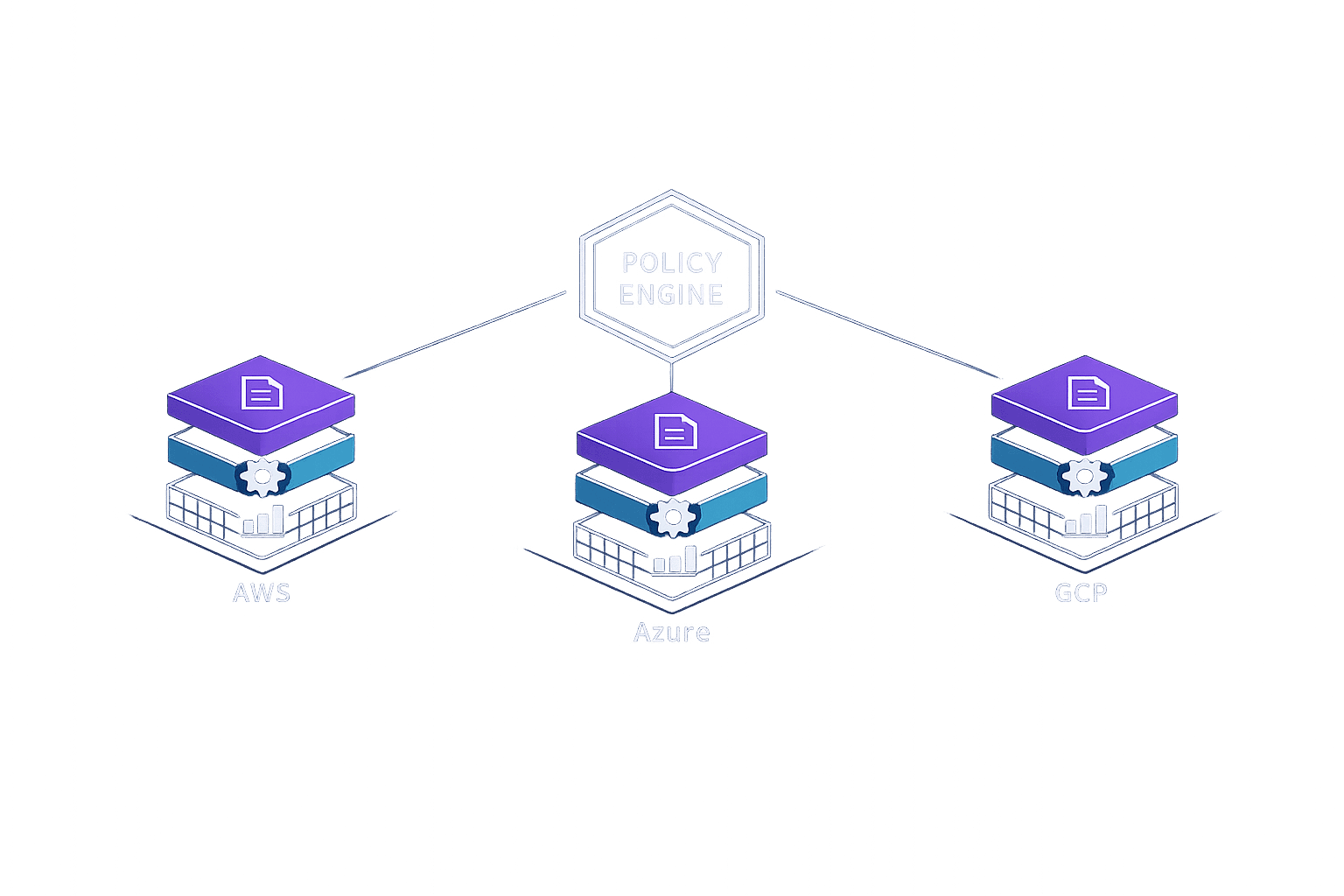
Managing security policies across AWS, Azure, and GCP is complex but critical. Each cloud platform has its own tools, hierarchy, and enforcement mechanisms, making multi-cloud setups challenging. Here's what you need to know:
- AWS: Uses a layered policy model (SCPs, Permission Boundaries, IAM Policies) and tools like Security Hub and GuardDuty. It's highly customisable but requires more setup. Costs can rise unpredictably.
- Azure: Offers Azure Policy with cascading rules and effects (Deny, Audit, Modify, DeployIfNotExists). Defender for Cloud simplifies multi-cloud security and provides a free tier for basic compliance.
- GCP: Relies on Organisation Policies, IAM Deny Policies, and the Security Command Center. Its free Standard tier works well for Kubernetes-heavy teams, but advanced multi-cloud features are in the Enterprise tier.
Key takeaway: Each platform suits different needs - AWS for granular control, Azure for multi-cloud ease, and GCP for Kubernetes and AI projects. For smaller teams, third-party tools like Nuvm Cloud can centralise policy management and reduce complexity.
Quick Comparison
| Feature | AWS (Security Hub+) | Azure (Defender for Cloud) | GCP (Security Command Center) |
|---|---|---|---|
| Free Tier | 30-day trial | Free CSPM tier | Standard tier |
| Multi-Cloud Support | Limited | Strong | Enterprise tier only |
| Best For | AWS-only setups | Multi-cloud environments | Kubernetes-heavy teams |
| Pricing Model | Per-event/check | Per-resource/hour | % of GCP spend |
Tip: Start with free tools to assess your cloud security posture, and prioritise IAM to prevent misconfigurations, which account for 99% of cloud security failures.
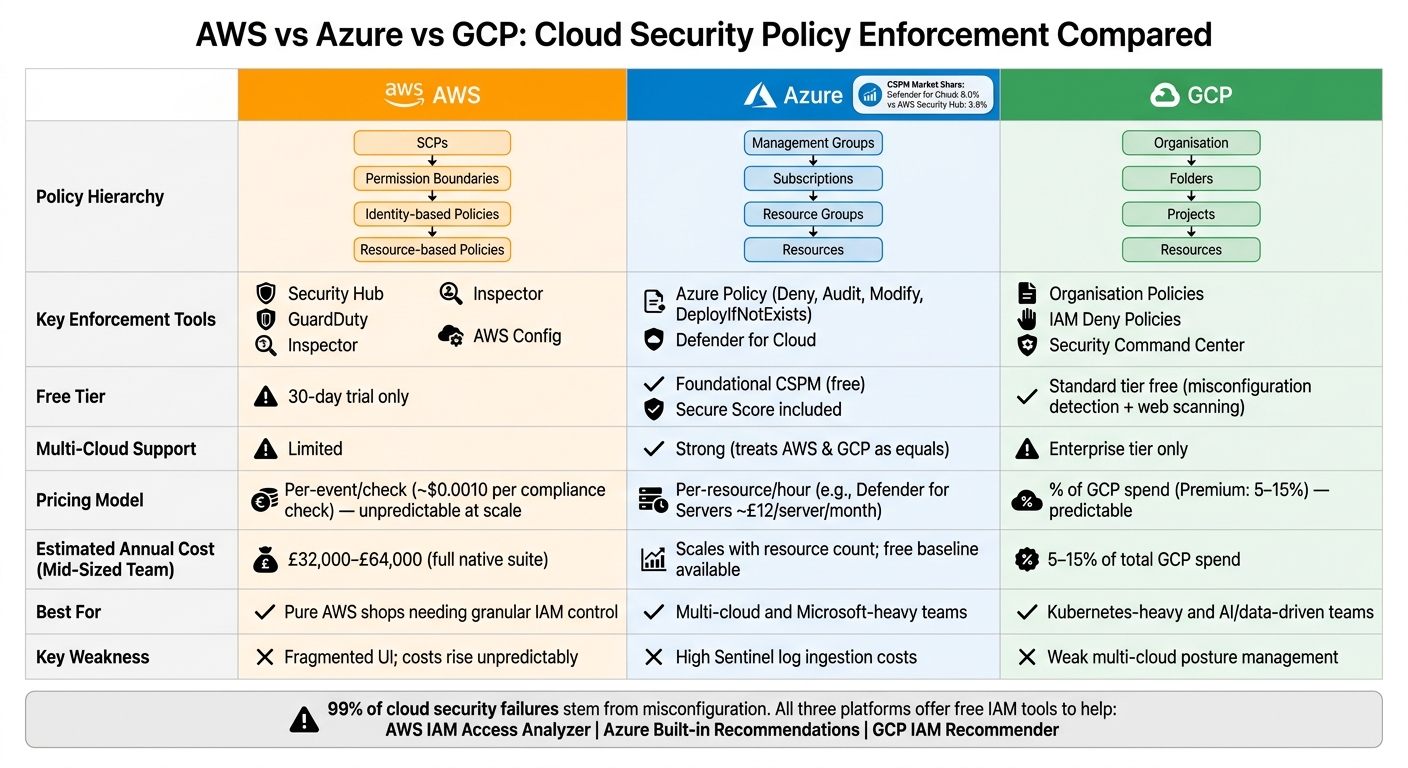
AWS vs Azure vs GCP: Cloud Security Policy Enforcement Compared
1. AWS
Policy Hierarchy
AWS uses a multi-layered approach to enforce policies, ensuring comprehensive security management. At the top of this hierarchy are Service Control Policies (SCPs). These act as overarching guardrails, setting the maximum permissions that any account within an AWS Organisation or Organisational Unit (OU) can have. Importantly, SCPs don’t grant permissions themselves; they simply limit what’s possible across all accounts.
Below SCPs, Permission Boundaries come into play. These define the upper limit of permissions that can be assigned to an individual IAM user or role, regardless of what identity-based policies attempt to grant. Finally, identity-based and resource-based policies manage the finer details of permissions, specifying who can access what resources and under what conditions.
| Policy Layer | Scope | Purpose |
|---|---|---|
| Service Control Policies (SCPs) | Organisation / OU | Defines maximum permission limits across accounts |
| Permission Boundaries | IAM User / Role | Restricts the permissions assignable to identities |
| Identity-based Policies | IAM User / Role / Group | Assigns permissions to specific users or groups |
| Resource-based Policies | Resources (e.g., S3, KMS) | Manages direct access to specific resources |
Policy Mechanisms
AWS employs a strict rule: explicit Deny overrides any Allow, and unless there’s an explicit Allow, access is denied by default. To assist with achieving least-privilege access, IAM Access Analyzer identifies resources shared externally and flags unnecessary permissions. This eliminates the need for tedious manual reviews.
AWS policies are enforced through a suite of integrated services, ensuring security measures are applied consistently across resources.
Enforcement Capabilities
AWS takes a modular approach to security, combining various tools rather than offering one unified solution. Key services include:
- Security Hub: Consolidates findings and benchmarks your security posture against standards like CIS and NIST.
- GuardDuty: Uses machine learning to detect threats by analysing VPC Flow Logs, CloudTrail, and DNS logs.
- Inspector: Continuously scans EC2 instances, Lambda functions, and container images for vulnerabilities.
- AWS Config: Monitors and records configuration changes to detect drift over time.
"The depth of integration with IAM is a meaningful security advantage in ways that third-party tools cannot match." - Cybersecurity Essential
While this approach offers deep integration, it does require more setup compared to unified solutions provided by competitors like Azure or GCP.
Automation and Tools
AWS also provides automation tools to quickly automate compliance issues. For example, AWS Config can trigger Remediation Actions automatically when configuration drift is detected. Security Hub supports Custom Actions, which use EventBridge rules to activate Lambda functions. A practical use case? Automatically closing a public S3 bucket as soon as it’s identified.
For organisations relying on SIEM platforms like Splunk, AWS Security Lake simplifies integration by normalising log data into the Open Cybersecurity Schema Framework (OCSF). This compatibility avoids vendor lock-in and makes cross-tool querying easier.
However, costs can add up. A mid-sized team using the full AWS native suite - including GuardDuty, Inspector, Security Hub, and Macie - should anticipate annual expenses between £32,000 and £64,000, depending on data volume. This is an important consideration when evaluating cloud security strategies.
sbb-itb-5d9b290
2. Azure
Policy Hierarchy
Azure, much like AWS, uses a layered governance model to simplify the enforcement of policies across complex environments. Its hierarchy consists of four levels: Management Groups at the top, followed by Subscriptions, Resource Groups, and finally individual Resources. Policies set at higher levels automatically cascade down, making it easier to implement organisation-wide rules - such as enforcing mandatory tagging or restricting resources to specific regions. This hierarchical structure is designed to handle large-scale environments efficiently.
Policy Mechanisms
Azure's governance relies heavily on Azure Policy, which operates using JSON-based configurations. These include:
- Definitions: Individual rules that outline specific requirements.
- Initiatives: Collections of related definitions grouped together for broader enforcement.
- Assignments: The application of these rules to specific scopes, such as a subscription or resource group.
Unlike AWS, which focuses on restricting API actions, Azure Policy can inspect and enforce specific resource settings. For example, it can ensure that storage accounts are encrypted or that required tags are present. This detailed level of control makes Azure Policy particularly versatile.
Enforcement Capabilities
Azure Policy enforces compliance through four distinct effects:
| Effect | Description |
|---|---|
| Deny | Prevents resource creation or updates if they fail to meet defined criteria. |
| Audit | Flags non-compliant actions in the dashboard without blocking them. |
| Modify | Automatically updates or adds fields (e.g., tags) during resource creation. |
| DeployIfNotExists | Deploys a template for required sub-resources if they are missing (e.g., enabling diagnostic settings). |
Azure also integrates Microsoft Defender for Cloud as its unified CSPM (Cloud Security Posture Management) and CNAPP (Cloud-Native Application Protection Platform) layer. This tool supports multi-cloud environments, treating AWS accounts and GCP projects as equals. As of early 2026, Defender for Cloud commands about 8.0% of the CSPM market - double the 3.9% share held by AWS Security Hub.
"Microsoft Defender for Cloud is the strongest multi-cloud platform among the three, by a meaningful margin." - Cybersecurity Essential
Automation and Tools
Azure goes beyond policy definition by offering tools to automate compliance and remediation. For instance, Logic Apps can be used to respond to policy breaches by notifying resource owners or securing exposed resources like storage accounts.
The Foundational CSPM tier is available at no cost for all onboarded subscriptions and provides a Secure Score, which is benchmarked against the Microsoft Cloud Security Benchmark (MCSB). This benchmark spans Azure, AWS, and GCP, offering a unified view of compliance.
The paid Defender CSPM tier includes advanced features such as:
- Attack path analysis using a Cloud Security Graph.
- Agentless VM scanning for vulnerabilities.
- Pull request annotations for Infrastructure-as-Code files in Bicep and Terraform, helping teams catch misconfigurations before deployment.
For small and medium-sized SaaS teams, third-party tools like Nuvm Cloud can be integrated to consolidate insights across multiple cloud environments.
Azure's pricing is based on resource usage. For example, Defender for Servers costs £12 per server per month. This pricing model is generally more predictable than AWS's per-check system, though costs can still rise significantly in larger deployments.
3. Google Cloud Platform (GCP)
Policy Hierarchy
GCP structures its security model around a four-tier hierarchy: Organisation, Folders, Projects, and Resources. Policies set at the Organisation level automatically cascade down through this hierarchy. This means company-wide rules - like restricting where resources can be located or disabling external IP addresses - apply across all folders, projects, and resources without needing to configure each one separately. This setup simplifies the enforcement of consistent controls across the platform.
Policy Mechanisms
GCP enforces policies using several key tools, including Organisation Policies, IAM Deny Policies, the IAM Recommender, and the Policy Analyzer. Organisation Policies allow administrators to set strict constraints on resource configurations across the hierarchy. IAM Deny Policies take this further by explicitly blocking certain permissions, creating non-negotiable security boundaries. The IAM Recommender leverages machine learning to study usage patterns and suggests ways to reduce permissions safely. Meanwhile, the Policy Analyzer enables administrators to query and review resource access.
Additionally, VPC Service Controls help secure sensitive resources by creating perimeters that limit data exfiltration risks - an essential feature for teams handling regulated data.
Enforcement Capabilities
GCP centralises enforcement through its Security Command Center (SCC). The Standard tier, available for free, includes basic features like misconfiguration detection via Security Health Analytics and web security scanning. The Premium tier introduces advanced tools like threat detection and vulnerability scanning, typically costing between 5% and 15% of total GCP usage. The Enterprise tier goes even further, adding multi-cloud support for AWS and Azure, along with Google SecOps (formerly Chronicle) and Mandiant threat intelligence integration.
"SCC Enterprise is the only CNAPP with embedded SecOps (SIEM + SOAR) and Mandiant threat intelligence." - Arnav Sharma, Microsoft MVP
The Enterprise tier also includes a Risk Engine, which simulates potential attacker paths, highlights exploitable routes, and calculates attack exposure scores. For Kubernetes users, GCP’s GKE stands out:
"GKE has the most opinionated security defaults of the three major managed Kubernetes offerings, including mandatory workload identity for service accounts, built-in binary authorisation for image signing, and native integration with Google's container scanning." - Cybersecurity Essential
Automation and Tools
GCP supports automated remediation by triggering Cloud Functions or Pub/Sub notifications in response to findings. These tools ensure consistent enforcement of policies. For large-scale log analysis, Google Security Operations offers petabyte-scale analytics with rapid search capabilities, providing unified visibility across multiple clouds.
For teams working on AI-heavy projects, Model Armor acts as a specialised firewall for large language models, protecting against prompt injection and data leakage. Another standout offering is GCP’s Cryptomining Protection Programme, which includes a financial guarantee against undetected cryptomining attacks on your infrastructure. Similar to AWS and Azure, GCP’s automation tools help maintain consistent security across multi-cloud environments.
Cloud Governance Explained | AWS, Azure & GCP Policy Structures
Pros and Cons
After diving into the detailed reviews of AWS, Azure, and GCP, let’s break down the key advantages and drawbacks of each platform. These points are based on their specific capabilities and how they cater to different operational needs.
AWS works well for teams ready to dedicate time to configuration. Its granular, pay-as-you-go pricing (around $0.0010 per compliance check) makes it cost-effective for smaller workloads. Plus, it integrates seamlessly with AWS-native services, making it a strong choice for organisations fully committed to AWS. However, the trade-off is complexity - instead of a single product, you’re piecing together services like Security Hub, GuardDuty, Inspector, and Macie. Costs can also rise as workloads scale.
Azure's Defender for Cloud is user-friendly, particularly for smaller teams managing multi-cloud environments. The Foundational CSPM tier is free, with paid plans like Defender for Servers starting at approximately £12 per server per month. It offers excellent visibility across multiple clouds, but scaling log ingestion can become expensive.
GCP's Security Command Center stands out with its free Standard tier and predictable Premium pricing (5–15% of total GCP spend). This is appealing for teams looking to avoid unexpected billing surprises. GKE’s secure defaults are a bonus for smaller teams by reducing manual hardening tasks. However, its multi-cloud posture management is limited to the Enterprise tier.
| Feature | AWS (Security Hub+) | Azure (Defender for Cloud) | GCP (Security Command Center) |
|---|---|---|---|
| Free Tier | 30-day trial | Foundational CSPM | Standard tier |
| Ease of Setup | Moderate (multiple services) | High (unified portal) | High (integrated into Org) |
| Multi-Cloud Support | Limited | Strong multi-cloud connectivity | Enterprise tier only |
| Best For | Pure AWS shops | Multi-cloud; Microsoft-heavy teams | Kubernetes-heavy; data-heavy teams |
| Pricing Model | Per-event/check (unpredictable at scale) | Per-resource/hour | % of cloud spend (predictable) |
| Key Weakness | Fragmented UI; costs rise unpredictably | High Sentinel ingestion costs | Weak multi-cloud posture |
These comparisons highlight how each provider’s strengths align with different team priorities.
For teams without a dedicated security engineer, it’s a good idea to start with the free or trial tiers to establish a baseline. Prioritising IAM (Identity and Access Management) is critical, as excessive permissions have been linked to 31% of cloud-related breaches. Fortunately, all three platforms offer free tools to help with this: AWS IAM Access Analyzer, Azure’s built-in recommendations, and GCP’s IAM Recommender.
To streamline multi-cloud management, smaller teams might explore unified solutions like Nuvm Cloud. This can simplify posture management across platforms. For SaaS teams, leveraging these free or trial tiers can help establish strong foundational security while keeping costs manageable. Tools like Nuvm Cloud can further simplify operations for teams juggling multiple cloud environments.
Conclusion
Each provider shines in its own area of expertise. AWS is a strong choice for teams already immersed in its ecosystem, offering detailed, high-quality logging capabilities and seamless integration with other AWS services. Azure Defender for Cloud is ideal for multi-cloud setups, treating AWS and GCP as equal players in its ecosystem. Meanwhile, GCP's Security Command Center caters well to Kubernetes-focused and data-driven SaaS teams, particularly those using GKE.
Regardless of the provider, one fact remains: the responsibility for configuration, access control, and data security lies with you. Many risks can be avoided with the right tools and best practices, especially by addressing preventable configuration errors.
Beyond technical considerations, regional compliance adds another layer of complexity, as explored in our cloud security insights. For UK-based SaaS teams operating across multiple clouds, native tools can sometimes leave gaps in visibility. This is where unified platforms become particularly valuable. Both Azure and GCP offer mappings to regional frameworks like the UK NCSC Cyber Essentials, aligning with the multi-cloud challenges already mentioned.
For teams without a dedicated security engineer, solutions like Nuvm Cloud are tailored to simplify this process. It provides small and mid-sized SaaS teams with centralised policy enforcement across AWS, GCP, and Azure, along with automatic compliance evidence mapping for frameworks such as SOC 2 and ISO 27001 - all from a single dashboard.
FAQs
Which policy layer should I implement first?
Misconfigured Identity and Access Management (IAM) policies are a major cloud security risk. Why? Because granting overly permissive access can leave your entire environment exposed. Each cloud provider has its own policy languages and inheritance models, making it crucial to secure access controls properly.
Start by establishing a least-privilege baseline - this ensures users and systems only have the permissions they absolutely need. Once that's in place, you can focus on other critical areas like data encryption, network configuration, and continuous monitoring using Cloud Security Posture Management (CSPM) tools. These steps work together to build a more secure cloud environment.
How can I avoid surprise security tooling costs at scale?
To keep security costs manageable as your business grows, avoid tools that charge based on usage - like per event, scan, or finding. These pricing models can make it tough to predict expenses as your data scales up. Instead, look for unified platforms with straightforward, transparent pricing. For small to mid-sized SaaS teams, Nuvm Cloud is a great option. It combines nine scanners in a single dashboard, offering consistent costs without the hassle of complex enterprise procurement or fluctuating fees.
What’s the simplest way to enforce one baseline across all three clouds?
The easiest approach is to rely on a unified Cloud Security Posture Management (CSPM) platform. While built-in tools like Microsoft Defender for Cloud include multi-cloud capabilities, third-party platforms often deliver more uniform coverage across AWS, GCP, and Azure.
For small to medium-sized SaaS teams, Nuvm Cloud stands out by offering integrated scanning for all three providers. It automates compliance mapping and streamlines remediation, making it easier to enforce policies consistently without the hassle of complicated configurations.