OWASP Top 10 Risks: Fixes For Small Teams
OWASP Top 10 Risks: Fixes For Small Teams
Small teams often struggle with security risks due to limited resources. The OWASP Top 10 highlights the most critical security vulnerabilities in web applications, from broken access control to cryptographic failures. For small SaaS teams, addressing these risks is crucial to avoid breaches, comply with regulations like GDPR, and maintain customer trust.
Key Takeaways:
- Top Risks to Focus On: Broken access control, security misconfiguration, cryptographic failures, injection, and software supply chain issues.
- Fixes That Work: Embed security into your workflows using tools like Trivy, Semgrep, and Checkov. Automate checks in pull requests, CI/CD pipelines, and cloud monitoring.
- Tools for Small Teams: Free or low-cost solutions like TruffleHog, Checkov, and Nuvm Cloud simplify risk management without requiring a dedicated security team.
- Prioritise: Start with public-facing vulnerabilities and "toxic combinations" (e.g., overly permissive IAM roles paired with exposed resources).
By integrating lightweight, automated checks into your development process, you can address OWASP risks without overwhelming your team. Security doesn’t need to be daunting - small steps can make a big difference.
OWASP Top 10 2025: Your complete guide to securing your applications
OWASP Top 10 Overview for SaaS Teams
The OWASP Top 10 highlights real-world risks for SaaS teams managing containerised services, REST APIs, and serverless functions.
How OWASP Risks Map to SaaS Architectures
Modern SaaS architectures introduce vulnerabilities that align closely with the OWASP Top 10. For instance, Broken Access Control often shows up as overly permissive IAM roles or wildcard permissions tied to production service accounts. Meanwhile, Security Misconfiguration - which is predicted to account for 99% of cloud breaches by 2025 - can result from leaving default cloud settings unchanged or failing to encrypt storage volumes. Similarly, Cryptographic Failures frequently occur in cloud storage, such as unencrypted S3 buckets or RDS instances without encryption at rest.
Here’s how these risks typically appear across a SaaS stack:
| SaaS Component | Primary OWASP Risk | Common Example |
|---|---|---|
| APIs | Broken Access Control | Unauthorised data access through insecure endpoints |
| Containers | Vulnerable Components | Known CVEs in base images (e.g., libssl) |
| Serverless functions | Security Misconfiguration | Over-privileged execution roles with IAM wildcards |
| Cloud storage | Cryptographic Failures | Sensitive data in unencrypted S3 or GCS buckets |
Injection risks have also evolved. While traditional SQL injection still exists, serverless functions now introduce new challenges, especially when insecure code patterns - often generated by AI tools - are deployed. Additionally, Software Supply Chain Failures arise during the build process, often through compromised npm packages or malicious code injections.
Given these connections, focusing on the most critical overlaps is essential for effective risk management.
How to Prioritise Risks as a Small Team
Knowing where vulnerabilities emerge helps smaller teams decide what to tackle first. When resources are limited, prioritise "toxic combinations" - instances where a resource is publicly accessible, contains a known vulnerability, and is tied to an over-privileged IAM role. These scenarios are where breaches are most likely to occur.
"Most cloud breaches aren't vulnerability exploits. They're misconfigurations." - Phillip (Tre) Bucchi, Founder, Valtik Studios
Start with Broken Access Control and Security Misconfiguration, as these are both high-impact and relatively easy to address. Automated CSPM tools can quickly identify obvious issues, such as publicly accessible S3 buckets, open ports, and wildcard IAM permissions, often within the first 24 hours of a scan. After that, focus on exposure: vulnerabilities hidden in a container that isn’t internet-facing are less urgent than those affecting public API endpoints.
Practical Fixes for the OWASP Top 10
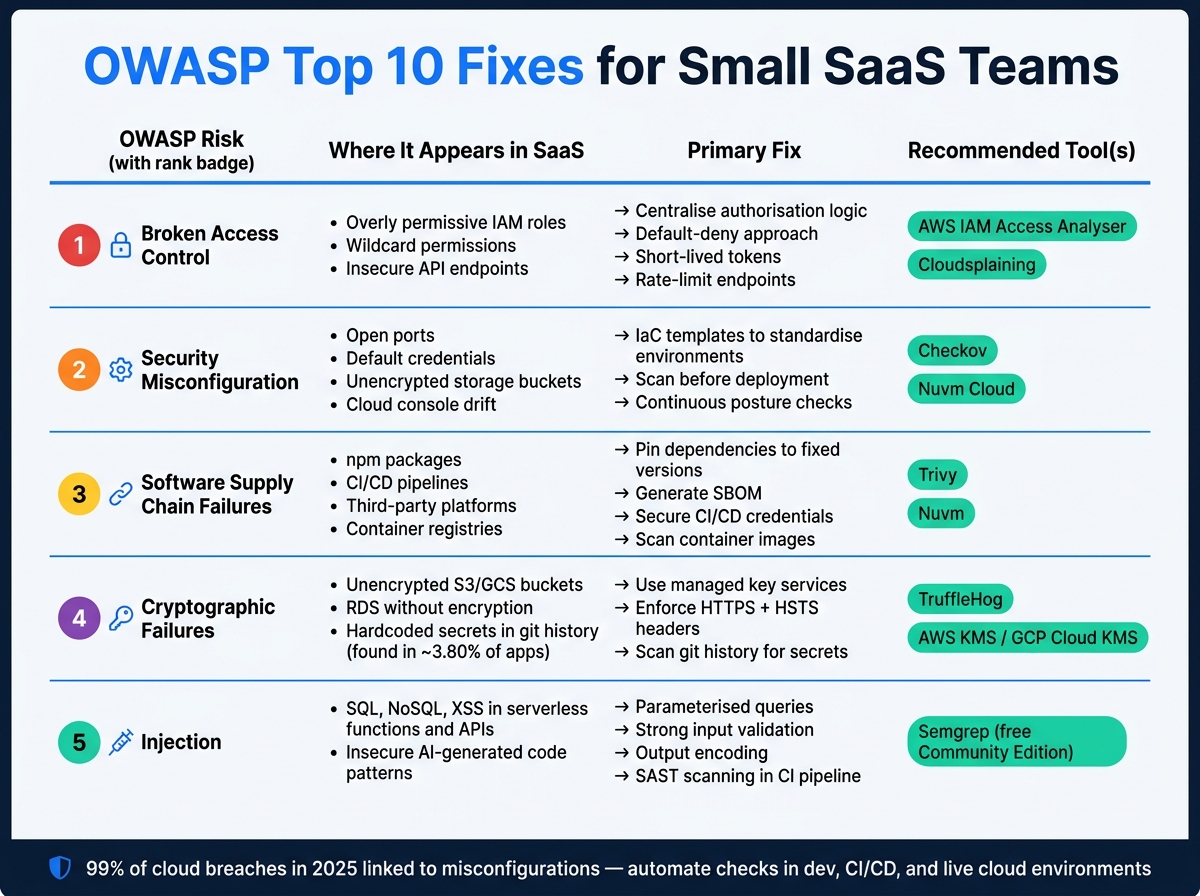
OWASP Top 10 Fixes for Small SaaS Teams: Risks, Tools & Actions
Building on our OWASP overview, here are practical fixes designed specifically for small teams. Once you've identified the most critical risks for your SaaS setup, these solutions can help you address them efficiently. These fixes are designed to fit seamlessly into your existing workflows.
Broken Access Control
Broken Access Control ranks as the top risk in the 2025 OWASP list. To tackle this, centralise your authorisation logic. This means avoiding scattered permission checks and implementing a default-deny approach. Use short-lived tokens, invalidate sessions immediately upon logout, and ensure API permission checks occur with every request. Adding endpoint rate-limiting can further reduce risk.
Once access control is sorted, the next step is to secure your environment's configuration.
Security Misconfiguration
Security Misconfiguration is a frequent issue in cloud setups, often caused by open ports, default credentials, or overly permissive storage settings.
To address this, use Infrastructure as Code (IaC) templates to standardise your development, staging, and production environments. This reduces configuration drift, which can hide vulnerabilities. Tools like Checkov can scan Terraform and CloudFormation templates before deployment to flag insecure settings. For live environments, Nuvm Cloud offers posture checks across AWS, GCP, and Azure. It identifies problems like publicly exposed storage buckets or missing encryption, providing clear explanations and actionable remediation commands - no dedicated security expert required.
With your configurations secured, it's time to focus on your software supply chain.
Software Supply Chain Failures
Software Supply Chain Failures impact every stage of the build lifecycle, from npm packages to CI/CD pipelines and third-party platforms. To reduce these risks, pin dependencies to fixed versions, create a Software Bill of Materials (SBOM), and secure your CI/CD credentials. Tools like Trivy can scan container images for known vulnerabilities. Nuvm also integrates dependency and container scanning into a unified dashboard, streamlining the process and combining it with cloud posture results.
With the supply chain addressed, shift your focus to data protection.
Cryptographic Failures
Cryptographic Failures are found in about 3.80% of applications, often due to weak algorithms, poor key management, or hardcoded secrets. To mitigate these issues, use managed key services like AWS KMS or GCP Cloud KMS. Enforce HTTPS across your application and apply HSTS headers to prevent protocol downgrade attacks. Tools like TruffleHog can scan your git history for embedded secrets and flag real credentials.
Once encryption and secrets are secure, the final area to address is injection.
Injection
Injection attacks, including SQL, NoSQL, and cross-site scripting (XSS), remain a major concern. To protect against these, use parameterised queries to prevent attackers from altering query structures. Pair this with strong input validation and output encoding. Semgrep's free Community Edition can scan your code during CI, flagging patterns that are vulnerable to injection before they make it to production.
By implementing these fixes, you can build strong security into your cloud workflows without putting an extra burden on your small team.
| OWASP Risk | Primary Fix | Recommended Tool |
|---|---|---|
| Broken Access Control | Centralised authorisation, deny by default | AWS IAM Access Analyser, Cloudsplaining |
| Security Misconfiguration | IaC hardening, posture audits | Checkov, Nuvm Cloud |
| Supply Chain Failures | SBOM generation, dependency pinning | Trivy, Nuvm |
| Cryptographic Failures | Managed keys, secret scanning | TruffleHog, Nuvm |
| Injection | Parameterised queries, SAST in CI | Semgrep |
sbb-itb-5d9b290
Embedding Security into Small Team Workflows
Fixing individual vulnerabilities is just one part of the equation. The harder part? Ensuring those fixes stay in place and preventing new risks as your codebase and infrastructure evolve. For small teams, automation is the only practical way to keep up.
Security During Development
Integrating security checks directly into the development process - often called shift-left security - helps catch vulnerabilities early. Tools like Semgrep can be added to your IDE, or you can set up pre-commit hooks to run quick, local scans. These scans can flag issues like injection patterns, hardcoded secrets, or other common coding mistakes before they even make it to your CI pipeline. The idea isn’t to slow developers down but to spot problems when they’re easiest to fix.
Once these local checks are in place, expand their coverage by integrating them into your CI/CD pipeline.
Running Security Checks in CI/CD
Automated scans on every pull request can help block high-risk code changes before they’re merged. For example, a small SaaS team could implement a setup like this:
- Trivy for scanning container images for known vulnerabilities.
- Checkov to review Terraform or CloudFormation templates for misconfigurations.
- A SAST tool like Semgrep to spot insecure code patterns.
To maintain momentum, configure the pipeline to block builds only for Critical or High severity findings. This ensures that serious risks are addressed without slowing down the development process.
For teams without a dedicated security engineer, platforms like Nuvm Cloud can simplify things. It combines container, dependency, IaC, and code scanning into one dashboard, offering plain-English explanations and actionable remediation steps.
While CI/CD pipelines secure your code and templates, continuous monitoring protects against risks that arise post-deployment.
Continuous Cloud Monitoring
CI/CD scans are great for catching issues in code and templates, but they won’t help with configuration drift - those manual changes in the AWS console that bypass your pipeline entirely. Alarmingly, in 2025, 99% of cloud breaches were linked to misconfigurations. This makes continuous monitoring of your live environment essential.
Cloud Security Posture Management (CSPM) tools can monitor your cloud accounts to ensure they align with secure baselines. Solutions like Nuvm Cloud extend CI/CD security into your live environment, flagging issues like publicly exposed storage buckets or missing encryption as soon as they happen - not just at deployment. This constant visibility eliminates the need for manual audits, reduces overhead, and helps small teams stay compliant with frameworks like SOC 2 and ISO 27001.
OWASP Top 10 Remediation Checklist for Small Teams
This checklist is designed to keep your team on top of security fixes, ensuring vulnerabilities are addressed promptly and residual risks are managed effectively. By embedding security into daily development, you can ensure nothing critical slips through the cracks.
Key Actions per OWASP Risk
For each OWASP risk, focus on a couple of impactful actions. Here's a breakdown of the essential steps:
| OWASP Risk | Priority Actions |
|---|---|
| Broken Access Control | Identify public S3/GCS buckets and wildcard IAM permissions in production roles. |
| Security Misconfiguration | Enable encryption by default on RDS instances and storage buckets; review open security groups. |
| Software Supply Chain Failures | Create a Software Bill of Materials (SBOM) and scan container images in your registry with Trivy. |
| Cryptographic Failures | Enforce HTTPS on all endpoints; enable server-side encryption for all data stores. |
| Injection | Use Semgrep to detect injection patterns in your codebase; mandate parameterised queries in code reviews. |
| Secrets Exposure | Scan repositories and CI/CD configurations with TruffleHog to uncover exposed API keys and tokens. |
| Vulnerable Dependencies | Run tools like Grype or Trivy on dependency manifests; block builds with Critical CVEs. |
| IaC Misconfigurations | Scan Terraform and CloudFormation templates with Checkov before deploying. |
Keep in mind that risks often emerge from the combination of vulnerabilities rather than their individual severity. Watch out for these "toxic combinations" where moderate issues compound into critical risks.
By having these clear actions in place, you can further enhance your remediation process with the right tools.
Using Tools to Speed Up Remediation
A centralised platform can simplify the process by bringing all checks into one place and automatically correlating findings.
For instance, Nuvm Cloud integrates nine scanners, covering areas like cloud posture (AWS, GCP, Azure), containers, source code, secrets, dependencies, IaC, Kubernetes, and web applications - all within a single dashboard. Each finding is paired with a plain-English explanation and actionable remediation commands. This approach aligns well with shift-left security practices. Additionally, compliance evidence for frameworks like SOC 2, PCI DSS, ISO 27001, and NIS2 is automatically mapped from scan results, transforming audit prep into a manageable, ongoing task. The Platform plan (€299/month) includes features like SAST, verified secret detection, and unlimited web vulnerability scans, making it a comprehensive solution. For teams with limited budgets, tools like AWS Security Hub or Azure Defender for Cloud’s free Foundational CSPM tier are practical alternatives to get started.
"The tool matters less than what you do with it. Deploying Wiz without a remediation process generates expensive reports. Running Prowler with disciplined remediation produces real security improvements." - Phillip (Tre) Bucchi, Founder, Valtik Studios
Tracking and Reviewing Progress
After speeding up remediation with unified tools, it's crucial to regularly review your progress. Vulnerabilities evolve as deployments and updates are made, so continuous tracking is essential. At a minimum, aim for quarterly reviews. Use a Secure Score to measure progress - a higher score reflects reduced risk. Automating ticket creation in Jira for high-severity findings ensures that no issue is overlooked.
The goal isn’t to achieve perfection but to demonstrate steady improvement over time. This trend not only strengthens your security posture but also provides tangible progress to share with stakeholders or auditors when required.
Conclusion
Key Takeaways for Small Teams
Security doesn’t have to involve a massive budget or a dedicated department. By focusing on the most pressing risks, automating repetitive tasks, and weaving security measures into your existing workflows, small teams can achieve meaningful protection.
Cloud misconfigurations are the top cause of breaches, making them the most urgent issue to tackle. This is where Cloud Security Posture Management (CSPM) becomes invaluable.
"If you only buy one tool, buy a CSPM (or the CSPM module of a CNAPP). It tackles 60–70% of cloud-security issues." - Shawn Nunley, Founder, Cloud Security Office Hours
Next Steps for SaaS Teams
To secure your SaaS environment, start by addressing Broken Access Control. This means auditing S3 buckets, reviewing wildcard IAM roles, and immediately closing any gaps. These steps target one of the most damaging vulnerabilities.
Next, integrate Infrastructure as Code (IaC) scanning into your CI/CD pipeline, add dependency checks to your build process, and ensure continuous monitoring of your cloud posture. For a streamlined approach, tools like Nuvm Cloud offer nine integrated scanners in one dashboard, along with plain-language remediation guidance and automatic compliance mapping for standards like SOC 2, ISO 27001, PCI DSS, and NIS2. If a paid tool isn’t an option, start with provider-native tools like AWS Security Hub or open-source options such as Prowler and Trivy to establish a baseline.
The goal is steady improvement - fewer critical vulnerabilities each quarter and a security posture that not only protects your business but also reassures customers and auditors.
FAQs
What should we fix first with limited time?
When tackling security issues, it’s essential to focus on the most pressing misconfigurations and vulnerabilities that could lead to significant risks. Issues such as publicly exposed data, insecure permissions, and potential data leaks should be at the top of your list.
To streamline this process, consider leveraging prioritisation frameworks provided by Cloud Security Posture Management (CSPM) tools. These frameworks can help pinpoint the most critical attack paths, allowing you to address vulnerabilities in a more organised and efficient manner. By concentrating on these high-risk areas, you can significantly reduce the likelihood of security breaches.
Which security checks should block a pull request?
Security checks that should stop a pull request in its tracks include vulnerabilities, misconfigurations, exposed secrets, and insecure dependencies. These issues are particularly concerning when they pose a high risk or fail to meet compliance standards. It's crucial to prioritise tackling problems that could severely compromise security or breach regulatory requirements.
How do we stop cloud drift after deployment?
To keep cloud environments in check after deployment, continuous monitoring and automated remediation are essential. Tools like Microsoft Defender for Cloud and Orca Security help by offering visibility into configurations, spotting drift, and providing guidance for fixing issues. For smaller SaaS teams, Nuvm Cloud is a handy option. It proactively monitors your setup, flags idle or risky resources, and ensures your cloud stays aligned with its intended state - minimising security risks caused by drift.