IaC Secrets Scanning: Manual vs. Automated
IaC Secrets Scanning: Manual vs. Automated
Hardcoded secrets in Infrastructure as Code (IaC) files, like AWS keys or database passwords, pose serious security risks.
To address this, you can either manually review your code or detect secrets in code before deployment or use automated tools. Manual scanning offers better context and tailored fixes but struggles with large-scale projects. Automated tools are faster, integrate with CI/CD pipelines, and reduce audit effort but may generate false positives and require fine-tuning.
Key Takeaways:
- Manual Scanning: Best for small-scale projects or nuanced risks. Time-consuming and inconsistent for audits.
- Automated Scanning: Ideal for large teams or frequent changes. Fast, scalable, and audit-friendly but may overwhelm with alerts.
- Hybrid Approach: Combine both for efficiency - automate routine scans, and manually review high-risk areas.
For small SaaS teams in the UK, open-source tools like Checkov or TruffleHog are a great start. For compliance needs, platforms like Nuvm Cloud simplify management with unified dashboards and affordable pricing.
Manual IaC Secrets Scanning
How Manual Scanning Works
Manual scanning involves carefully reviewing Infrastructure as Code (IaC) files - like Terraform, CloudFormation, or ARM templates - for sensitive information. This process generally relies on three main methods:
- Peer reviews: Team members check pull requests before they’re merged.
- Search-based discovery: Using tools like
grepor IDE search functions with regular expressions to spot patterns such as"password:","access_key:", or"client_secret:". - Checklists: Following predefined guidelines to ensure high-risk parameters are reviewed during critical points in the development cycle.
Experienced reviewers also go beyond pattern recognition. They assess the context of potential vulnerabilities, such as identifying suspiciously random strings or deciding when a static key should be replaced with an IAM role - insights that simple regex searches can’t provide.
Strengths of Manual Scanning
One major benefit of manual scanning is contextual understanding. A skilled reviewer can instantly tell the difference between an actual AWS access key and a placeholder like YOUR_API_KEY_HERE, which might trigger a false positive in automated tools. This reduces unnecessary alerts and saves time.
Another advantage is the ability to suggest practical improvements. For instance, instead of just flagging a hardcoded database password, a reviewer might recommend moving it to a secure storage solution like AWS Secrets Manager or Azure Key Vault. While while automated tools compare to manual efforts by highlighting issues, experienced engineers address the root causes.
Limitations of Manual Scanning
Despite its strengths, manual scanning has clear drawbacks, especially when scaling up. Human reviewers can only handle so much, and fatigue increases the likelihood of missing secrets - particularly in large pull requests or repositories filled with numerous configuration files.
Compliance is another challenge. For frameworks like SOC 2 or PCI DSS, collecting evidence manually can take 200–400 hours per audit cycle. For small engineering teams, this is a significant drain on resources. Moreover, manual reviews often lack structured outputs, leaving no reliable audit trail - just a vague record that someone reviewed the code.
As the ECOSIRE Research and Development Team aptly stated:
"Manual security management becomes impossible".
This is especially true in environments with multiple cloud accounts, dozens of microservices, and hundreds of IAM policies.
Next, we’ll dive into automated scanning to see how it compares in terms of processes and advantages.
sbb-itb-5d9b290
Automated IaC Secrets Scanning
How Automated Scanning Works
Automated tools analyse IaC files using three main techniques. First, regex-based pattern matching identifies credentials like AWS access keys, GCP credentials, Azure client secrets, and database connection strings. Second, entropy analysis spots high-randomness strings that could indicate sensitive data. Finally, heuristics help flag data types that are likely to be sensitive.
Modern platforms go beyond simple detection by mapping resources, identities, and secrets into a security graph. This links the secrets found in IaC files to the live infrastructure they provision, offering teams a clearer picture of the risks. Instead of just a list of flagged strings, this approach provides meaningful context by connecting code to the actual cloud environment. These techniques form the backbone of the operational benefits discussed below.
Advantages of Automated Scanning
Automated tools bring speed and scale that manual processes simply cannot match. For example, platforms like Wiz and Orca can deliver a complete cloud risk profile in under 24 hours. This efficiency is far beyond what manual reviews can achieve. Additionally, these tools integrate directly into developer workflows - through IDE plugins, pre-commit hooks, and CI/CD pipelines - helping catch secrets before they ever make it to production.
Another major benefit is compliance. Collecting evidence manually for audits often takes 200–400 hours per cycle, but automation can slash that effort to just 20–40 hours. This not only saves time but also ensures a more consistent and reliable process.
Challenges of Automated Scanning
One of the biggest hurdles is managing the sheer volume of findings. For mid-sized organisations, initial scans can uncover anywhere from 500 to 5,000 issues. Without proper prioritisation, this can lead to alert fatigue, where critical risks may be overlooked.
False positives are another issue, particularly with entropy analysis. Random-looking strings that are actually harmless can be flagged unnecessarily. To address this, teams often need to fine-tune suppression rules and create custom policies.
Finally, there is the challenge of remediation. Tools that only surface issues without providing clear solutions can become underutilised. The most effective tools pair detection with actionable steps, such as guided remediation or even one-click fixes. Routing findings directly into systems like Jira ensures that issues are addressed promptly, rather than lingering in a security backlog.
What Is IaC Security Scanning? Terraform, Kubernetes & Cloud Misconfigurations Explained
Manual vs. Automated: A Direct Comparison
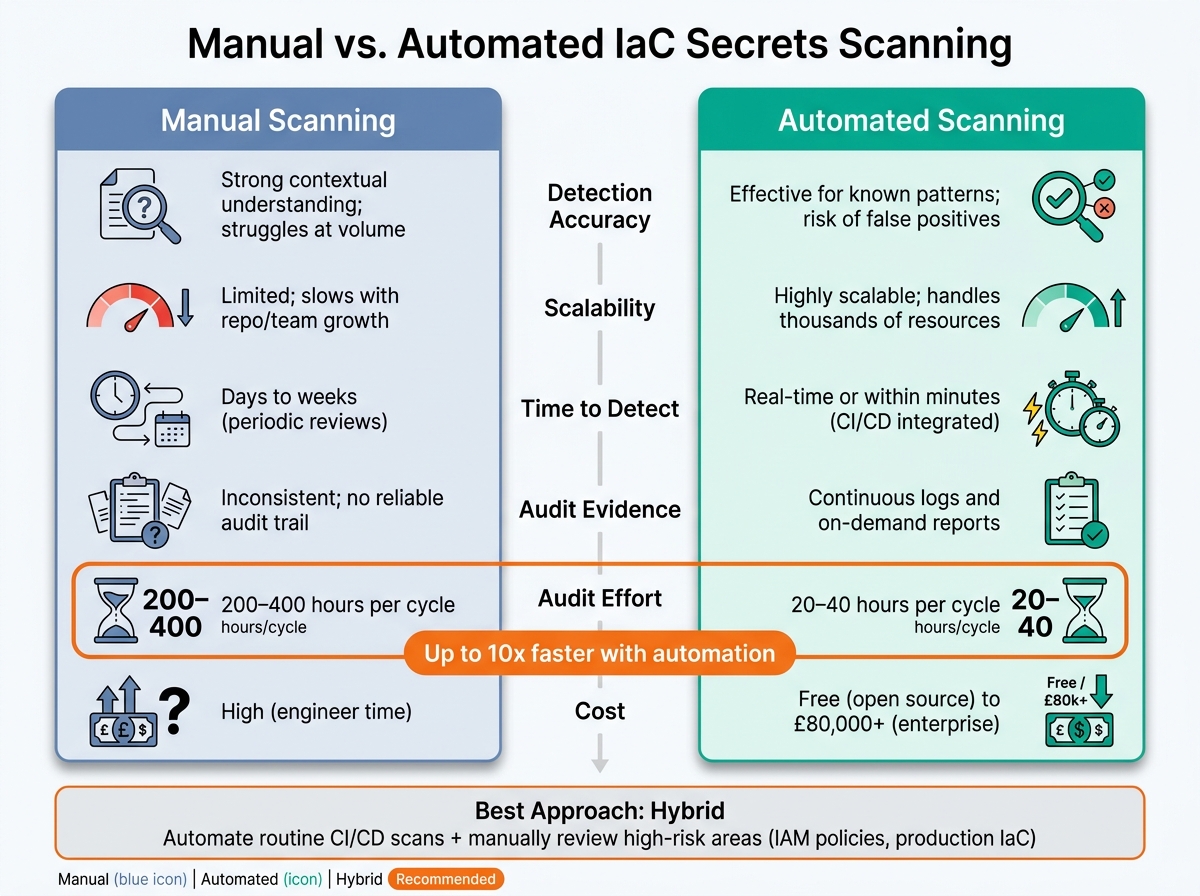
Manual vs. Automated IaC Secrets Scanning: Key Differences at a Glance
Comparison Across Key Dimensions
When comparing manual and automated scanning, the differences become evident across several core aspects that are particularly important for small SaaS teams.
| Dimension | Manual Scanning | Automated Scanning |
|---|---|---|
| Detection Accuracy | Strong for context-heavy risks; struggles with volume | Effective for known patterns; may produce false positives |
| Scalability | Limited; struggles as resources increase | Highly scalable; handles thousands of resources seamlessly |
| Time to Detect | Days to weeks (periodic reviews) | Real-time or within minutes (via CI/CD integration) |
| Audit Evidence | Inconsistent tracking | Continuous logs and reports, accessible on demand |
| Audit Effort | 200–400 hours per cycle | 20–40 hours per cycle |
| Cost | High (engineer time) | Ranges from free (open source) to £80,000+ (enterprise) |
One standout difference is the audit effort. Cutting preparation time from as much as 400 hours to 40 hours gives engineers the freedom to focus on product development rather than administrative tasks. These comparisons help clarify when each approach is most effective, which becomes even more apparent in specific scenarios.
Use Cases and Scenarios
Pull request checks are a clear strength of automation. Tools integrated into pull request workflows can block hardcoded API keys before they reach the main branch. This speed is unmatched by manual reviews. The same applies to incident response, where automated scanning accelerates detection. However, manual analysis plays a crucial role in assessing the severity of risks. For example, an experienced engineer can evaluate whether an exposed secret is accessible from the internet and linked to a privileged role - a combination that could escalate the issue from minor to critical.
Periodic compliance scans highlight the strengths of manual methods. Legacy credentials or non-standard integrations often require human insight, especially when dealing with flagged secrets tied to third-party systems with complex trust relationships. Automated tools may miss these nuances, making human involvement indispensable in such cases.
Given these differing strengths, a hybrid approach often proves to be the most effective.
Hybrid Approaches for Small Teams
For small SaaS teams in the UK, combining manual and automated methods often delivers the best results. Automated scanning ensures comprehensive, ongoing monitoring across repositories, pull requests, and CI/CD pipelines. Meanwhile, manual reviews are best suited for high-risk areas, such as IAM trust policies, VPC configurations, or infrastructure-as-code (IaC) provisioning production databases.
"Cloud security posture management is not a project with an end date - it is a continuous practice that evolves with your cloud environment." – ECOSIRE Research and Development Team
A good starting point is open-source tools. Options like Checkov and TruffleHog are free, integrate easily with CI/CD platforms, and require minimal setup. Once your team has established a foundational process, you can consider adding commercial platforms if the volume of findings warrants it. This approach keeps compliance manageable and consistent, avoiding last-minute scrambles.
Tools and Where Nuvm Cloud Fits
Overview of Available Tools
The Infrastructure as Code (IaC) secrets scanning space can be divided into three main categories: open-source tools, CI-native integrations, and commercial platforms.
Open-source tools are an excellent starting point for smaller teams. Take Checkov by Bridgecrew, for instance. It's widely used for scanning Terraform, CloudFormation, Kubernetes, Helm, and ARM templates, with over 30 million downloads from PyPI each month. Then there's TruffleHog, which specialises in finding secrets by scanning git histories and file systems for high-entropy strings and known credential patterns. Similarly, GitLeaks offers secrets detection but with a more lightweight setup. These tools are free, integrate seamlessly into CI/CD pipelines, and benefit from active community support.
CI-native integrations - like GitHub Actions or Azure DevOps pipeline tasks - allow you to run these scanners directly within your existing workflows. This approach is ideal for teams aiming to "shift left" without adding the burden of extra infrastructure or tools.
Commercial platforms cater to different needs. For example, Wiz, which Google acquired for $32 billion in March 2026, uses a Security Graph to connect secrets with identities and attack paths. Impressively, 40–50% of Fortune 100 companies are customers. Another example is Orca Security, which employs an agentless SideScanning method and earned FedRAMP Moderate Authorisation in February 2025. While these platforms offer comprehensive features, they're often tailored for large enterprises, making them less suitable for smaller teams or startups. On the other hand, providers like Aikido and Intruder focus on small and medium-sized businesses (SMBs), offering simpler, managed solutions.
Here’s a quick comparison of these tools:
| Tool | Type | IaC Support | Best For |
|---|---|---|---|
| Checkov | Open-source | Terraform, CloudFormation, Kubernetes, Helm, ARM | Developers seeking free, customisable scanning |
| TruffleHog | Open-source | Git history, file systems | Detecting secrets across repositories |
| Wiz | Enterprise commercial | Terraform, CloudFormation, ARM | Large-scale, graph-based attack path analysis |
| Orca Security | Enterprise commercial | AWS, Azure, GCP native | Agentless visibility and federal workload support |
| Aikido / Intruder | SMB commercial | Varies by platform | Small teams needing managed solutions |
| Nuvm Cloud | SMB commercial | Terraform (IaC scanner) | Small SaaS teams requiring unified compliance-ready scanning |
Where Nuvm Cloud Fits
Nuvm Cloud addresses a clear gap in this landscape, particularly for small SaaS teams in the UK. For teams without a dedicated security engineer, the leap from open-source tools to enterprise platforms can feel daunting. Open-source tools like Checkov and TruffleHog are undoubtedly powerful, but they often demand manual configuration, extra effort to interpret results, and additional work to align findings with compliance standards. On the other hand, enterprise solutions solve these challenges - but at a cost and complexity level that's often unworkable for small teams.
This is where Nuvm Cloud steps in. It combines nine integrated scanners, covering everything from IaC and secrets to cloud posture, containers, and dependencies, all within a single dashboard. Instead of juggling multiple tools and manually piecing together outputs, Nuvm Cloud consolidates findings in one place, offering clear guidance and automated remediation. Its verified secret detection feature also cuts down on false positives, allowing teams to focus on what matters.
Another standout feature is Nuvm Cloud's ability to map scan results directly to compliance frameworks like SOC 2, ISO 27001, and PCI DSS. This saves UK SaaS teams significant effort when preparing for audits. With a Platform plan priced at around £299 per month, which includes secret detection, IaC scanning, SAST, and web vulnerability scanning for unlimited users, it offers an affordable alternative to enterprise tools that often cost upwards of £50,000 per year.
Moreover, Nuvm Cloud's API-based setup takes just minutes, a huge advantage for teams without dedicated security resources. For small SaaS teams, this makes it an efficient and cost-effective solution tailored to their specific needs.
Conclusion and Decision Framework
Key Takeaways
Manual scanning provides detailed insights but struggles with scalability, while automated scanning delivers fast and consistent results when properly configured. Neither is inherently better - the best choice hinges on your team's specific needs and available resources.
For context, manual compliance evidence collection typically takes around 200–400 hours per audit cycle. In contrast, automation can cut this down to just 20–40 hours. Additionally, Gartner forecasts that 99% of cloud security failures through 2027 will result from avoidable configuration errors. These figures highlight how crucial it is to adopt the right tools early in the process.
How to Choose the Right Approach
Your choice should align with your team's size and the complexity of your codebase. Here's a quick guide:
| Situation | Recommended Approach |
|---|---|
| Solo developer or very small static project | Manual review works well |
| Small SaaS team with a growing codebase | Open-source automation tools (e.g., Checkov, TruffleHog) integrated into CI/CD pipelines |
| Small team with compliance needs (SOC 2, ISO 27001) | Use a unified commercial platform (e.g., Nuvm Cloud) |
| Large multi-cloud enterprise | Opt for an enterprise CNAPP solution (e.g., Wiz, Orca) |
To build a strong security strategy, consider a hybrid approach. For many small SaaS teams, this means automating routine scans within CI/CD workflows to detect misconfigurations early, while reserving manual reviews for areas with higher risks. Ensure you maintain visibility across all repositories to support effective remediation and ongoing compliance efforts.
FAQs
What should I do first if a secret is found in my IaC repository?
If a secret is discovered in your IaC repository, the first step is to identify and evaluate the exposure to understand its scope and potential impact. Next, take immediate action to rotate or revoke the secret to block any unauthorised use. Finally, ensure you remove the secret from the repository entirely and set up preventative measures, such as automated secrets scanning within your CI/CD pipeline, to avoid similar incidents in the future.
How can I reduce false positives in automated secrets scans?
To reduce false positives in automated secrets scans, consider adjusting severity thresholds so that only high-priority findings generate alerts. Create exceptions for approved secrets to prevent repeated notifications. Customise detection rules to fit your specific environment by implementing tailored policies, and whitelist harmless patterns when necessary. Make it a habit to regularly review and fine-tune these settings to keep scans precise, relevant, and centred on actual concerns.
What’s the simplest hybrid setup for a small SaaS team?
For small SaaS teams, blending automated Infrastructure as Code (IaC) scanning with manual reviews strikes a balance between ease and thoroughness. Automated tools can quickly analyse configurations like Terraform, CloudFormation, or Kubernetes manifests within CI/CD pipelines, flagging potential issues early in the process. Meanwhile, manual reviews for high-stakes configurations add an essential layer of scrutiny. Tools like Nuvm simplify this combined approach by aggregating results from various scanners and offering straightforward remediation steps, making it manageable for teams without dedicated security experts.