How to Detect Secrets in Code Before Deployment
How to Detect Secrets in Code Before Deployment
Secrets in your code can lead to severe security breaches. These include API keys, database credentials, and private keys that, if leaked, could grant attackers unrestricted access to your systems. Alarmingly, millions of secrets are exposed on public repositories annually, with many remaining active for years.
To avoid this, you need to detect and remove secrets before deployment. Here's how:
- Manual methods: Use
grepand regular expressions to find patterns like AWS keys (AKIA[0-9A-Z]{16}) or GitHub tokens (ghp_[A-Za-z0-9_]{36}). Entropy analysis can also flag high-randomness strings, which are common in secrets. - Automated tools: Tools like Gitleaks, TruffleHog, and GitGuardian automate detection, integrate into CI/CD pipelines, and reduce false positives by verifying active credentials.
- Best practices: Use pre-commit hooks, CI/CD scans,
.gitignorefiles, and tools likedetect-secretsto block secrets before they enter version control. Rotate exposed credentials immediately and clean up Git history if necessary.
Manual Methods for Detecting Secrets
Using Grep and Regex Patterns
One straightforward way to spot sensitive credentials in your codebase is by using command-line tools like grep combined with regular expressions. This method allows you to search for specific patterns that match the structure of known credentials. For example, AWS access keys always begin with AKIA, GitHub personal access tokens start with ghp_, and Stripe secret keys use the prefix sk_live_. You can craft targeted regex patterns such as AKIA[0-9A-Z]{16} for AWS keys, ghp_[A-Za-z0-9_]{36} for GitHub tokens, or -----BEGIN\s?(RSA|EC|DSA|OPENSSH)?\s?PRIVATE KEY----- to detect private keys.
In addition to regex searches, it’s wise to manually review configuration files that developers often forget to exclude via .gitignore. Files like .env, *.pem, *.key, and docker-compose.yml are common culprits. Another critical area to check is the Git history. Even if a secret has been removed in recent commits, it can still be found in earlier versions. To dig into the history of a file, use git log --all --full-history -- [file_path].
Entropy Analysis
When regex patterns fall short - especially for credentials in non-standard formats - entropy analysis can be a helpful alternative. High-entropy strings, which exhibit a lot of randomness, are often indicators of secrets like API keys or tokens. Shannon entropy is a measure of this randomness, and strings with scores above 3.0 or 4.0 typically deserve closer scrutiny. This method is particularly useful for detecting custom formats, such as internal passwords or bespoke API tokens, that don’t follow standard patterns.
However, entropy analysis isn’t perfect. It flags all high-entropy strings, which can include non-sensitive data like base64-encoded images, UUIDs, or cryptographic hashes. To determine if a flagged string is sensitive, you’ll need to examine its context. For instance, check if it’s tied to variables like JWT_SECRET or DATABASE_PASSWORD.
Limitations of Manual Detection
While grep and entropy analysis are useful starting points, they have notable shortcomings. Manual methods don’t scale well. Grep works fine for small, one-off code reviews, but it becomes unwieldy when dealing with hundreds of repositories. Regex patterns also lack context - they can detect a string but can’t tell if it’s a production secret or just a placeholder in test data. As Sourcegraph explains:
The core problem is straightforward. Developers need credentials to build and test software. Under deadline pressure, those credentials get hardcoded into configuration files or application code.
Entropy analysis, meanwhile, generates too many false positives, requiring developers to manually review each flagged string. This process is prone to human error, especially when developers hardcode secrets with the intention of moving them to environment variables "later" - a task that often gets overlooked. The cost of fixing a secret that has already entered version control is 13 times higher than catching it before a commit. On average, an enterprise codebase contains 5.5 hardcoded secrets per developer annually. These challenges highlight the need for automated tools to ensure thorough and scalable secret detection.
sbb-itb-5d9b290
How to Automatically Run Detect-Secrets with Git Pre-Commit Hooks | Secure Your Code with Pre-Commit
Open-Source Tools for Secret Detection
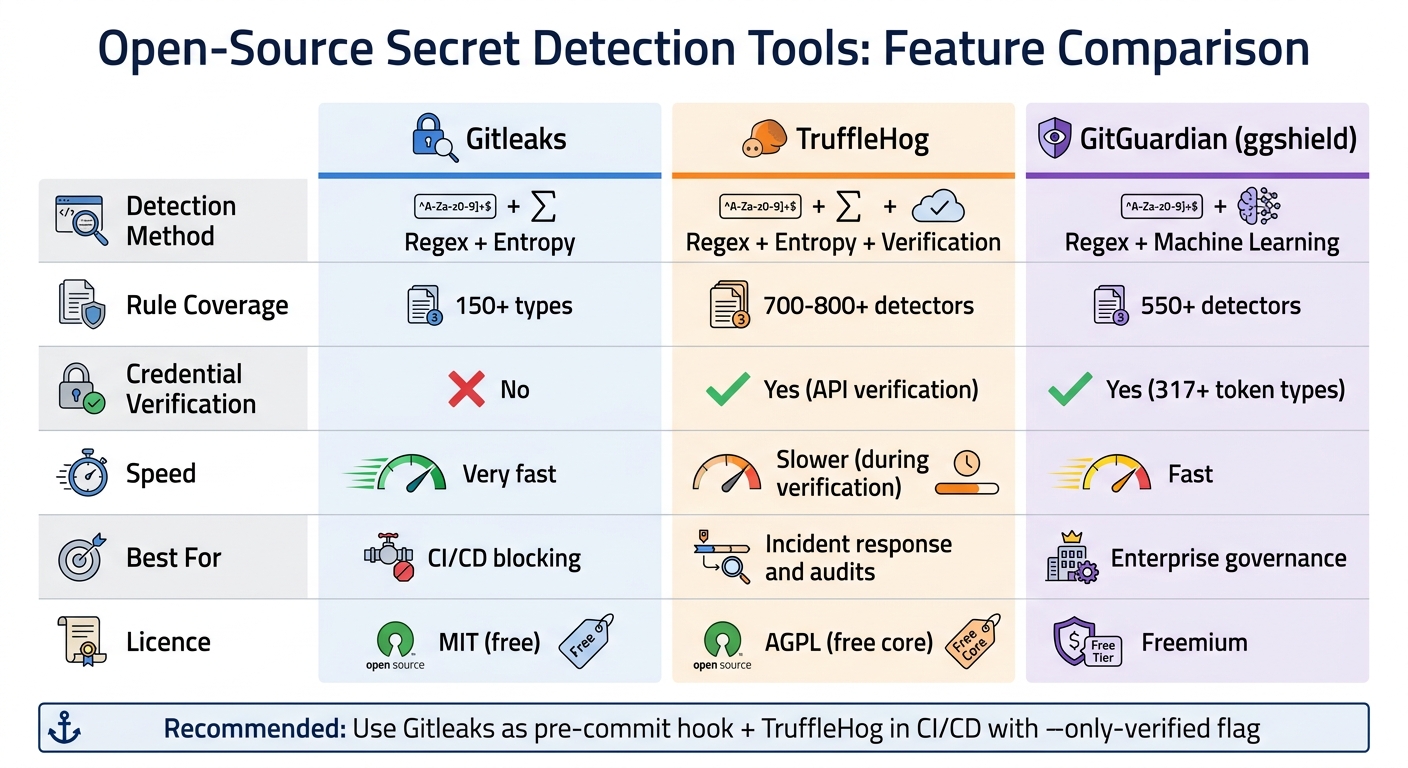
Secret Detection Tools Comparison: Gitleaks vs TruffleHog vs GitGuardian
When managing multiple repositories or collaborating in a team, manual methods like grep and entropy analysis can quickly become impractical. Open-source tools step in to automate and scale secret detection, making it easier to integrate this critical process into CI/CD pipelines. These tools address the limitations of manual approaches, offering more efficient and comprehensive solutions.
GitGuardian

GitGuardian provides a commercial platform alongside its free CLI tool, ggshield. With over 550 detectors powered by machine learning, it scans platforms like GitHub, GitLab, Bitbucket, and Azure DevOps. This reduces false positives by 50% and supports verification for over 317 token types. GitGuardian can analyse both live commits and historical data, even monitoring public GitHub history from the past 6–8 years.
You can integrate ggshield as a pre-commit hook or configure it to scan pull requests before merging. While the free tier is ideal for small teams, paid plans include advanced governance features, making it a strong choice for larger organisations.
TruffleHog
TruffleHog combines regex and entropy analysis with API-based credential verification, checking services like AWS, Stripe, and Slack to confirm whether a secret is active. This verification step significantly reduces false positives but can slow down history scans by 10–30 times compared to regex-only tools.
With 700–800 detectors and provider-specific logic, TruffleHog can scan not just Git repositories but also S3 buckets, Docker images, and JavaScript files. For security audits or incident response, the --only-verified flag is particularly useful, as it highlights active credentials that need immediate attention .
Gitleaks
Gitleaks is a lightweight Go-based tool designed for fast secret detection. It uses regex patterns and entropy filters defined in TOML configuration files, with over 150 pre-built rules covering services like OpenAI, Stripe, and GitHub. Seamlessly integrating with CI/CD pipelines (including GitHub Actions and GitLab), it can also output results in SARIF format for security dashboards.
A standout feature is its baseline scanning mode, which allows teams to create a baseline file for existing secrets in legacy codebases. This ensures alerts focus only on new findings, reducing noise and easing the rollout process. Gitleaks is entirely free under the MIT licence and works effectively as a pre-commit hook, offering developers instant feedback .
For small- to mid-sized SaaS teams, these tools provide practical and efficient ways to secure code before deployment.
| Feature | Gitleaks | TruffleHog | GitGuardian (ggshield) |
|---|---|---|---|
| Detection Method | Regex + Entropy | Regex + Entropy + Verification | Regex + Machine Learning |
| Rule Coverage | 150+ types | 700–800+ detectors | 550+ detectors |
| Credential Verification | No | Yes (API verification) | Yes (317+ token types) |
| Speed | Very fast | Slower (during verification) | Fast |
| Best For | CI/CD blocking | Incident response and audits | Enterprise governance |
| Licence | MIT (free) | AGPL (free core) | Freemium |
A layered approach works well here: use Gitleaks as a pre-commit hook for instant feedback, and add TruffleHog to your CI/CD pipeline with the --only-verified flag to catch active secrets without overwhelming developers.
Automating Secret Detection in CI/CD Pipelines
Relying solely on pre-commit hooks isn't foolproof - developers can bypass them with the --no-verify flag. To strengthen your security, a multi-layered approach works best. Combine pre-commit hooks for instant feedback with mandatory CI/CD scans that act as a safeguard, ensuring no secrets slip through. Here's how you can implement these layers effectively.
Setting Up CI/CD Integration
To integrate secret detection into your CI/CD pipeline, tools like Gitleaks or TruffleHog can be added to your workflow. For GitHub Actions, you can create a workflow file (e.g., .github/workflows/security.yaml) to automatically run scans on every pull request. A key setup detail is configuring fetch-depth: 0 in the checkout step. This setting ensures the scanner examines the branch's full commit history, not just the latest commit.
jobs:
  secret-scan:
    runs-on: ubuntu-latest
    steps:
      - uses: actions/checkout@v4
        with:
          fetch-depth: 0
      - uses: gitleaks/gitleaks-action@v2
        env:
          GITHUB_TOKEN: ${{ secrets.GITHUB_TOKEN }}
          GITLEAKS_ENABLE_COMMENTS: true
For GitLab CI, you can add Gitleaks as part of the test stage in your .gitlab-ci.yml file. Use the zricethezav/gitleaks Docker image, and configure the job to fail if secrets are detected. This ensures that merges are blocked until the issues are resolved.
If you're working with a legacy codebase, existing secrets can create noise in your scans. A practical solution is using detect-secrets with a baseline file (e.g., .secrets.baseline). This baseline records known issues, so the scanner focuses only on new secrets introduced in pull requests. This method keeps your team alert to fresh vulnerabilities without being overwhelmed by historical problems.
Pre-Commit Hooks and PR Blocking
Pre-commit hooks are your first line of defence, offering the quickest feedback. You can manage these hooks using a shared .pre-commit-config.yaml file and the pre-commit Python framework. Configure tools like Gitleaks to scan only staged files (gitleaks protect --staged) for faster performance.
For false positives, inline comments like # gitleaks:allow can suppress specific detections.
While pre-commit hooks are great for speed, CI/CD scans are essential as a final safety net before code is merged. As Rafter aptly pointed out:
The right secret scanner is the one that gets used. A perfect detection tool that developers bypass because it's too slow or too noisy protects nothing.
For larger teams using GitHub or GitLab Enterprise, push protection adds another layer of security by implementing server-side blocking. Unlike pre-commit hooks, this measure can't be bypassed locally.
Commercial Solutions for Small SaaS Teams
The Nuvm Platform for Secret Detection
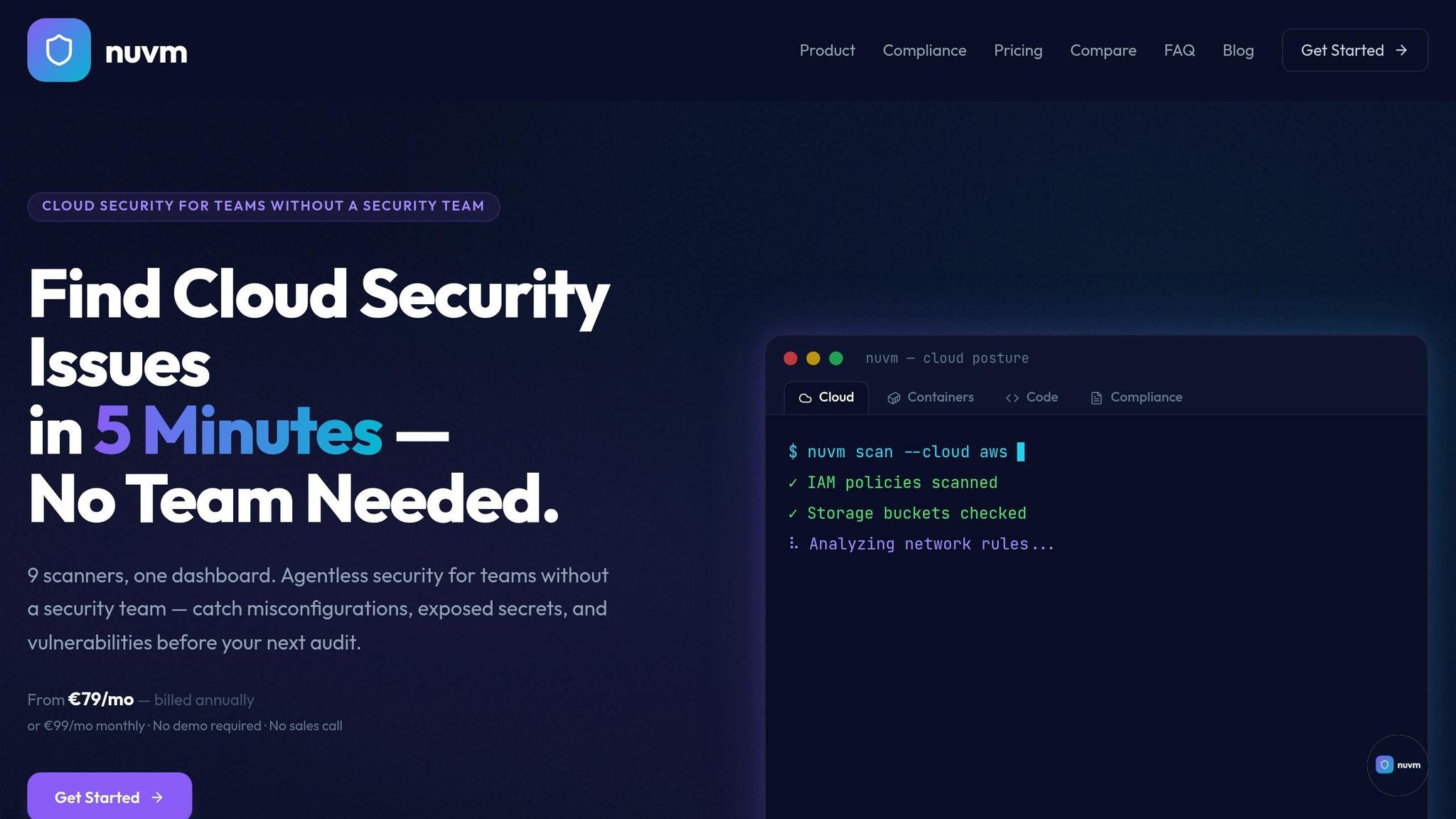
When small SaaS teams look beyond open-source tools, commercial platforms like Nuvm step in to offer a more streamlined approach to secret detection and remediation. Open-source tools often excel at detection but can overwhelm smaller teams with a flood of alerts. Nuvm tackles this by combining TruffleHog with eight additional scanners, all integrated into a single dashboard. It also actively verifies leaked credentials, cutting down on unnecessary alerts and focusing only on confirmed risks. Plus, it provides clear, actionable remediation steps written in plain English.
For teams lacking a dedicated security engineer, Nuvm makes secret scanning simple. It can be deployed in under 10 minutes, eliminating the hassle of juggling multiple CLI tools. These features make Nuvm a standout choice for smaller teams, offering a practical alternative to enterprise-level solutions.
Comparison to Enterprise Tools
Enterprise platforms like Wiz and Orca are designed with larger organisations in mind - think companies with 500+ employees and dedicated security teams. These platforms offer a wealth of customisation and auditing features to handle complex security needs. However, as highlighted in Microsoft's 365 Blog:
Many small businesses do not have a dedicated IT team to manage their security needs. As a result, they need a simple and affordable solution.
For small and medium-sized businesses (SMBs), the stakes are high. Around one in three SMBs has faced a cyberattack, with costs ranging from £200,000 to £5.6 million. The challenge is compounded by the fact that security engineers are often outnumbered by developers at a ratio of 100:1. This makes it crucial for tools aimed at SMBs to empower developers to handle incidents on their own.
Pricing and SMB Benefits
One of the biggest perks for small SaaS teams is the reduced management overhead. Automated remediation workflows can save over 23 hours per week - a huge relief when you're managing an average of 36 business-critical SaaS applications without a dedicated security team. On top of that, bundled security suites can cut costs by as much as 57% compared to buying individual products.
Nuvm also simplifies pricing, ditching the complicated per-seat licensing model common with enterprise tools. Its plans start at €99/month for cloud posture essentials, scaling up to €299/month for the full security stack. This includes verified secret detection, code scanning, unlimited workspaces and users, live chat support, and priority for feature requests. It’s a cost-effective way to get enterprise-grade protection without the red tape and procurement headaches of larger platforms.
Remediation and Best Practices for Exposed Secrets
Rotating Exposed Secrets
When secrets are exposed, acting quickly and systematically is crucial to minimise potential damage.
If a secret ends up in your Git history, consider it compromised - even if you delete it in a later commit. The safest course of action is immediate rotation. Revoke the exposed credential at its source (whether it's AWS, GitHub, or your database provider), replace it with an environment variable, or integrate it with a centralised secrets management tool like HashiCorp Vault. Always test the new credential to ensure it works, and confirm the old one is fully deactivated. It's also wise to review access logs to check for any unauthorised activity. This serves as a reminder of the risks that come with exposed secrets.
You can also remove the secret from your Git history using tools like git-filter-repo, but only after the credential has been revoked and replaced. Keep in mind that cleaning Git history, especially in active repositories, can be a complex and time-consuming process. Revoking the secret should always come first, with history cleanup being a secondary step.
Policy Enforcement and IDE Integrations
Prevention is your best defence. Use pre-commit hooks with tools such as Gitleaks or detect-secrets to block sensitive information before it's committed. GitHub's Push Protection feature can also reject pushes containing recognised secret patterns, preventing accidental leaks. For added security, integrate real-time detection plugins into your IDE to catch issues as you code.
Another layer of protection can come from deploying honeytokens - fake credentials placed in repositories to act as tripwires. If these decoy secrets are accessed, they trigger alerts, giving you an early warning of potential breaches. Additionally, standardise your workflows with .env.example templates and enforce .gitignore policies to prevent configuration files from being committed. The goal is to make it easier to avoid committing secrets than to deal with the fallout later.
These preventative strategies should be paired with ongoing monitoring to maintain long-term security.
Continuous Monitoring and Auditing
Keeping secrets safe requires continuous vigilance. For instance, in 2024, a staggering 23.8 million secrets were leaked on public GitHub repositories - a 25% increase from the previous year. Alarmingly, 70% of secrets leaked in 2022 were still active years later. Regular audits can help uncover older, overlooked secrets, while runtime monitoring ensures sensitive credentials aren't exposed in live environments.
Automated tools like TruffleHog can verify whether detected credentials are still active by pinging APIs, reducing false positives and allowing you to focus on genuine threats. With security engineers often outnumbered by developers at a ratio of 100:1, continuous scanning of all branches and commit histories becomes vital. This approach empowers teams to respond effectively by following clear playbooks and leveraging automated feedback systems.
Conclusion
Key Takeaways
Detecting secrets before deployment is a critical step in maintaining secure infrastructure. In 2025 alone, around 28.65 million new secrets were discovered in public GitHub commits. Alarmingly, attackers can exploit exposed AWS credentials in as little as five minutes after a push, leaving almost no time for a response.
An effective approach involves multiple layers: pre-commit hooks for instant feedback, CI/CD pipeline scanning to enforce security, and regular repository audits to address past leaks [1,3]. Automated tools play a key role by using regex, entropy analysis, and machine learning to detect secrets at scale. Tools like TruffleHog even verify credentials to filter out false positives, ensuring that only active secrets are flagged [3,4].
The costs of neglecting this are steep. Fixing a secret leak after it has been committed is 13 times more expensive than catching it during pre-commit checks. With security engineers often outnumbered by developers at a ratio of 100:1, automation becomes a necessity to safeguard your organisation effectively.
Next Steps for Implementation
Ready to strengthen your secret detection? Here’s how you can start:
- Install pre-commit hooks: Use tools like Gitleaks or detect-secrets for quick, sub-second feedback during development [3,12].
- Integrate secret scanning into CI/CD pipelines: Tools like Gitleaks Action or TruffleHog can block pull requests containing sensitive data [3,8].
- Perform a historical repository scan: Run a full-history scan with TruffleHog’s
--only-verifiedflag to uncover and prioritise high-risk leaks.
Additionally, establish a clear emergency response plan. If a secret is exposed, prioritise rotating the credentials, reviewing access logs, and cleaning Git history if needed. To prevent future issues, schedule weekly automated scans to catch any lingering problems and update your .gitignore to exclude sensitive files like .env, *.pem, and *.tfvars [11,12]. The goal is simple: make preventing leaks easier than dealing with their consequences.
FAQs
Which secret-scanning approach should I start with?
To keep sensitive data out of your codebase, begin with pre-commit hook tools like Gitleaks or detect-secrets. These tools help catch secrets before they make their way into your Git history, saving you time and reducing remediation costs.
- Gitleaks stands out for its speed and regex-based detection, making it an efficient choice for identifying potential issues early.
Once you've set up this initial layer of protection, you can expand by using tools like TruffleHog or GitGuardian. These are excellent for performing historical scans of your repository and providing real-time monitoring to address any vulnerabilities that may slip through.
How can I reduce false positives without missing real secrets?
To reduce false positives while still identifying genuine secrets, it's crucial to fine-tune detection rules and employ advanced methods like AI or machine learning. Using filters to catch frequent false-positive patterns and leveraging tools that combine regex with entropy checks can sharpen both sensitivity and precision. AI-driven models are especially useful as they adapt to changing patterns, cutting down on irrelevant alerts and improving the reliability of detection.
What should I do immediately if a secret is found in Git history?
If a credential is discovered in your Git history, the first step is to rotate or revoke the exposed credential right away. This helps block any unauthorised access. While it's also crucial to remove the secret from the Git history, this process can take time - so focus on securing the credential first. To avoid similar issues in the future, consider adding automated secret detection tools to your CI/CD pipeline. These tools can catch leaks early and save you from bigger headaches down the line.