Checklist for Automated Compliance Evidence Collection
Checklist for Automated Compliance Evidence Collection
Automating compliance evidence collection saves time, reduces errors, and ensures better audit outcomes. By integrating tools like CSPM, CI/CD scanners, and centralised logging, you can continuously gather proof that your security controls are working. This process helps you meet frameworks like SOC 2, ISO 27001, PCI DSS, and UK GDPR while cutting audit prep times and reducing compliance gaps.
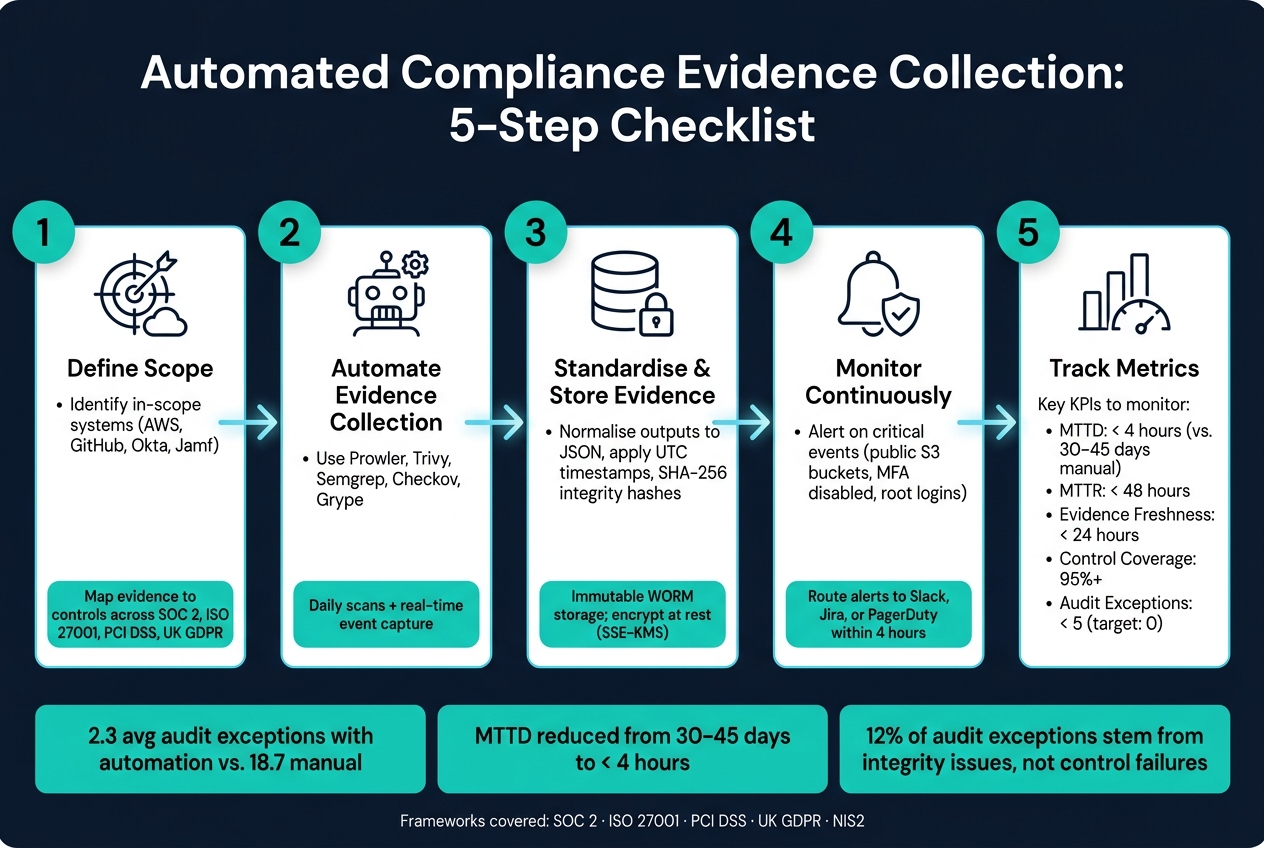
Key Steps:
- Define Scope: Identify in-scope systems (e.g., AWS, GitHub, Okta) and map evidence to controls.
- Automate Evidence Collection: Use tools like Prowler, Trivy, and Semgrep to collect data daily or in real-time.
- Standardise and Store Evidence: Normalise outputs, ensure UTC timestamps, and use secure, immutable storage.
- Monitor Continuously: Set alerts for critical events (e.g., public S3 buckets) and review evidence regularly.
- Track Metrics: Focus on indicators like Mean Time to Detect (MTTD) and Mean Time to Remediate (MTTR).
By organising your evidence pipelines and leveraging automation, even small teams can stay audit-ready year-round.
Automated Compliance Evidence Collection: 5-Step Checklist
Automating Evidence Collection for Audit Success
sbb-itb-5d9b290
Defining Your Compliance Scope and Evidence Requirements
Start by clearly defining the scope and purpose of your evidence collection. Without clear boundaries, you might end up collecting too much - wasting time and storage - or, worse, overlooking critical controls. This clarity is essential for choosing and configuring the right tools.
Identifying In-Scope Systems, Environments, and Data
Identify all systems that handle sensitive data or perform critical security functions. For most UK SaaS companies, this typically includes:
- Cloud infrastructure: Platforms like AWS, GCP, or Azure.
- Identity providers: Tools such as Okta or Azure AD.
- Source control platforms: Examples include GitHub or GitLab.
- Endpoint management tools: Options like Jamf or Intune.
- SaaS tools handling personal data: Google Workspace, Slack, and HR platforms - especially under UK GDPR when processing employee or customer data.
Clearly distinguish between environments. Production is always in scope, but staging and development environments are only included if they process real customer data.
| System Category | Tools | Relevant Frameworks |
|---|---|---|
| Cloud Infrastructure | AWS, Azure, GCP | SOC 2, ISO 27001, PCI DSS |
| Identity & Access | Okta, Azure AD | SOC 2, ISO 27001, UK GDPR |
| Source Control | GitHub, GitLab | SOC 2, ISO 27001 |
| Endpoint Management | Jamf, Intune | ISO 27001, UK GDPR |
| SaaS / Productivity | Google Workspace, Slack | UK GDPR |
Mapping Controls to Evidence Types
Once you've defined your scope, map each control domain to the specific evidence it requires. This step avoids vague claims like "we ran a scan" and ensures your evidence is detailed and precise. For example, a scan report should include timestamps, severity ratings, and remediation updates.
Here’s a breakdown of common control domains and the evidence they typically require:
| Control Domain | Evidence Required |
|---|---|
| Access Control | IAM policies, MFA enforcement status, quarterly access reviews |
| Vulnerability Management | Scan reports with severity ratings, patching evidence within SLAs |
| Change Management | Approved pull requests, CI/CD deployment logs, version history |
| Network Security | Firewall/security group rules, VPC flow logs, SSL policies |
| Data Protection | Encryption-at-rest settings, KMS key rotation logs, backup success reports |
Many pieces of evidence can satisfy multiple frameworks. For instance, an access review report can apply to both SOC 2 and ISO 27001, which helps reduce duplication. These mappings are also critical for setting up automated evidence collection pipelines.
Setting Evidence Retention Periods and Freshness Rules
Retention and freshness are two essential considerations for evidence management:
- Retention: This determines how long evidence must be stored. For example, PCI DSS mandates a 12-month retention period, with the latest 3 months readily accessible. While UK GDPR doesn’t specify a fixed timeframe, your policy should be documented and enforced, with evidence to back it up.
- Freshness: This refers to how recent the evidence must be. For configuration-based controls, daily automated collection is the baseline. Evidence older than 24 hours is often considered outdated. Operational events - like deployments, access changes, or incidents - should be captured in real time rather than in batches.
To ensure consistency, always use UTC timestamps synchronised via NTP across your evidence pipeline. Auditors frequently flag mismatched timestamps as evidence integrity issues, so this step is critical.
Choosing and Configuring Automation Tools
After defining your scope and evidence requirements, the next step is selecting automation tools that can efficiently handle the data collection process. For smaller engineering teams, the rule is straightforward: choose tools that can do more with less. Every additional tool increases the complexity of integration and the risk of evidence gaps. These tools will form the backbone of your automated evidence pipelines.
Cloud Security Posture Management and Configuration Scanning
CSPM tools play a key role in collecting evidence for cloud infrastructure controls. They continuously monitor your cloud environments, comparing them against established configurations, and generate timestamped findings that can be shared with auditors.
Checklist for setting up CSPM tools:
- Enable AWS CloudTrail, GCP Audit Logs, or Azure Monitor across all relevant accounts to ensure logs are accessible for collection.
- Use Prowler on AWS, GCP, or Azure to map findings to frameworks like SOC 2, ISO 27001, and PCI DSS.
- Schedule daily scans to quickly identify any configuration drift.
- Export findings in structured formats like JSON or CSV with timestamps included - avoid relying on screenshots as primary evidence.
- Tag findings with relevant control IDs (e.g., CC6.1 for SOC 2 logical access) to maintain traceability without manual cross-referencing.
If you operate across multiple cloud providers, managing separate Prowler outputs can become cumbersome. Tools like Nuvm Cloud simplify this by consolidating CSPM scanning into a unified dashboard. It automatically maps findings to multiple compliance frameworks, provides plain-English explanations, and even includes remediation commands - perfect for teams without a dedicated security expert.
Application and Supply Chain Security Scanning
While CSPM tools focus on cloud configurations, compliance frameworks also require evidence related to application code, container images, and infrastructure templates. These scanning tools help address vulnerability management, change management, and secure development practices.
Checklist for application and supply chain scanning:
- Integrate Trivy into your CI/CD pipeline to scan container images during builds, capturing severity ratings and CVE details.
- Use Semgrep for static analysis of your source code repositories. Configure it to fail builds on high-severity findings, ensuring remediation efforts are automatically tracked.
- Scan Terraform and other IaC templates with Checkov before applying them. Failed checks create a natural audit trail of issues and their resolutions.
- Analyse dependency manifests (e.g.,
package-lock.json,requirements.txt) with a tool like Grype to document vulnerabilities in third-party libraries. - Store all scan artefacts - not just summaries - in your evidence repository, attaching commit SHAs and timestamps for traceability.
Centralised Logging and Monitoring
Scans alone don’t provide a complete picture for auditors. Evidence of authentication events, privilege changes, and network activity must also be captured in real time. A centralised log store consolidates this data into a single, coherent audit trail.
Checklist for logging and monitoring setup:
- Enable AWS CloudTrail across all regions and management events, or the equivalent on GCP/Azure.
- Forward logs to a centralised store like Elasticsearch, Splunk, or a managed SIEM to prevent evidence from being scattered across accounts.
- Create log filters or saved queries for key events, such as console logins, IAM policy changes, security group updates, and data access on sensitive resources.
- Set up alerts for high-risk events (e.g., root account logins, MFA being disabled, public S3 bucket creation) and route them to Slack or your ticketing system to ensure a documented response.
- Enable log integrity settings (e.g., CloudTrail log file validation) to meet tamper-evidence requirements.
"Automated evidence collection is no longer a novelty - it's table stakes for modern compliance teams who are being asked to do more with less." - Evan Rowse, GRC Subject Matter Expert, Vanta
Test your logging setup now to ensure it’s functioning correctly. Pull a sample of events from the past 48 hours to verify they match actual occurrences in your environment. Silent logging failures are a frequent audit issue, so catching them early is critical.
Setting Up Evidence Pipelines and Storage
Once you've chosen your automation tools, the next step is to organise your evidence in a structured, secure pipeline. Disorganised scan outputs can make audit preparation a nightmare. Instead, aim to collect, standardise, and store evidence in a way that simplifies sharing and eliminates the last-minute scramble. This approach aligns with continuous monitoring practices, saving valuable time during audits. Here’s how to ensure your evidence is consistent, easy to access, and secure.
Normalising and Tagging Evidence
For evidence to be useful, it must include consistent metadata, no matter which tool generated it. Without standardisation, you risk dealing with mismatched timestamps, inconsistent control references, and an unsearchable repository.
Key steps for normalising and tagging evidence:
- Use a consistent schema for every record. Include fields like Control ID (e.g., SOC 2 CC6.1 or ISO 27001 A.9.1.1), evidence type (e.g., configuration, log, inventory), source system (e.g., AWS IAM, GitHub, Okta), and a UTC timestamp.
- Stick to UTC timestamps to avoid confusion during audits involving multiple time zones.
- Tag evidence to map it across multiple frameworks. For instance, a single MFA enforcement record can meet both SOC 2 CC6.1 and ISO 27001 A.9.4.2, saving you from collecting the same data twice.
- Use scripts or middleware to transform outputs from tools like Prowler, Trivy, or Semgrep into a standard JSON format before storage.
- Add an integrity hash (e.g., SHA-256 checksum) to every record. This reassures auditors that the data hasn’t been tampered with - a critical point since 12% of audit exceptions stem from integrity issues, not actual control failures.
| Evidence Field | Purpose | Example Value |
|---|---|---|
| Control ID | Maps evidence to framework | SOC 2 CC6.1 / ISO 27001 A.9.1.1 |
| Collected At | Provides temporal proof | 2026-05-14T10:00:00Z (UTC) |
| Evidence Type | Categorises the artefact | Configuration / Log / Inventory |
| Source | Identifies origin system | AWS IAM / GitHub PR / Okta Logs |
| Integrity Hash | Ensures data hasn't changed | SHA-256 checksum |
Automating Evidence Collection Jobs
Manual evidence collection is risky and inconsistent. Forgetting to run a scan at the right time could leave a gap in your records. Automating these tasks ensures consistency and reliability.
Steps to automate evidence collection:
- Schedule daily snapshots of infrastructure configurations. For operational events like deployments or access changes, collect evidence immediately as events occur.
- Use cloud functions like AWS Lambda or GCP Cloud Functions, triggered by schedulers, to run collection scripts. This avoids relying on personal machines or shared server cron jobs.
- Define your pipelines as code using Terraform. This allows you to version-control storage buckets, IAM permissions, and scheduler rules, making the pipeline reproducible and auditable.
- Store evidence in immutable storage with WORM (Write Once Read Many) capabilities. This prevents alterations, meeting requirements for SOC 2 and ISO 27001.
- Save full scan artefacts instead of just summaries. A complete JSON output from tools like Prowler or Trivy carries more weight with auditors than a simple dashboard screenshot.
"The moment you build your own compliance automation, that codebase becomes part of your risk surface, and you'll need to validate and secure it like any other production system." - Evan Rowse, GRC Subject Matter Expert, Vanta
Securing Evidence Storage
Collecting and normalising evidence is only part of the process. If your storage practices introduce vulnerabilities, you could compromise audit integrity and breach data protection rules.
Checklist for securing evidence storage:
- Enable server-side encryption (SSE-S3 or SSE-KMS) and enforce HTTPS-only access via bucket policies to protect data both at rest and in transit.
- Implement role-based access control (RBAC). Auditors should only have read-only access, while engineers shouldn’t access HR-related evidence like background checks. Segregate access by evidence type, not just by team.
- Ensure compliance with UK GDPR by configuring storage buckets in UK or EU regions, such as
eu-west-2(London) oreu-west-1(Ireland) on AWS. Avoid storing personal data in US regions unless a valid transfer mechanism is in place. - Enable versioning on storage buckets to preserve historical states. This is especially useful if auditors request evidence from a specific time period.
- Block public access at the bucket level. Evidence repositories must never be publicly accessible, even by accident.
For teams without dedicated security resources, platforms like Nuvm Cloud can simplify this process. They automatically map compliance evidence from scan results across AWS, GCP, and Azure for frameworks like SOC 2, PCI DSS, ISO 27001, and NIS2. This can significantly reduce the time spent on manual tagging and normalisation, offering a practical solution for smaller teams.
Setting Up Continuous Monitoring and Review Workflows
Keep evidence organised and maintain ongoing oversight by addressing issues early, routing them efficiently, and improving controls over time. For more cloud security insights, explore our latest guides on compliance automation.
Connecting Alerts to Team Workflows
To support effective evidence management, integrate real-time alerts into your team's existing tools. For example, if an S3 bucket is made public or MFA is disabled for a new user, send alerts directly to platforms like Slack or Jira. Assign responsibilities for these alerts and ensure escalation occurs if the issue isn’t resolved within four hours.
To prevent alert fatigue, prioritise critical and high-severity events for immediate attention, while grouping lower-priority issues into daily summaries. For the most severe cases - such as missing encryption on a new resource - consider escalating unresolved alerts through tools like PagerDuty after four hours.
| Alert Type | Example Alert | Suggested Routing |
|---|---|---|
| Identity & Access | MFA disabled for new user | Slack alert to IT Admin; auto-create a Jira ticket |
| Cloud Configuration | S3 bucket made public | Real-time alert; automated rollback or ticket creation |
| Vulnerability Mgmt | Critical CVE detected | Alert to Security Team; link directly to remediation steps |
| Change Management | Unapproved code deployment | Notification to DevOps lead for immediate review |
Running Periodic Evidence Reviews and Tests
While automated alerts are crucial, regular manual reviews help identify false positives and ensure accuracy. Conduct weekly evidence reviews to address these issues and resolve drift. Additionally, perform quarterly IAM access reviews to ensure that former employees or those with changed roles no longer have sensitive permissions. Teams using continuous automation report an average of 2.3 audit exceptions, compared to 18.7 for those relying solely on manual reviews.
Tracking Metrics and Refining Your Process
Tracking the right metrics gives you a clear picture of your compliance programme’s effectiveness and highlights areas needing attention. Focus on key performance indicators (KPIs) such as Mean Time to Detect (MTTD) - how quickly you identify compliance failures - and Mean Time to Remediate (MTTR) - how long it takes to resolve them. Continuous monitoring can bring MTTD down from 30–45 days to under four hours.
Other important metrics include evidence freshness (ensuring infrastructure configuration evidence is no older than 24 hours) and control monitoring coverage (aiming for 95%+ of all controls).
| KPI | Target | How to Measure |
|---|---|---|
| Control Monitoring Coverage | 95%+ of all controls | Platform dashboard |
| Mean Time to Detect (MTTD) | < 4 hours | Compare alert timestamp to event log |
| Evidence Freshness | < 24 hours old | Verify collection timestamps |
| Mean Time to Remediate (MTTR) | < 48 hours (average) | Analyse Jira ticket lifecycles |
| Audit Exceptions | < 5 (target: 0) | Review final auditor report findings |
Review these metrics monthly to spot trends. If MTTR regularly exceeds 48 hours, it’s often due to unclear ownership or a lack of automated remediation scripts. For example, overly permissive IAM roles cause 28% of drift events, while missing encryption on new resources accounts for 19%. Addressing these issues with automated scripts reduces manual effort and keeps your evidence pipeline accurate. These metrics not only validate your controls but also help refine your compliance framework over time.
Conclusion: Making Compliance Manageable for Small Teams
Automating compliance evidence collection can transform the way small teams handle audits. Instead of rushing to gather data every quarter, you can save time and reduce risk by setting up systems that run smoothly in the background. By mapping your controls early, using tools with strong integrations, centralising evidence storage, and linking alerts to your existing workflows, you create a process that avoids last-minute chaos when auditors come knocking.
With automation in place, your team can move from firefighting to maintaining controls proactively. Audit prep becomes quicker, and any compliance issues are flagged within hours, not weeks.
For small teams without dedicated security engineers, tools like Nuvm Cloud simplify the entire process. Its nine integrated scanners cover all key areas, feeding data into a single dashboard. Compliance evidence for frameworks like SOC 2, PCI DSS, ISO 27001, and NIS2 is automatically mapped from scan results, building your audit trail without manual effort. At £79/month (billed annually), it’s far more affordable than traditional GRC platforms, which typically cost between £8,000 and £12,000 per year.
Start by focusing on your highest-risk areas, such as cloud infrastructure and user access. Gradually expand your coverage, and even with a small team, you can maintain a strong, audit-ready compliance programme throughout the year.
FAQs
What evidence should I automate first for SOC 2 or ISO 27001?
Automating evidence collection is a smart first step, especially for key areas like continuous monitoring and inventory management. These processes are essential for staying compliant and act as the groundwork for gathering the specific evidence needed for standards such as SOC 2 or ISO 27001. By focusing on these foundational controls, you streamline compliance efforts while ensuring accuracy and efficiency.
How often should evidence be collected to stay audit-ready?
To stay ready for audits, it's crucial to gather evidence on an ongoing basis. Using automated tools or scheduling regular, real-time collections works much better than relying on occasional manual checks. This ensures that compliance data remains current and easy to access, cutting down the chances of missing information and making audit preparation far simpler.
How can I prove evidence hasn’t been tampered with?
Automated evidence collection systems maintain integrity using cryptographic hashes, audit logs, and secure storage solutions. Cryptographic hashes play a key role in verifying that the data hasn't been altered. Audit logs provide a transparent record of all collection activities, ensuring accountability. Additionally, storing evidence in environments designed to detect tampering - combined with strict access controls - adds an extra layer of protection. It's crucial to make sure your tools incorporate these features to prove the evidence remains unchanged from the moment it was collected.