5 Steps to Automate Dependency License Checks
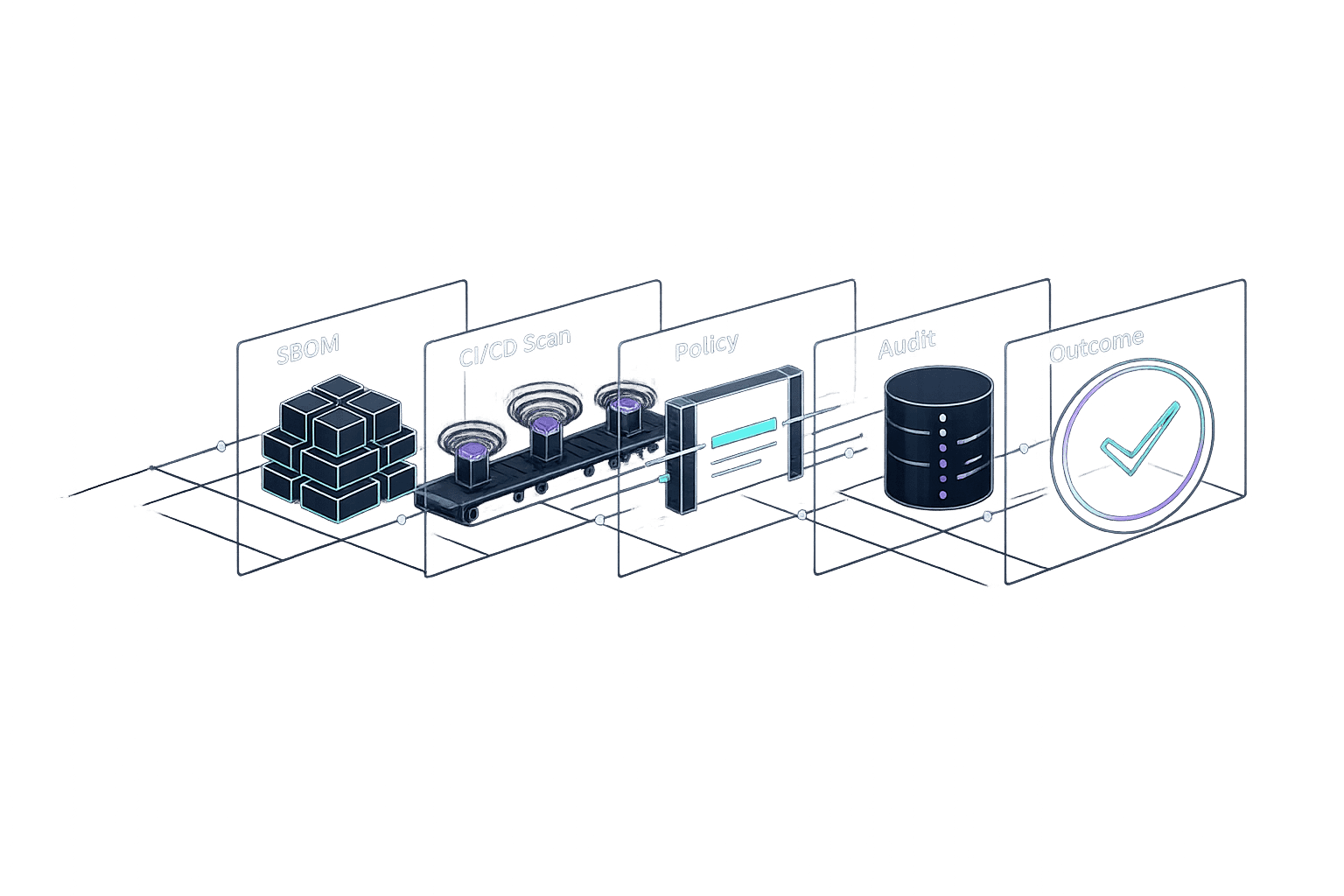
5 Steps to Automate Dependency License Checks
Managing open-source licenses in your software can be overwhelming - especially with transitive dependencies and varying legal obligations. Manual tracking isn't practical, but automation simplifies this process, especially when you compare DIY tools and enterprise solutions to find the right fit. Here's how you can automate dependency license checks in five steps:
- Create a Dependency Inventory: Use tools like
SyftorTrivyto generate an SBOM (Software Bill of Materials) that tracks all dependencies, including those bypassing package managers. - Select a Scanning Method: Options include repository-native tools, CI-based auditing, SCA tools like
Snyk, or SBOM-driven reviews. - Integrate License Checks into CI/CD: Add tools like
Trivyto your pipelines to flag non-compliant dependencies before they reach production. - Set License Policies: Categorise licenses into permissive, semipermissive, and restrictive. Automate enforcement with tools that block high-risk licenses.
- Maintain Compliance Records: Automate reporting, triage flagged issues, and document decisions for audits.
Why does this matter? Manual compliance can take 200–400 hours per audit, while automation reduces this to 20–40 hours. With the right tools and workflows, you can manage risks, save time, and stay audit-ready.
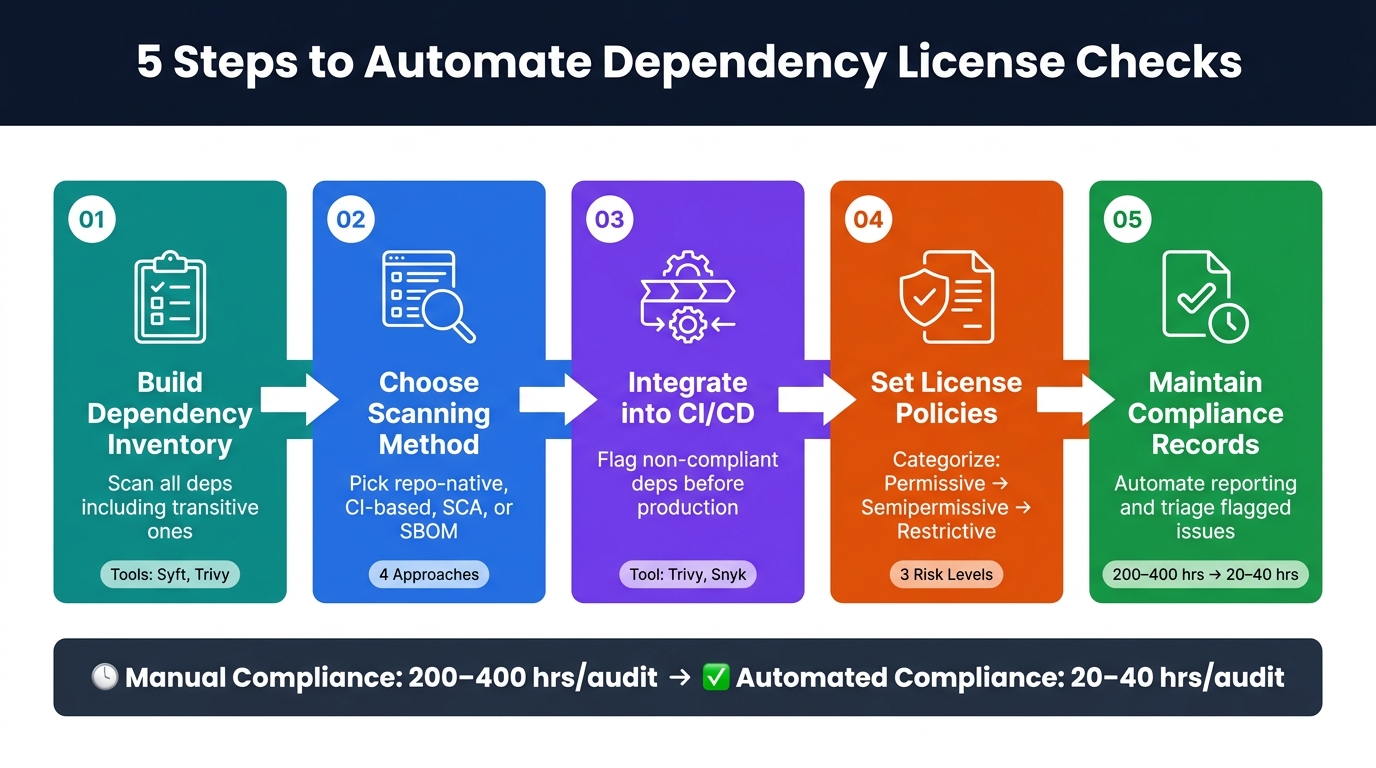
5 Steps to Automate Dependency License Checks
Oh my license! – Achieving order by automation in the license chaos of your dependencies
sbb-itb-5d9b290
Step 1: Build and Maintain a Dependency Inventory
Start by listing every dependency in your codebase, including those that are indirectly included (transitive dependencies). These transitive dependencies are often where licence issues can hide, and tracking them manually is nearly impossible.
The best place to begin is with your package manifests and lockfiles - files like package-lock.json, Gemfile.lock, or requirements.txt. Lockfiles are especially important because they record the exact versions of all transitive dependencies resolved during installation, not just the top-level ones you've specified.
Use SBOM Tools for Comprehensive Dependency Tracking
Lockfiles don't tell the whole story. Some dependencies bypass package managers entirely - brought in through tools like wget, curl, or directly added in a Dockerfile. Standard manifest scanning tools often overlook these, leaving potential vulnerabilities undetected.
To gain complete visibility, generate a Software Bill of Materials (SBOM). Tools such as Syft and Trivy can scan container images and file systems to produce SBOMs in formats like CycloneDX or SPDX. These structured, machine-readable inventories include all components, even transitive dependencies, and can be integrated into your licence-checking processes.
Keep the Inventory Current
An inventory is only valuable if it reflects the present state of your project. Set up automated SBOM scans to run whenever a package changes. For example, trigger scans on pull requests, builds, or even on a daily schedule. This is crucial because new vulnerabilities and licence updates are continually published, meaning a dependency that was once safe might require re-evaluation even if your code hasn't changed.
"Asset inventory surfaces shadow IT resources... and helps organisations understand their true cloud footprint. You cannot protect what you cannot see." - Ethan Vereal, CTO, TechCloudPro
A regularly updated inventory forms the backbone of integrating licence checks into your CI/CD pipeline, which will be explored further in Step 3.
Step 2: Choose a Licence Scanning Approach
Once your dependency inventory is complete, the next step is to decide on a licence scanning method. There are four main approaches, each with its own advantages and drawbacks. Picking the right one - or combining multiple approaches - can help you reduce unnecessary alerts and identify problems early on.
Repository-Native Licence Metadata Checks
One of the easiest ways to start is by using tools that are already part of your repository platform. For example, GitHub's dependency graph can pull licence details straight from package manifests without requiring extra setup. These checks are cost-free and simple to enable, making them a great first step for smaller teams or those just starting to formalise their licence compliance. However, these tools only work with the licence data declared in your manifest files and won’t pick up on dependencies installed outside of a package manager.
CI-Based Licence Auditing
Adding licence checks directly into your CI/CD pipeline is a proactive way to catch issues before code is merged. By auditing licences on every pull request, you can prevent non-compliant dependencies from reaching production. Lightweight command-line tools can easily integrate with platforms like GitHub Actions or Jenkins, requiring minimal setup. The main challenge here is fine-tuning your policy rules to avoid false positives that could block builds unnecessarily. While this might involve some initial effort, it can save significant time in the long run.
Software Composition Analysis Tools
Software Composition Analysis (SCA) tools take licence scanning a step further by offering more detailed insights. Tools like Snyk can perform reachability analysis, which distinguishes between libraries present in your file system and those actually used at runtime. This is important because basic scans can produce a flood of irrelevant alerts. For instance, a study by JFrog revealed that a simple SCA scan flagged 3,171 false positives in a single container image by mistakenly identifying irrelevant Linux kernel CVEs. Advanced, context-aware tools can reduce false positives by as much as 90%, allowing engineers to focus on genuine risks.
SBOM-Driven Licence Review
Using Software Bill of Materials (SBOMs) from tools like Syft or Trivy provides a detailed, portable record of all components in your software. This approach is especially useful for industries that need audit-ready documentation. However, SBOMs have their limitations. An analysis of the eight most-downloaded Docker Hub containers showed that relying solely on SBOM metadata led to over 90 missed CVEs because key components installed outside package managers weren’t detected. To address this, SBOM reviews should be supplemented with binary analysis for better coverage.
Here’s a comparison of the four approaches:
| Approach | Best For | Key Strength | Main Limitation |
|---|---|---|---|
| Repository-Native | Startups and small teams | Free and easy to set up | Limited scope; misses non-manifest installs |
| CI-Based Auditing | DevOps-centric teams | Catches issues early | Requires policy tuning to avoid false positives |
| SCA Tools | Mid-sized SaaS teams | Detailed analysis; fewer false positives | Higher subscription cost |
| SBOM-Driven | Regulated industries | Audit-ready documentation | Misses components outside package managers |
For many small-to-mid-sized SaaS teams, combining CI-based auditing with SBOM-driven reviews (and adding binary scanning for container-heavy workflows) provides a balanced approach. This combination offers both day-to-day compliance checks and the robust documentation needed for audits, setting the stage for integrating licence checks into your CI/CD pipeline in Step 3.
Step 3: Add Licence Checks to Your CI/CD Pipeline
Integrating licence checks into your CI/CD pipeline ensures non-compliant dependencies are flagged before they reach production. Automating this step makes it easy to align with modern CI/CD tools, keeping your process efficient and secure. For more cloud security insights, explore our latest guides.
One tool that stands out for this purpose is Trivy. It's lightweight and designed for seamless pipeline integration:
"Trivy is a lightweight binary that you invoke on demand, which makes it extremely easy to integrate in scripts and pipelines."
With Trivy, you can quickly add a scan to a GitHub Actions workflow or a Jenkins stage. Similarly, Snyk integrates smoothly into pull requests and can even create automatic fix PRs, saving time and effort.
To avoid drowning in alerts, set a severity threshold, such as --severity HIGH,CRITICAL in Trivy. Tools like this can cut through the noise, reducing high-severity alerts by up to 85%. This ensures your pipeline focuses on issues that truly matter and require immediate action.
For even earlier detection, consider adding a pre-commit hook. This catches potential problems before they even make it into the pipeline, saving time and reducing the cost of fixes. After running a scan, export the results in a machine-readable format, like JSON or a CycloneDX SBOM. This step ensures findings are organised and ready for compliance audits instead of being lost in log files.
To keep the development workflow secure and efficient, display scan results directly as PR annotations in tools like GitHub or Azure DevOps. This approach embeds security into the code review process, making it a natural part of development rather than an afterthought.
Step 4: Set and Enforce Licence Policies
After incorporating licence checks into your CI/CD pipeline, the next logical step is setting clear, enforceable policies. Automated scanning is a great start, but without well-defined rules, developers may encounter inconsistent or unclear licence enforcement.
Define Licence Categories
Start by grouping licences into three main categories: Permissive, Semipermissive, and Restrictive. Once categorised, configure your scanning tool (like Trivy or Snyk) to block builds that use dependencies under Restrictive licences. This ensures consistency and reduces compliance risks.
| Licence Category | Risk Level | Examples | Key Requirement |
|---|---|---|---|
| Permissive | Low | MIT, Apache 2.0 | Include licence and copyright notice |
| Semipermissive | Medium | Mozilla (MPL), Eclipse (EPL) | Disclose modifications to the licensed code |
| Restrictive | High | GNU GPL, AGPL | May require disclosing the entire application source |
Handle Copyleft and Attribution Requirements
Certain licences bring specific obligations that need attention. For example, copyleft licences like GPL and AGPL can pose significant challenges for SaaS teams. Unlike permissive licences, these may require you to disclose the entire source code of your application if it incorporates such licences. This can be especially problematic for SaaS products, as AGPL defines "distribution" in a broader sense. To minimise risks, treat AGPL as part of the Restrictive category by default, and only consider exceptions after a thorough legal review.
Attribution is another key requirement that shouldn't be overlooked. Most open-source licences, whether permissive or not, require you to include a licence and copyright notice in your product or its documentation. Instead of tracking this manually, use your SCA tool to automate the creation of a NOTICES or THIRD-PARTY-LICENSES file. Tools like Syft can generate this as part of your SBOM (Software Bill of Materials) creation process, ensuring your attributions stay updated with minimal effort.
"The shift left principle of DevSecOps can be applied to LegalOps as well." - Jono Bergquist, Anchore
Catching a copyleft dependency early in development is far less disruptive than discovering it during a security review or customer audit.
Step 5: Review Findings and Keep Compliance Records
Once you’ve set up automated scanning and implemented clear policies, the next steps are to effectively manage flagged issues and maintain thorough documentation. These actions ensure your licence compliance process is both practical and defensible.
Triage and Resolve Licence Issues
After your automated scans and policy enforcement (Steps 3 and 4), it’s time to deal with flagged issues. Be prepared - initial scans might uncover anywhere from 500 to 5,000 issues. However, not all of these will require immediate attention, so prioritisation is key.
Start by focusing on high-risk dependencies. Pay particular attention to those under Restrictive licences, such as GPL or AGPL, especially if they’re actively used in production. Next, address Semipermissive licences, which might involve obligations like source code disclosure. Permissive licence issues, such as missing attribution notices, can often be grouped together and resolved in a single pass.
To streamline this process, integrate your scanning tool with platforms like Jira. This ensures that each flagged issue is logged as a task, complete with an assigned owner, a due date, and a clear resolution plan. Without such integration, flagged issues often remain unaddressed, languishing in dashboards.
Keep Audit-Ready Records
Once you’ve resolved the most critical issues, focus on creating detailed records. Proper documentation is vital for demonstrating compliance. Record every decision - whether you remediate, replace, or accept a flagged dependency - along with the reasoning behind it and a timestamp.
If you decide to accept a risk or make an exception to your policy, use your tool’s suppression feature. This creates a formal suppression rule with a written explanation, providing a clear audit trail. Avoid simply dismissing alerts, as this can leave gaps in your compliance records.
Automating continuous reporting can save significant time. Instead of spending 200–400 hours on manual evidence collection during an audit cycle, automated systems can reduce this to just 20–40 hours. Additionally, tracking metrics like Mean Time to Remediate (MTTR) by severity level shows auditors and legal teams that your compliance process is ongoing and improving, rather than a one-off effort.
Tools and Workflow Recommendations
Once you’ve established your scanning, policies, and records, the right tools can make your process much smoother. Here’s an overview of some options to consider.
Open-Source Tools for Licence Scanning
Relying on manual integration can quickly become overwhelming. Thankfully, there are three open-source tools that can handle most dependency licence checks:
- Trivy: This tool scans container images, file systems, and code repositories for vulnerabilities and licence risks across popular ecosystems like npm, pip, and Maven. It works quickly but only lists licences - it doesn’t map them to your compliance policies or flag specific obligations. That part still requires manual effort.
- Syft and Grype: These two tools work well together. Syft generates a complete SBOM (Software Bill of Materials) with licence metadata for every dependency in your project. You can review this directly or feed it into other tools for further analysis. Grype, on the other hand, uses the SBOM from Syft to scan for vulnerabilities. However, neither tool has built-in capabilities to enforce licence policies.
| Tool | Primary Use | Licence Support |
|---|---|---|
| Trivy | SCA, container scanning | Lists licences; no policy enforcement |
| Syft | SBOM generation | Provides a complete dependency inventory with licence metadata |
| Grype | Vulnerability scanning | Uses Syft’s SBOM; lacks built-in licence policy enforcement |
While these tools are free and open-source, they do require manual integration and management. For smaller teams, this can add up to a significant workload.
If you’re looking for a more streamlined option, the next section introduces Nuvm Cloud as an alternative.
Using Nuvm Cloud for Unified Scanning
Open-source tools are flexible, but managing their outputs can be time-consuming. For teams without a dedicated security engineer, Nuvm Cloud offers a unified solution. It combines dependency scanning, container scanning, SBOM generation, IaC scanning, and other security checks into one dashboard - no custom scripting required.
Unlike open-source tools that provide raw data, Nuvm Cloud enhances results with plain-English explanations and actionable remediation commands. It also maps scan results directly to compliance frameworks like SOC 2, ISO 27001, PCI DSS, and NIS2, aligning with the audit-ready records discussed earlier in Step 5.
For €179/month (Pro plan), Nuvm Cloud eliminates the need to build and maintain your own pipeline. It’s particularly helpful for SaaS teams tackling growing licence compliance demands, whether preparing for a SOC 2 audit or onboarding enterprise clients.
Compared to enterprise platforms like Wiz or Snyk, which cater to larger organisations with dedicated security teams, Nuvm Cloud strikes a balance. It simplifies compliance efforts through automation, saving time and reducing manual work - key goals of this process.
Managing Exceptions and Policy Overrides
Once you've set up your policies and started maintaining compliance records, the next step is managing exceptions. This ensures that approved overrides are tracked in an organised way. Not every flagged licence issue will block compliance. For instance, you might use a dependency with a copyleft licence in an internal tool that will never be distributed, or you might have already reviewed and approved a package with attribution requirements. The trick is to handle these cases systematically, rather than ignoring or bulk-dismissing alerts. This structured approach ties in with the audit-ready records discussed earlier.
Set up formal suppression rules for any licence exceptions that have been reviewed and approved. Most Software Composition Analysis (SCA) tools let you mark specific findings as "accepted" and attach a reason. This prevents repeated alerts while keeping the dashboard organised. Ensure every suppression includes details like the approver, the justification, and an expiry date. Without these, you risk accumulating a list of unexplained exceptions that could cause trouble during an audit.
For cases that aren't clear-cut, route them to legal review. For example, if there's disagreement over a dependency under LGPL-2.1, it's better to escalate it. Use your ticketing system (like Jira) to handle these cases formally. Automate the process by creating tickets for flagged licences that exceed your severity threshold, ensuring a clear and traceable workflow.
Third-party attribution notices also need special attention. Even permissive licences like MIT or Apache 2.0 require that you include the original copyright notice. Manually tracking this across dozens of dependencies is both tedious and prone to error. Instead, use tools like Syft to generate a Software Bill of Materials (SBOM) and automatically compile a NOTICES file. This eliminates the need for manual tracking and reduces the chance of mistakes.
Make sure exceptions are visible, assigned to an owner, and have a time limit. Without a review date or a designated owner, overrides can become liabilities during audits. Assign responsibility for each exception, set a date for review, and ensure the full log is accessible to whoever manages your compliance evidence. This way, you maintain control and accountability over your exceptions.
Keeping Licence Compliance Up to Date
Licence compliance isn’t a one-and-done task. Dependencies change, new packages are added, and licence terms evolve. A scan from just three months ago won’t reflect your current codebase. In fact, audits reveal that 56% of codebases contain open-source licence conflicts.
To stay ahead, combine automated checks in your CI/CD pipeline with regular scans. Automated scans help identify newly flagged issues in existing dependencies, while per-commit and per-pull request (PR) checks prevent problems from being introduced in the first place. Together, these measures act as a safety net: CI/CD gating blocks issues early, and scheduled scans catch anything that might have slipped through or changed over time.
Your licence policies also need to keep pace with changes in legal requirements and product models. A practical approach is to adopt a continuous review cycle - update policy files monthly to account for inventory changes and conduct a full review annually. By storing these policies as version-controlled YAML files, a single update can be applied across all pipelines instantly. Once policies are up to date, the focus shifts to managing new dependencies as they are introduced.
Integrate scanners directly into pull requests to audit updates to package manifests like package.json or requirements.txt before merging. Tools such as GitHub Actions or GitLab CI can handle this seamlessly. This proactive step keeps the review workload manageable and prevents a backlog of unresolved issues.
Building on earlier steps, maintain a living SBOM (Software Bill of Materials) that updates automatically with every build. Unlike static snapshots that quickly become outdated, a continuously updated SBOM provides an accurate, audit-ready record of all dependencies and their licences at any moment. Pair this with automated alerts - via Slack, Jira, or similar tools - to ensure new findings get immediate attention.
Conclusion: Automating Dependency Licence Compliance
Licence compliance doesn’t need to be a stressful, last-minute scramble. By following the five steps outlined in this guide - creating a dependency inventory, selecting a scanning method, integrating checks into your CI/CD pipeline, enforcing licence policies, and maintaining audit-ready records - you can establish a process that keeps your codebase in check without disrupting your team’s workflow.
The time savings alone highlight the value of automation. Manual compliance efforts can take 200–400 hours per audit cycle, whereas automated reporting cuts this down to just 20–40 hours. For smaller SaaS teams, especially those without a dedicated security function, this shift can transform audits from a chaotic ordeal into a straightforward, manageable routine.
What makes this method effective is how each step supports the next. Your SBOM (Software Bill of Materials) informs your scanner, your scanner enforces your licence policies, and those policies generate the evidence your auditors need. Once this pipeline is in place, new dependencies are automatically checked, with potential issues flagged in pull requests rather than surfacing during legal reviews.
The real game-changer is moving from periodic to continuous compliance. Instead of treating licence checks as a one-off task, automated workflows catch problems as soon as they arise. This proactive approach keeps your security posture steady and minimises risk exposure. It’s this consistency that makes meeting frameworks like SOC 2 and ISO 27001 achievable for teams without a dedicated security department.
You don’t need to overhaul everything at once. Start with tools that integrate smoothly into your current workflow, whether that’s Syft for generating SBOMs, Trivy for scanning, or an all-in-one solution like Nuvm Cloud that combines dependency scanning with cloud compliance management. The key is to start - and to make the process automatic.
FAQs
What should a licence policy for dependencies include?
A licence policy serves as a guide for identifying and documenting dependency licences, ensuring they align with your project, and managing potential conflicts or risks. To keep things running smoothly, it's smart to:
- Keep a detailed inventory of all dependencies.
- Follow the terms of any open-source licences your project uses.
- Automate compliance checks within your CI/CD pipeline to catch issues early.
For smaller teams, using tools with built-in licence risk detection can make compliance management much easier. These tools can flag potential problems early on, saving time and effort down the line.
How do I stop licence scans breaking builds with false positives?
To keep licence scans from disrupting builds due to false positives, it's important to manage exceptions and adjust detection thresholds. Start by adding exceptions to whitelist known false positives, ensuring they don't trigger unnecessary alerts. Implement custom policies to tailor detection rules, aligning them with your project's specific needs.
Additionally, set severity thresholds to ignore low-priority issues, allowing your team to focus on what truly matters. Make it a habit to review and update configurations regularly. This helps reduce unnecessary alerts, keeps the process efficient, and ensures that development speed isn't sacrificed while maintaining robust security.
What evidence do I need to keep for an audit?
To be ready for an audit, it's crucial to keep documented evidence of your cloud configurations, compliance status, and any security findings. This means holding onto reports, logs, and records detailing remediation actions. Using tools like CSPM platforms can simplify this process by automatically generating the necessary evidence, ensuring you're always prepared.